***
title: SIP Transfers
subtitle: Transfer calls to SIP-compatible endpoints.
slug: call-transfer-to-sip
description: Transfer calls from AI agents to SIP endpoints like PBX systems, softphones, or SIP trunks.
---------------------
For clean Markdown of any page, append .md to the page URL. For a complete documentation index, see https://docs.synthflow.ai/llms.txt. For full documentation content, see https://docs.synthflow.ai/llms-full.txt.
SIP transfers enable your AI agent to hand off calls to SIP endpoints such as PBX systems, SIP phones, or softphones.
Looking for other transfer types? See the [Call Transfers overview](/call-transfers) for phone number (TEL) and dynamic transfer options.
***
## Prerequisites
* Your SIP endpoint must be reachable from Synthflow
* SIP (UDP/TCP 5060) and RTP ports open and forwarded
***
## Setup
Go to **Agents** → \[Your Agent] → **Actions**.
Under **During the call**, click **Add Action** → **Call Transfer**.
Enter your SIP URI (e.g., `sip:user@domain.com`).
Configure transfer settings:
* **Transfer mode:** Warm (with message or context summary) or blind
* **Timeout:** How long to wait for the endpoint to answer
Click **Add Action** to save.
***
## Custom X-Headers
You can define custom X-headers in the UI to pass additional metadata with your SIP INVITE requests. This is useful for routing logic, caller identification, or integration with your PBX system.
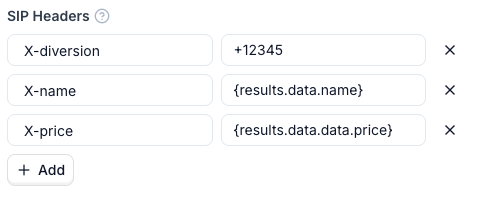 Header values can be populated using **variables** or **info extractors**.
### Variables
Use `{}` syntax to inject dynamic values into a header:
| Variable Source | Example | Description |
| --------------------------- | ------------------------------------------------------- | ---------------------------------------------------- |
| **Pre-call webhook** | `{results.data.name}` | Data returned from your pre-call webhook |
| **During-call actions** | `{results.data.data.price}` | Results from custom actions executed during the call |
| **Flow designer variables** | `{variable_name}` | Variables defined and collected in the flow designer |
| **System variables** | `{call_id}`, `{from_phone_number}`, `{to_phone_number}` | Built-in system variables for the current call |
If you use a custom action before the transfer, the transfer waits for the action to resolve before initiating. This ensures variables returned by the action are available in your SIP headers.
### Info Extractors
An info extractor lets the AI agent pull a specific piece of information from the conversation and pass it as a header value. Each extractor has two fields:
| Field | Description |
| ---------- | ------------------------------------------------------------------------------------------------------------------------------------------------- |
| **Header** | The X-header name the extracted value is sent in (e.g., `X-Customer-Intent`) |
| **Prompt** | Instructions telling the agent what to extract (e.g., "What is the caller's intent? Return one of: make a claim, cancel policy, general inquiry") |
The agent evaluates the prompt against the conversation at transfer time and writes the result into the specified header. Use info extractors when the value you need doesn't exist as a variable — for example, a caller's intent, sentiment, or a summary of the conversation so far.
For more on how extractors work, see [Information Extractors](/use-the-information-extractor).
### Example: Passing Call Context for Agent Handoff
A common pattern is to combine variables and info extractors so the human agent receives full context on transfer:
| Header Name | Source | Value / Prompt |
| ------------------- | -------------- | -------------------------------------------------------------------------------------------------------- |
| `X-Customer-Intent` | Info extractor | "Classify the caller's intent as one of: make a claim, cancel policy, billing question, general inquiry" |
| `X-Caller-Name` | Info extractor | "What is the caller's name?" |
### Field Requirements
| Field | Requirements |
| --------- | --------------------------------------------------------------------------------------------------------------------------------------- |
| **Name** | Must start with `X-` and contain only letters (A-Z, a-z), digits (0-9), hyphen (-), and underscore (\_). Pattern: `^X-[A-Za-z0-9\-_]+$` |
| **Value** | Cannot contain CR (`\r`), LF (`\n`), or NULL (`\0`) characters. Supports variables (e.g., `{customer_id}`). |
**Avoid adding too many X-headers.** Excessive headers increase the size of SIP INVITE packets, which can lead to packet fragmentation and loss—especially over UDP. Keep your headers minimal and only include data that your PBX or routing logic actually needs.
***
## Supported SIP URI Formats
| Format | Example | Use Case |
| ------------ | ------------------------------ | --------------------------------- |
| Basic | `sip:user@domain.com` | Standard SIP endpoint |
| With port | `sip:user@domain.com:5060` | Non-standard port |
| Secure (TLS) | `sips:user@domain.com` | Encrypted connections |
| E.164 | `sip:+1234567890@provider.com` | PSTN gateway routing |
| Raw | `internal-ext-123` | Custom telephony only (see below) |
***
## SIP Methods: REFER vs INVITE
The SIP method used depends on your transfer mode:
| Transfer Mode | SIP Method | Behavior |
| ------------- | ---------- | ---------------------------------------------------------------------------------- |
| Blind (Cold) | SIP REFER | Synthflow hands off the call entirely; your SIP server handles the new connection |
| Warm | SIP INVITE | Synthflow creates a new outbound call leg, bridges the calls after whisper/summary |
**SIP REFER considerations:**
* Caller ID shows the original caller's number
* Requires your SIP server to support REFER
* Transfer happens entirely on your telephony infrastructure
**SIP INVITE considerations:**
* Caller ID shows your Synthflow agent's number
* Allows whisper messages and conversation summaries
* Synthflow maintains control until transfer completes
***
## Security
Synthflow supports Access Control Lists (ACL) to secure inbound SIP calls. Configure your SIP server to accept connections only from Synthflow's IP addresses. Username/password authentication is not currently supported for inbound call transfers.
***
## Transfer Failure Handling
| Failure Scenario | Blind Transfer | Warm Transfer |
| ---------------------------- | -------------- | --------------------------- |
| SIP endpoint unreachable | Call ends | Agent can retry or continue |
| Timeout (no answer) | Call ends | Agent can retry or continue |
| SIP error response (4xx/5xx) | Call ends | Agent notified with error |
For mission-critical transfers, use warm transfer mode to enable graceful failure recovery and alternative routing.
***
## Related Links
* [SIP Integration Overview](/about-sip)
* [Direct SIP Dialing](/dial-to-the-sip-endpoint)
* [Forward Calls to SIP Trunk](/forward-calls-to-sip-trunk)
Header values can be populated using **variables** or **info extractors**.
### Variables
Use `{}` syntax to inject dynamic values into a header:
| Variable Source | Example | Description |
| --------------------------- | ------------------------------------------------------- | ---------------------------------------------------- |
| **Pre-call webhook** | `{results.data.name}` | Data returned from your pre-call webhook |
| **During-call actions** | `{results.data.data.price}` | Results from custom actions executed during the call |
| **Flow designer variables** | `{variable_name}` | Variables defined and collected in the flow designer |
| **System variables** | `{call_id}`, `{from_phone_number}`, `{to_phone_number}` | Built-in system variables for the current call |
If you use a custom action before the transfer, the transfer waits for the action to resolve before initiating. This ensures variables returned by the action are available in your SIP headers.
### Info Extractors
An info extractor lets the AI agent pull a specific piece of information from the conversation and pass it as a header value. Each extractor has two fields:
| Field | Description |
| ---------- | ------------------------------------------------------------------------------------------------------------------------------------------------- |
| **Header** | The X-header name the extracted value is sent in (e.g., `X-Customer-Intent`) |
| **Prompt** | Instructions telling the agent what to extract (e.g., "What is the caller's intent? Return one of: make a claim, cancel policy, general inquiry") |
The agent evaluates the prompt against the conversation at transfer time and writes the result into the specified header. Use info extractors when the value you need doesn't exist as a variable — for example, a caller's intent, sentiment, or a summary of the conversation so far.
For more on how extractors work, see [Information Extractors](/use-the-information-extractor).
### Example: Passing Call Context for Agent Handoff
A common pattern is to combine variables and info extractors so the human agent receives full context on transfer:
| Header Name | Source | Value / Prompt |
| ------------------- | -------------- | -------------------------------------------------------------------------------------------------------- |
| `X-Customer-Intent` | Info extractor | "Classify the caller's intent as one of: make a claim, cancel policy, billing question, general inquiry" |
| `X-Caller-Name` | Info extractor | "What is the caller's name?" |
### Field Requirements
| Field | Requirements |
| --------- | --------------------------------------------------------------------------------------------------------------------------------------- |
| **Name** | Must start with `X-` and contain only letters (A-Z, a-z), digits (0-9), hyphen (-), and underscore (\_). Pattern: `^X-[A-Za-z0-9\-_]+$` |
| **Value** | Cannot contain CR (`\r`), LF (`\n`), or NULL (`\0`) characters. Supports variables (e.g., `{customer_id}`). |
**Avoid adding too many X-headers.** Excessive headers increase the size of SIP INVITE packets, which can lead to packet fragmentation and loss—especially over UDP. Keep your headers minimal and only include data that your PBX or routing logic actually needs.
***
## Supported SIP URI Formats
| Format | Example | Use Case |
| ------------ | ------------------------------ | --------------------------------- |
| Basic | `sip:user@domain.com` | Standard SIP endpoint |
| With port | `sip:user@domain.com:5060` | Non-standard port |
| Secure (TLS) | `sips:user@domain.com` | Encrypted connections |
| E.164 | `sip:+1234567890@provider.com` | PSTN gateway routing |
| Raw | `internal-ext-123` | Custom telephony only (see below) |
***
## SIP Methods: REFER vs INVITE
The SIP method used depends on your transfer mode:
| Transfer Mode | SIP Method | Behavior |
| ------------- | ---------- | ---------------------------------------------------------------------------------- |
| Blind (Cold) | SIP REFER | Synthflow hands off the call entirely; your SIP server handles the new connection |
| Warm | SIP INVITE | Synthflow creates a new outbound call leg, bridges the calls after whisper/summary |
**SIP REFER considerations:**
* Caller ID shows the original caller's number
* Requires your SIP server to support REFER
* Transfer happens entirely on your telephony infrastructure
**SIP INVITE considerations:**
* Caller ID shows your Synthflow agent's number
* Allows whisper messages and conversation summaries
* Synthflow maintains control until transfer completes
***
## Security
Synthflow supports Access Control Lists (ACL) to secure inbound SIP calls. Configure your SIP server to accept connections only from Synthflow's IP addresses. Username/password authentication is not currently supported for inbound call transfers.
***
## Transfer Failure Handling
| Failure Scenario | Blind Transfer | Warm Transfer |
| ---------------------------- | -------------- | --------------------------- |
| SIP endpoint unreachable | Call ends | Agent can retry or continue |
| Timeout (no answer) | Call ends | Agent can retry or continue |
| SIP error response (4xx/5xx) | Call ends | Agent notified with error |
For mission-critical transfers, use warm transfer mode to enable graceful failure recovery and alternative routing.
***
## Related Links
* [SIP Integration Overview](/about-sip)
* [Direct SIP Dialing](/dial-to-the-sip-endpoint)
* [Forward Calls to SIP Trunk](/forward-calls-to-sip-trunk)