***
title: Getting Started with Flow Designer
slug: flow-designer
---------------------
For clean Markdown of any page, append .md to the page URL. For a complete documentation index, see https://docs.synthflow.ai/llms.txt. For full documentation content, see https://docs.synthflow.ai/llms-full.txt.
The Flow Designer lets you build structured, multi-step AI voice agents using a visual, node-based interface. Instead of relying on a single prompt, you design a conversation graph where each node handles a specific task—whether that's collecting information, making decisions, or executing actions.
## Why use the Flow Designer?
Flow Designer agents are built on **deterministic conversation logic**, meaning the conversation follows a predictable, step-by-step path. This approach offers several advantages:
* **Predictable outcomes:** Conversations move through nodes in a controlled sequence, making behavior more reliable and easier to debug.
* **Variable collection:** Use Conversation nodes to gather and store information from users during calls, enabling dynamic and personalized interactions.
* **Decision control:** Define explicit branching rules—for example, *"If the user asks for Sales, route them to the Sales team."*
* **Complex workflows:** Handle sophisticated business logic with multiple decision points, loops, and conditional paths.
## Flow Designer vs Single-Prompt Agents
| Use Flow Designer When... | Use Single-Prompt Agents When... |
| --------------------------------------------------------- | -------------------------------------- |
| You need structured control over conversation paths | You want simplicity and flexibility |
| Deterministic logic is required (compliance, regulations) | Open-ended conversations are preferred |
| Complex multi-step workflows are needed | Straightforward conversational tasks |
| Multiple decision points and branching | Simple Q\&A or support scenarios |
| Audit trails and guaranteed outcomes are important | Quick prototyping is the priority |
Not sure which approach is right? Check out our detailed [comparison guide](/conversation-flow-vs-single-prompt) to choose between one mode or the other.
## Core Concepts
### What is Deterministic Logic?
**Deterministic logic** means your agent follows explicit, pre-defined rules rather than making autonomous decisions. Think of it like programming: "If condition A is true, go to step B. Otherwise, go to step C."
**Benefits:**
* **Reliability:** The agent behaves consistently every time.
* **Control:** You define exactly what happens at each decision point.
* **Troubleshooting:** When something goes wrong, you can trace the exact path through your flow.
**When to use deterministic logic:**
* Compliance-heavy scenarios (healthcare, finance, legal)
* Multi-step processes (lead qualification, troubleshooting, onboarding)
* Cases where you need audit trails or guaranteed outcomes
**When to use non-deterministic logic (Single-Prompt):**
* Open-ended conversations
* Creative or exploratory interactions
* Simple Q\&A scenarios
## Getting Started
### Starting Your Flow
1. **Set Global Settings:** Define your agent's personality, role, goal, and handle common objections.
2. **Add a Greeting Message:** Create a welcoming first impression.
3. **Add Steps:** Build out your conversation flow node by node.
### Adding Nodes
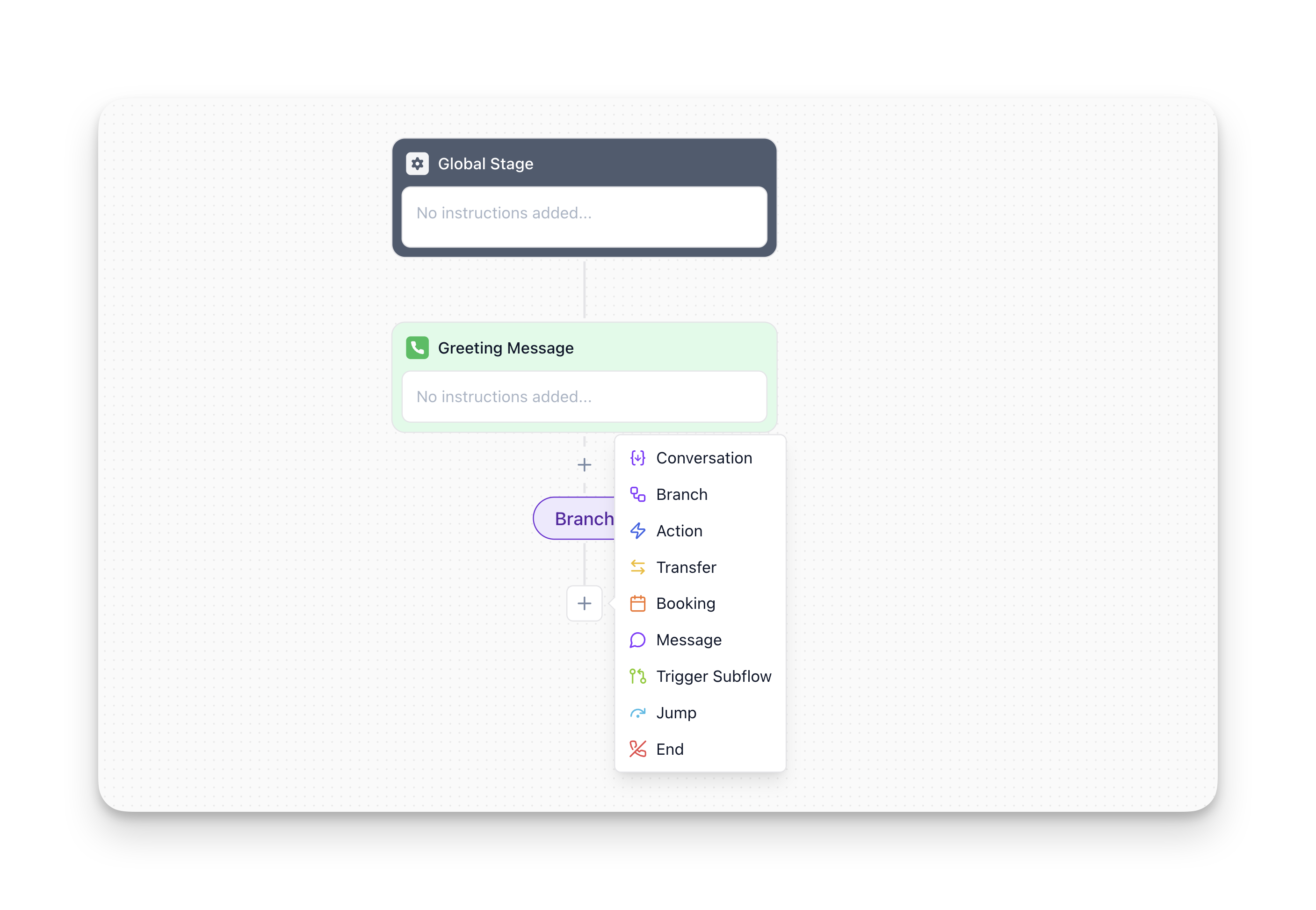
Click on the Plus icon to insert a new node into your flow.
## Nodes
Nodes are the building blocks of your conversation flows. Each node represents a specific action or decision point in your conversation. Here is a summary of all the available node types:
| Node Type | Purpose | When to Use |
| ------------------------------------------------------------ | -------------------------------------------------------------- | -------------------------------------------------------------- |
| [**Global Settings**](/configure-global-settings) | Define agent-wide settings | Set once at the start of your flow |
| [**Greeting Message**](/configure-the-greeting-message-node) | Welcome users and set context | First node triggered when a call starts |
| [**Conversation**](/configure-step-nodes) | Gather information from users (name, email, preferences, etc.) | When you need specific data to proceed |
| [**Message**](/message-node) | Deliver a one-way message without expecting a response | Confirmations, instructions, or scripted statements |
| [**Trigger Subflow**](/multi-agent-system) | Hand off to a specialized sub-agent, then return | Complex scenarios requiring modular logic (Multi-Agent System) |
| [**Branch**](/configure-branch-nodes) | Make decisions based on variables or conditions | Route users down different paths based on logic |
| [**Jump To**](/configure-jump-nodes) | Redirect flow to another node (like a "goto" in programming) | Loops, error handling, or reusing logic |
| [**Custom Action**](/configure-custom-action-node) | Execute external API calls or custom logic | Database queries, integrations, calculations |
| [**Call Transfer**](/configure-call-transfer-node) | Hand off to a human agent or external system | Escalations or specialized support |
| [**Real-Time Booking**](/configure-real-time-booking-node) | Schedule appointments using calendar integrations | Booking meetings, demos, or consultations |
| [**End Call**](/configure-the-end-node) | Close the conversation gracefully | Final step after completing the workflow |
## Multi-Agent System
As your agent grows and your use cases expand, conversations naturally become more complex. That's why the **Multi-Agent System** exists—it helps you keep your flows organized, scalable, and easier to manage as your product or customer interactions evolve.
**How it helps you:**
* **Keep your main flow simple and readable:** Move complex logic into dedicated subflows.
* **Reuse the same logic:** Trigger the same subflow from multiple points.
* **Easier to maintain:** Update your agent responses in one place instead of throughout your entire flow.
**Example:** Create a "Pricing Questions" subflow. Use the **Trigger Subflow** node whenever a user asks about pricing—the agent enters the pricing subflow, answers their questions, then automatically returns to continue the main conversation.
Learn more about it in the [Multi-Agent System documentation.](/multi-agent-system)
## Example: Restaurant Reservation Flow
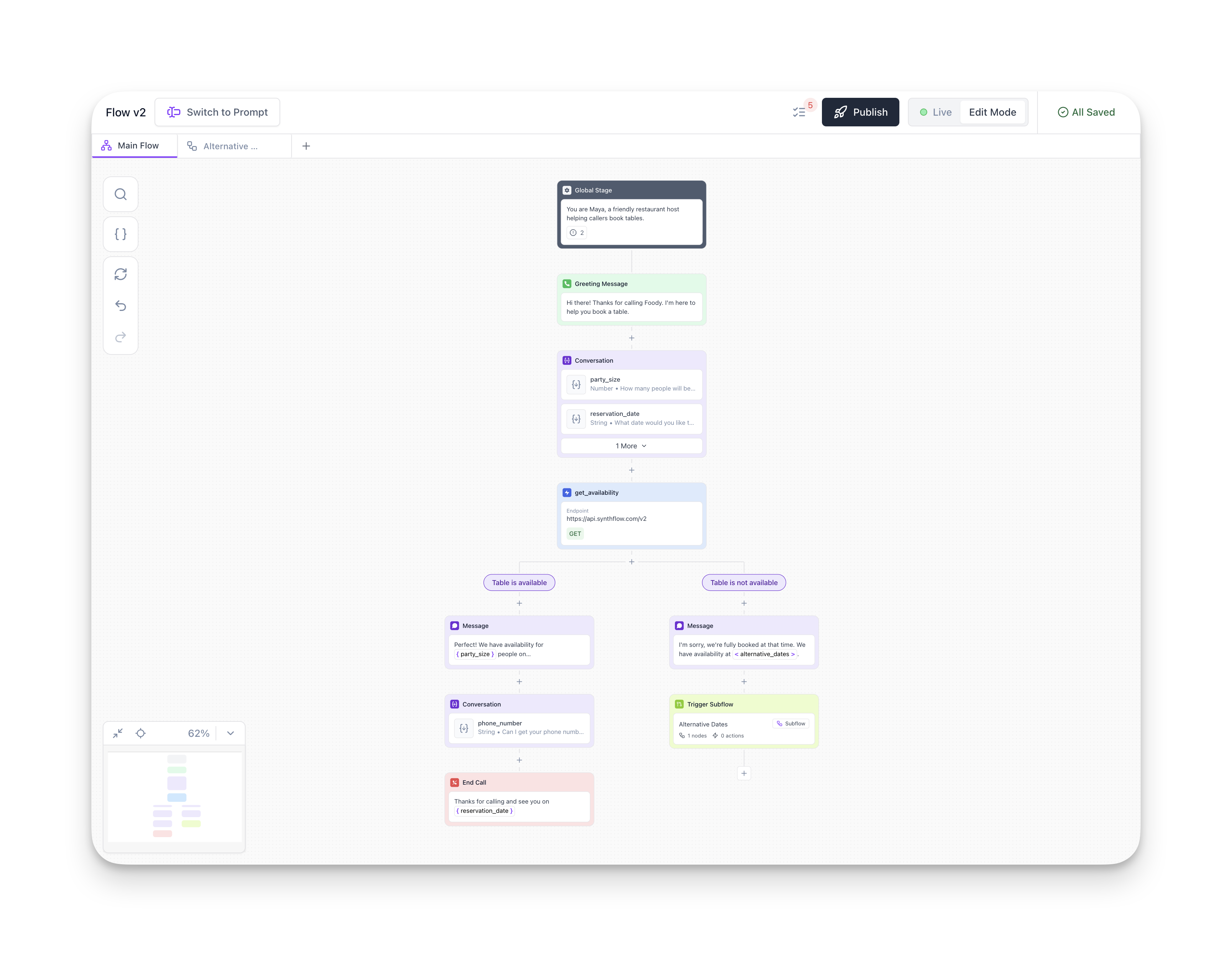
This example demonstrates how different node types work together to create a complete conversation flow. The agent collects information from the user (party size, date, time), checks availability via an API call, handles both success and failure scenarios with branching logic, and confirms the reservation—all while handling potential objections through Global Settings.
**Goal:** Allow users to book a table at a restaurant
**What this flow demonstrates:**
* Using Global Settings to define personality and handle objections
* Collecting multiple variables sequentially
* Integrating with external systems (booking API)
* Using branches to handle different outcomes
* Delivering confirmations with Message nodes
* Handling alternative scenarios when the first choice isn't available
```mermaid
flowchart TD
A["Global Stage
You are Maya, a friendly restaurant host helping callers book tables."] -->
B["Greeting Message
Hi there! Thanks for calling Foody. I'm here to help you book a table."]
B --> C["Conversation
{party_size}
{reservation_date}"]
C --> D["get_availability
GET https://api.synthflow.com/v2"]
%% Branches
D --> |Table is available| G["Message
Perfect! We have availability for {party_size} people..."]
D --> |Table is not available| J["Message
We're fully booked at that time.
We have availability at {alternative_dates}."]
%% Left branch
G --> H["Conversation
{phone_number}"]
H --> I["End Call
Thanks for calling and see you on {reservation_date}"]
%% Right branch
J --> K["Trigger Subflow
Alternative Dates (Subflow)"]
```
## Best Practices
1. **Start simple:** Build a basic flow first, then add complexity.
2. **Use variables:** Collect information to personalize the user experience and make decisions. Learn more [here.](/collect-variables)
3. **Use clear names:** Name nodes descriptively so you can quickly understand your flow.
4. **Minimize branches:** Too many branches make flows hard to follow. Consider using Multi-Agent System for complex scenarios and reusable flows.
5. **Handle edge cases:** Always plan for unexpected user input or system failures.
### Collecting Information before Branching
The **Conversation node** is essential for collecting variables that you'll reference later in your flow. It waits until the user provides the requested information before continuing, ensuring you have the data you need for branching logic, API calls, or personalization.
For example, if you need to route users based on their department preference, first use a Conversation node to collect that information, then use a Branch node to route them accordingly.
Here's a helpful pattern to keep in mind when building your flows:
| ❌ Incorrect Pattern | ✅ Correct Pattern |
| ----------------------------------------------------------------------------------------------------------------------------------------------------------------------------------------------------- | ------------------------------------------------------------------------------------------------------------------------------------------------------------------------------------------------------------------------------------------------------------ |
| `[Greeting Message: "Hi, how can I help?"]`
↓
`[Branch: Route based on response]`
**Problem:** Greeting doesn't wait for input. Branch has no data to evaluate. Flow gets stuck. | `[Greeting Message: "Hi, thanks for calling!"]`
↓
`[Conversation: "How can I help?"]`
↓
`[Branch: Route based on response]`
**Why it works:** Conversation node waits for and collects input, giving Branch data to evaluate. |
**Key principle:** Always use a **Conversation** node between your greeting and any branching logic. This ensures the system actively waits for and stores the user's response.
**Why the incorrect pattern fails:**
* The Greeting Message node speaks once and immediately moves forward
* It does not collect or wait for user input
* The Branch node has no data to evaluate
* If the user's response doesn't match branch conditions, the flow gets stuck
Learn more about how the Conversation node works [here.](/configure-step-nodes)
## FAQ
No. Use **Conversation nodes** only when you need to store the user's response for later use (e.g., branching logic, API calls, or final confirmation). For simple questions that don't require storage, you can handle them in the **Global Settings** or use a **Message Node** for one-way communication.
No. You must choose one approach when creating your agent. However, you can create multiple agents—some using Flow Designer and others using Single-Prompt—and coordinate them using call transfers or webhooks.
There's no hard limit, but for maintainability, we recommend keeping individual flows manageable and readable. For larger workflows, use the **Multi-Agent System** to break logic into smaller, reusable sub-flows.
Nodes themselves can't be directly reused, but you can use the **Multi-Agent System** to create reusable sub-flows that can be triggered from multiple parent flows.
This is one of the most common mistakes! The Greeting Message node delivers its message once and immediately moves to the next node—it doesn't wait for or capture user input.
If you try to branch right after greeting, there's no data for the Branch node to evaluate. The correct pattern is:
**\[Greeting Message] → \[Conversation] → \[Branch]**
The Conversation node waits for input and stores it, giving the Branch node something to evaluate.