***
title: Pricing plans and Rebilling
slug: set-up-pricing-and-rebilling
description: Set up agency pricing plans and Stripe rebilling so you can charge subaccounts for Synthflow usage.
---------------------
For a complete page index, fetch https://docs.synthflow.ai/llms.txt. For full documentation content, fetch https://docs.synthflow.ai/llms-full.txt.
Use pricing plans to bill your subaccounts and manage usage. Connect Stripe, set a monthly price and currency, define included minutes, and optionally include products.
Note:
* You need an Agency Owner or Admin role.
* Stripe must be connected before creating plans.
## Connect your Stripe account
On the left-hand sidebar, click **Agency**.
Click **Pricing Plans**.
Click **Connect Stripe** and complete the Stripe flow.
## Create a pricing plan
Create a pricing plan for your subaccounts to structure billing, control resources, and provide tailored packages for your clients.
1. **Set Price and Limits**: define the plan cost, maximum minutes, agents, and feature limits.
2. **Configure Usage-Based Pricing**: enable per-minute billing for a flexible pricing model.
3. **Add Extra Features**: extend the options of your subaccounts by providing templates, agents available, and team access.
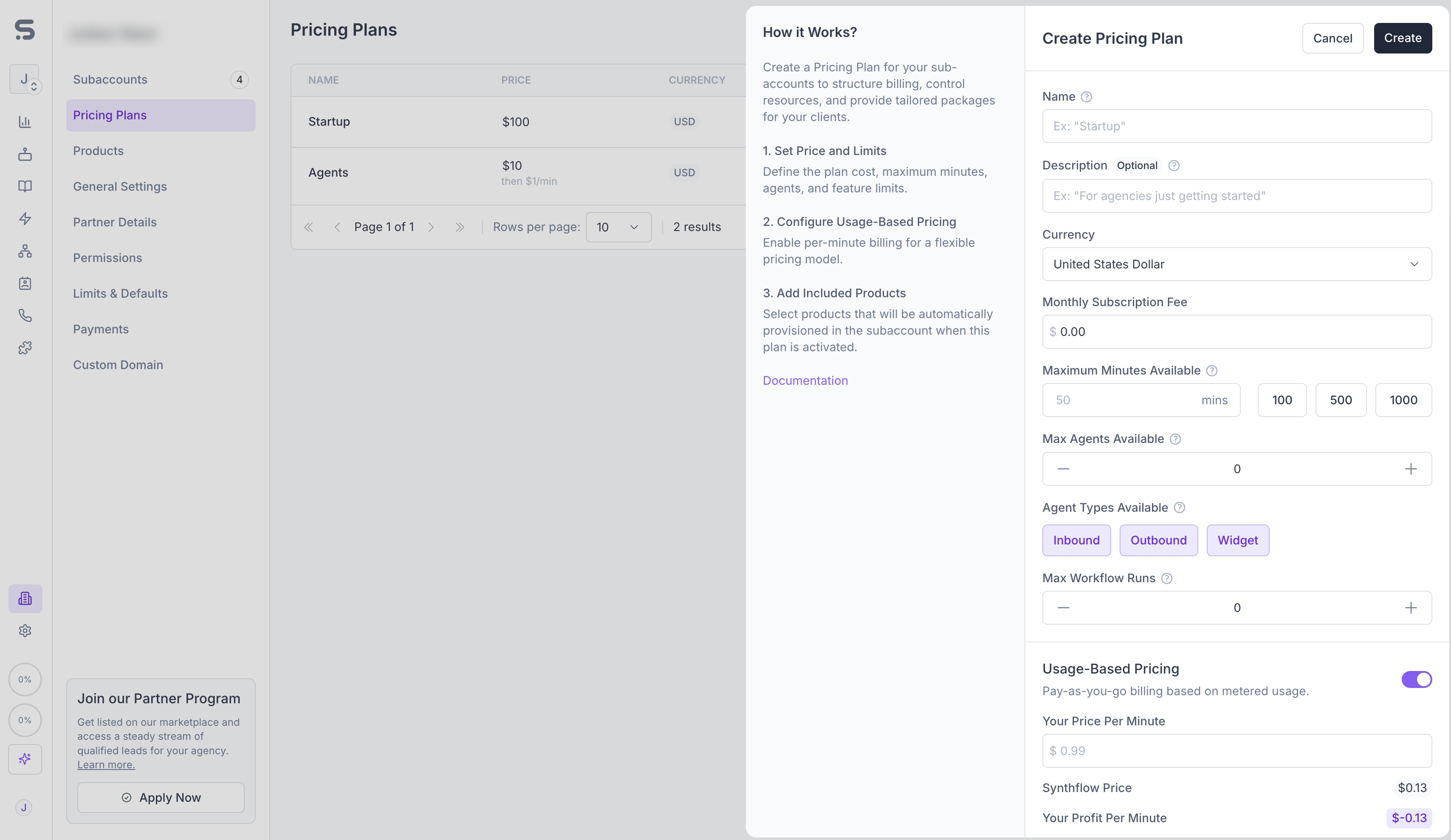
### Pricing Name
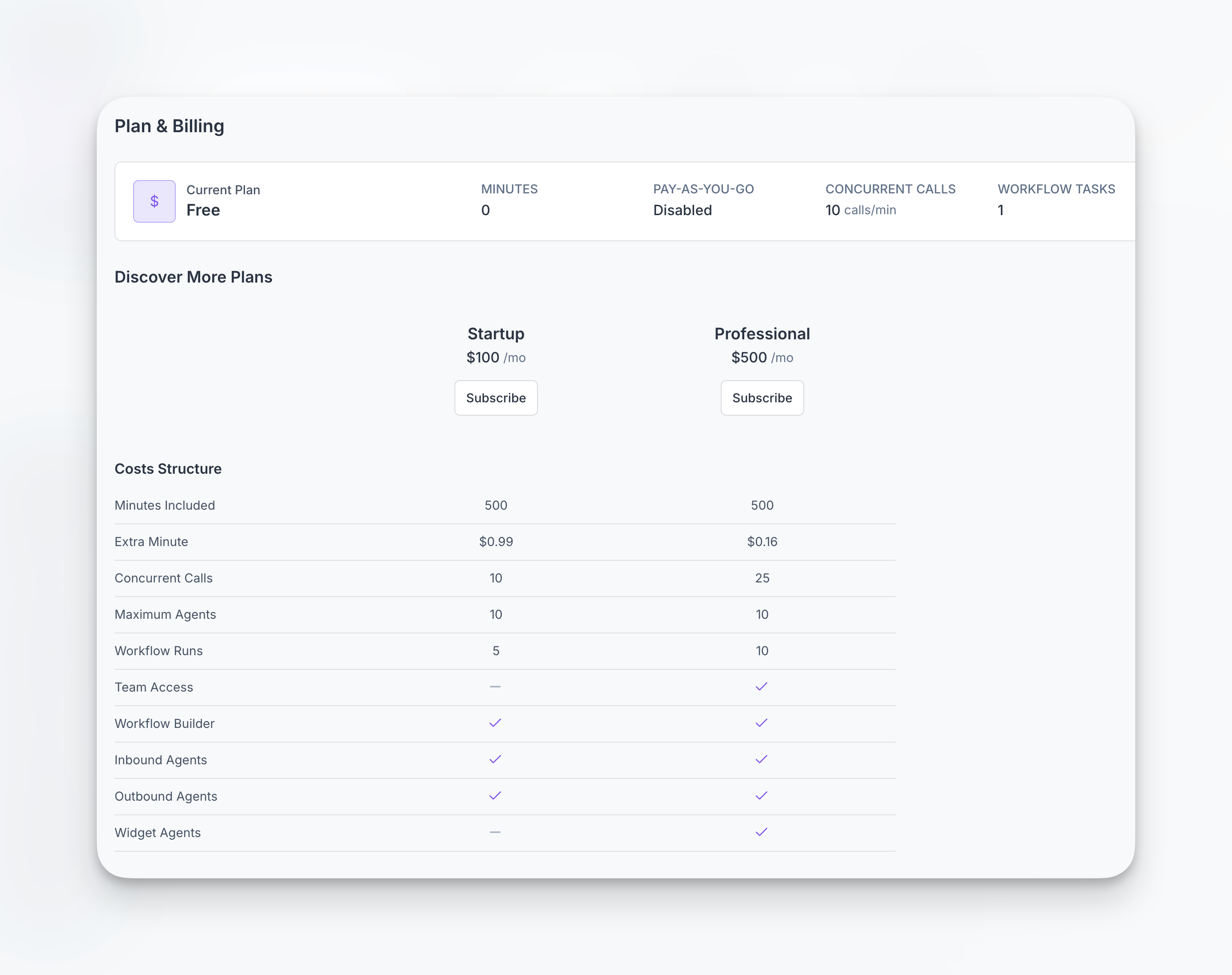
Enter a clear customer‑facing name. The screenshot below shows how plans appear to subaccounts.
### Amount
Plan fees are billed monthly. Taxes are added in the US and Canada and included in price elsewhere. Refer to your Stripe tax settings for details.
### Currency
Choose the currency of your pricing plan. The available currencies are:
* United States Dollar (\$)
* Euro (€)
* Canadian Dollar (CA\$)
* Australian Dollar (A\$)
Only pricing plans of the same currency can be available for subscription.
### Free trial
Plans support an optional free trial. Specify the number of **trial days** and the pool of **trial minutes** a subaccount can use before billing starts. Trial minutes cap at **200 minutes**, so the plan converts to paid automatically once usage exceeds that limit or when the trial window ends.
### Maximum Minutes Available
Set the maximum number of call minutes a subaccount can use in this plan.
For example, if a plan includes 6,000 minutes per month and the subaccount reaches that limit, then either:
1. Calls start to fail due to insufficient minutes, or
2. Pay‑as‑you‑go billing applies (if enabled).
### Maximum concurrent calls
Use the **maximum concurrent call** setting to limit how many calls a subaccount can run simultaneously. This lets you sell higher tiers with larger concurrency pools while protecting shared infrastructure in entry-level plans.
### Usage-based billing
Use this for metered minutes beyond the plan’s included allowance. The rate comes from the subaccount’s pricing plan in your connected Stripe account. For how usage is measured and how it appears for subaccounts on the [Usage dashboard](/usage#usage-dashboard), see the Usage and Billing page.
For example, if a tier includes **500 minutes** per period and you enable usage-based billing at **\$0.16 per minute**, only the first 500 minutes are covered by the plan allowance. **Each additional minute** is billed at **\$0.16**.
### Products
You can include products with a plan (for example, agents and workflows). Synthflow creates copies for the subaccount when the plan is activated; the originals remain unchanged. There is no limitation on the number of products that can be included in a plan.
Same as [importing products](/import-a-product), the included items are available for use immediately after subscription.
### Team access
Enable **team access** on a plan if multiple members within the same subaccount workspace should share billing and plan resources. When this option is on, every invited teammate inherits the plan limits (minutes, concurrency, add-ons) without needing separate subscriptions.