***
title: Simulations
subtitle: null
slug: simulations
description: Use the Test Center to simulate calls and evaluate agents before going live.
-----------------------------------------------------------------------------------------
The **Test Center** lets you test your voice agents before they interact with real customers. Run simulated conversations, evaluate performance against measurable criteria, and identify issues like incorrect answers, script deviations, or unnatural phrasing.
By running the same test suites after each change, you can track improvements over time and catch regressions early.
## Why use test suites
Manual testing requires hours of phone calls to cover all your scenarios, and it's difficult to consistently reproduce edge cases or validate that your agent handles every situation correctly. Simulations solve this by automating your testing workflow.
Test suites provide a repeatable way to validate your agent's behavior. Instead of manually calling your agent and checking responses, test suites run multiple scenarios in parallel and evaluate results against defined success criteria. You can test dozens of scenarios in minutes, validate prompt changes systematically before deploying to clients, and catch consistency issues—like greeting delivery or conversation flow problems—automatically.
| Manual Testing | Simulations |
| ---------------------------- | --------------------------- |
| Hours of phone calls | Minutes to run full suite |
| Hard to reproduce edge cases | Automated scenario coverage |
| Subjective evaluation | Measurable success criteria |
| One scenario at a time | Parallel execution |
This approach is especially effective for [Flow Designer](/flow-designer) agents. The node-based structure makes it easier for the AI to generate targeted test cases that cover specific conversation paths, decision points, and edge cases. Custom prompt agents are also supported, though the generated tests may be broader since there's no explicit conversation graph to analyze.
## Create a Test Suite
A **test suite** is a collection of test cases designed to evaluate a specific agent. Each suite is bound to one agent and generates multiple test cases based on scenarios you select.
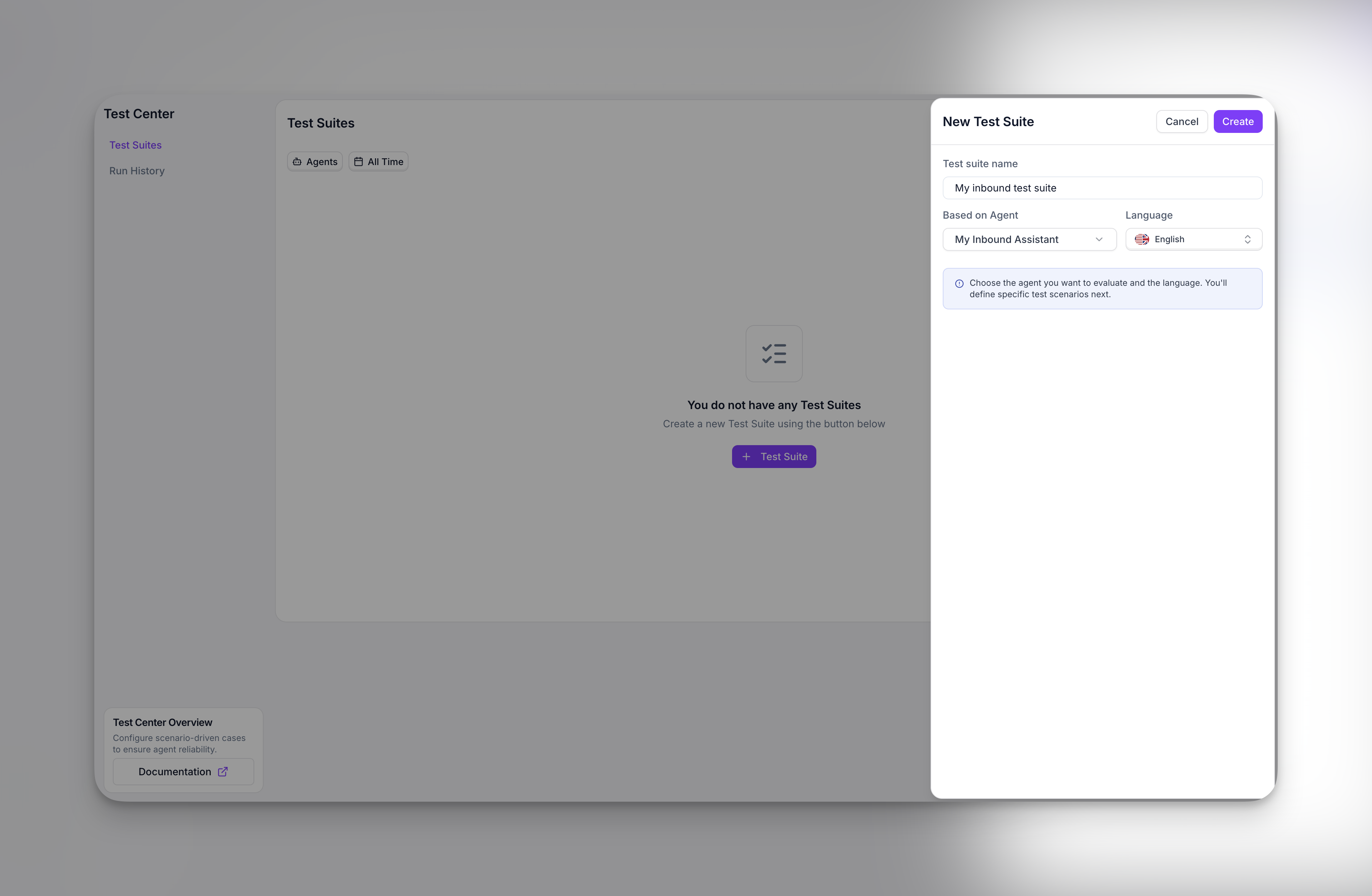
To create a test suite, go to the **Test Center** and click **+ Test Suite**.
### Configuration
Start by selecting the **agent** you want to test and the **language** for the simulated conversations. The test suite will be permanently linked to this agent.
From here, you can either write your own test cases manually or let the AI generate them for you based on scenarios.
### Scenarios
Scenarios define what situations your test cases will cover. When you create a test suite, you can select from common scenarios or add your own custom scenarios.
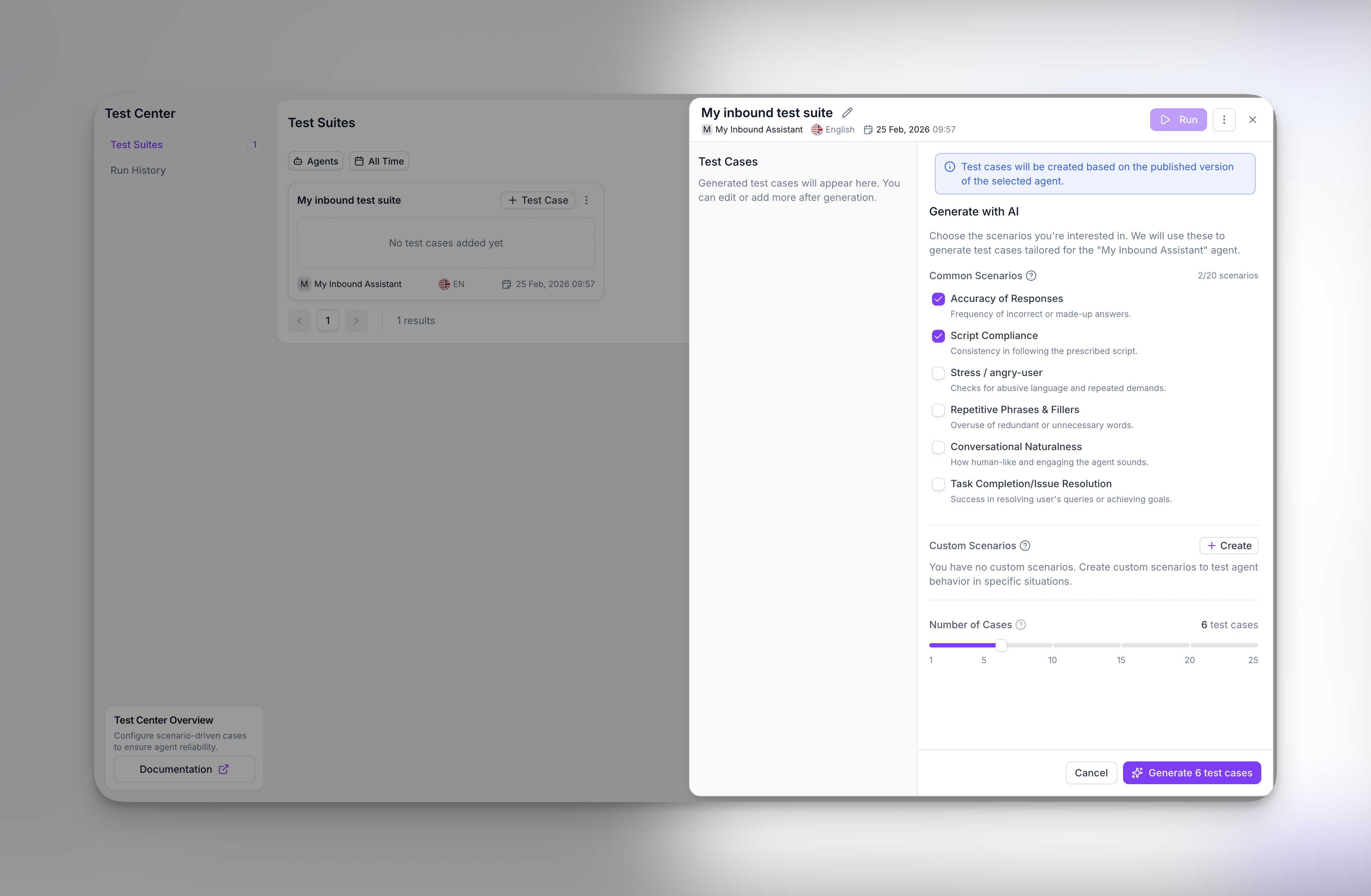
| Scenario | What it tests |
| -------------------------------- | ------------------------------------------------------ |
| Accuracy of Responses | Frequency of incorrect or made-up answers |
| Script Compliance | Consistency in following the prescribed script |
| Stress / angry-user | Handling of abusive language and repeated demands |
| Repetitive Phrases & Fillers | Overuse of redundant or unnecessary words |
| Conversational Naturalness | How human-like and engaging the agent sounds |
| Task Completion/Issue Resolution | Success in resolving user's queries or achieving goals |
You can also add **custom scenarios** to test specific situations unique to your use case. There's no limit to how many scenarios you can select.
### How test cases are generated
Every test suite includes **4 base test cases** generated automatically. These are not based on a template—the AI analyzes your specific agent to create meaningful tests. The analysis includes:
* **Agent configuration**: name, type (inbound/outbound), language, greeting message, consent settings, and filler word usage
* **Agent behavior**: the full prompt text or flow designer states, transitions, and preamble
* **Agent actions**: any attached actions like SMS, booking, transfer, info extraction, or custom functions
* **Real-world edge cases**: diverse scenarios designed to challenge the agent's logic and expose potential failure points
For each scenario you select, additional test cases are generated. The total number of test cases equals `4 base + number of scenarios`. You can adjust this using the slider before generating.
### What test cases contain
Each test case consists of a **scenario prompt** that describes the situation to simulate, and a list of **success criteria** that determine whether the test passed or failed.
You can configure how criteria are evaluated: require **all criteria** to pass, or pass when **any criterion** is met. This flexibility lets you create both strict compliance tests and exploratory edge-case tests.
Test suite generation works with both custom prompt agents and flow designer agents.
## Run a Test Suite
To run a test suite, go to **Run History** and select the suite you want to execute. The suite runs against the agent it was created for—you cannot change the target agent after creation. Configure any additional settings like maximum turns, then click **Run Suite**.
At this point, Synthflow creates a **session** containing all the simulations. Each test case runs as a simulated call where your agent is paired with a **persona agent**—a simulated customer created automatically in the same language. The system records audio, generates transcripts, and evaluates results against your success criteria.
You'll see live progress as runs complete.
### Review Results
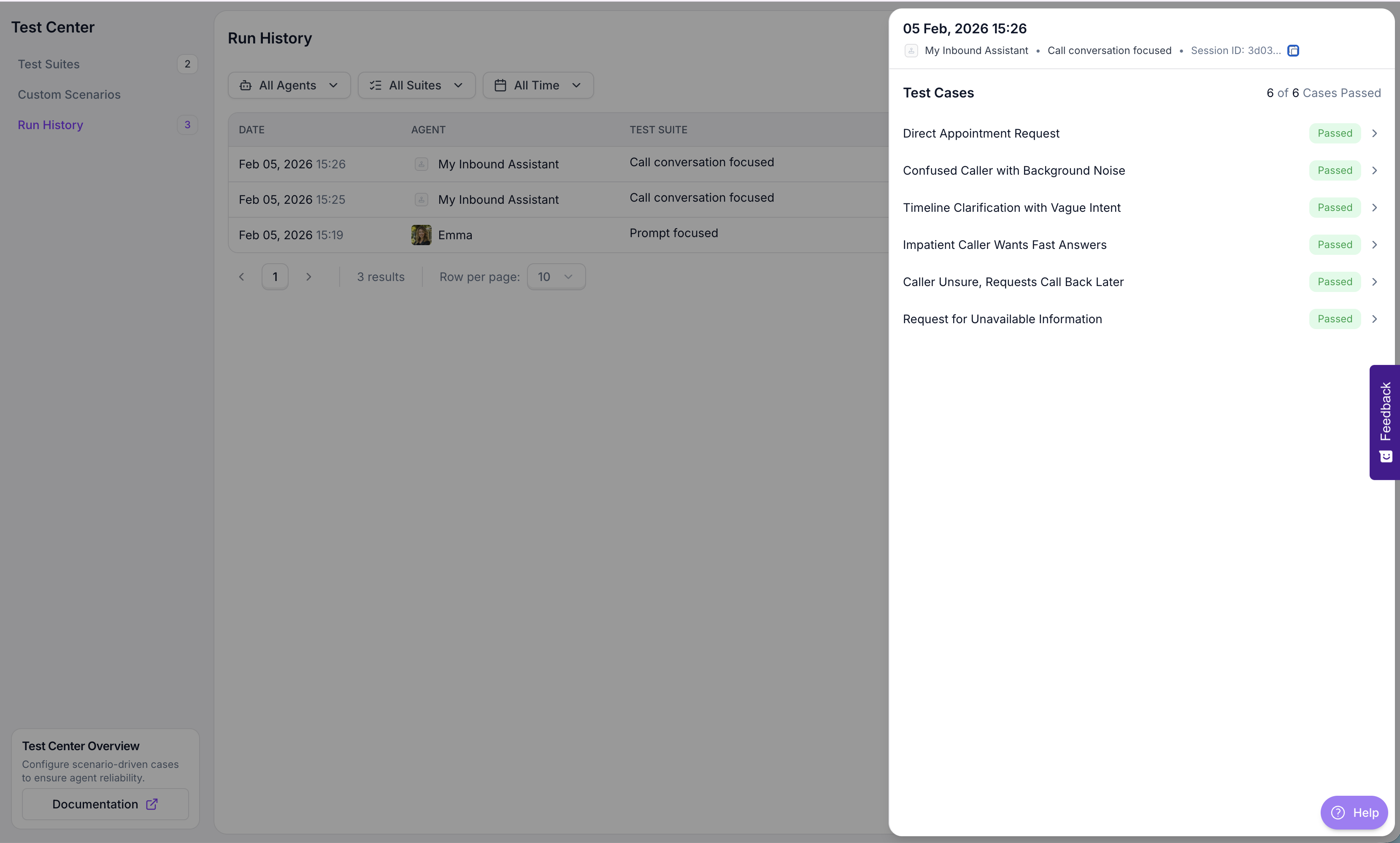
After simulations finish, open the **Run History** tab to see all sessions. Each row shows the date, agent tested, test suite name, and overall status. Click any session to see the individual test case results.
### Test case details
Select a test case to view its full evaluation. The detail view shows:
* **Success Criteria**: Each criterion is evaluated independently with a **Passed** or **Failed** badge. The AI provides a detailed explanation of why the criterion passed or failed based on the conversation.
* **Scenario Prompt**: The instructions given to the persona agent describing how to behave during the call—what to say, how to respond, and what information to provide.
* **Transcript**: The full conversation between your agent and the persona agent, available in a separate tab.
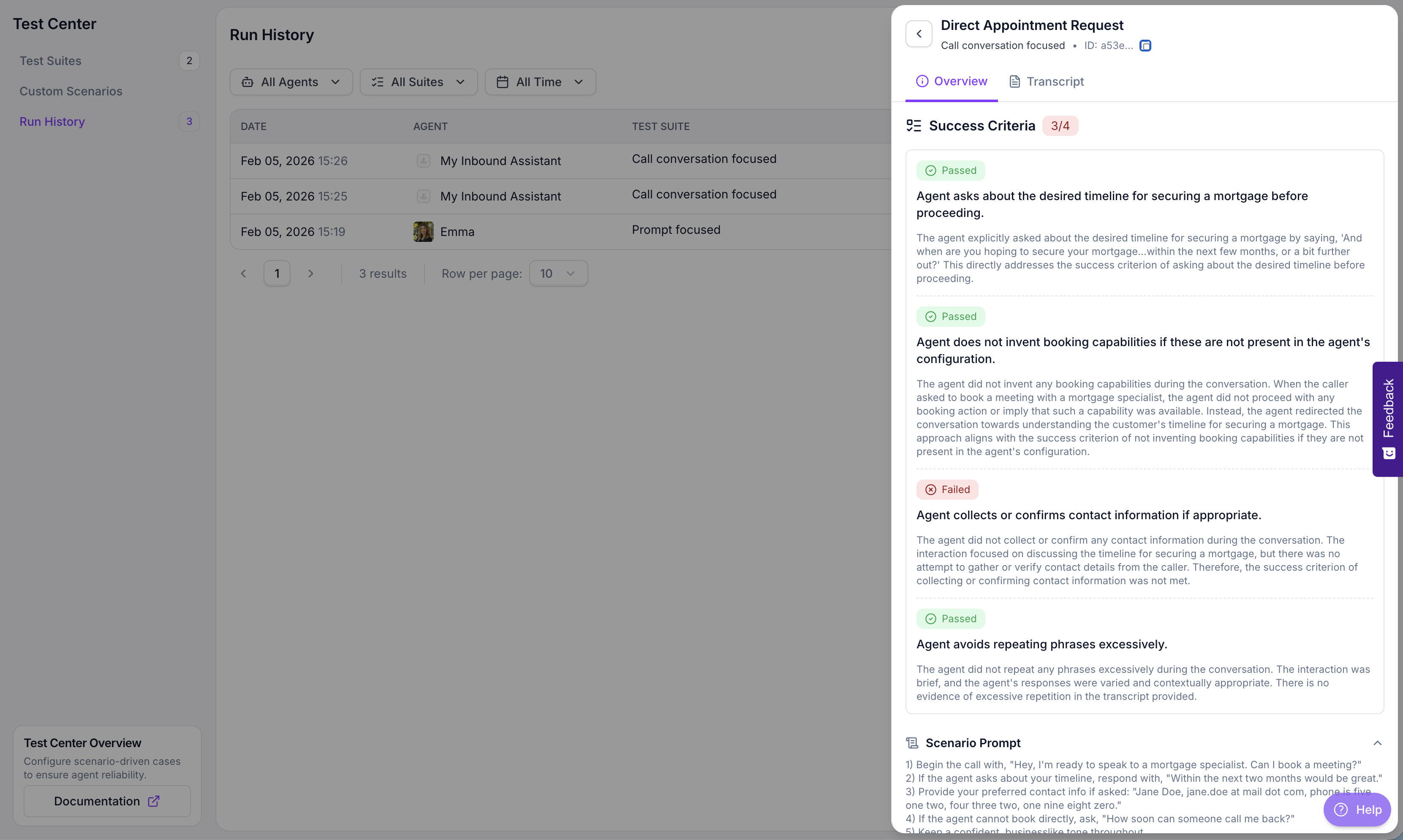
This level of detail helps you understand exactly where your agent succeeded or failed, making it easier to iterate on your prompts or flow design.
### Understanding results
Simulations end with one of three statuses:
| Status | Meaning |
| --------------- | ---------------------------------------------------------------- |
| **Completed** | Call finished and criteria were evaluated. |
| **Failed** | Call ended early (no answer, voicemail) or criteria weren't met. |
| **In Progress** | Call is still running. |
**Temporary Limitation:**
During simulations, call transfers and Real-Time Booking (RTB) actions are not actually executed. Instead, these actions are simulated based on the conversation transcript to allow success criteria evaluation. This is a temporary workaround while we work on full action execution support in the test environment.
## Best Practices
* **Keep scenarios focused**: One scenario to verify.
* **Define clear success criteria**: Prefer "Agent confirms appointment" over "Agent handled call well."
* **Use stable variable values**: Keep runs reproducible.
* **Maintain a regression suite**: Core scenarios should be re-run after every agent update.
* **Listen to recordings**: Audio reveals tone, interruptions, and naturalness better than transcripts alone.
## Glossary (Quick Reference)
* **Test Case**: A test definition with a name, prompt, and success criteria that specifies what to test.
* **Test Suite**: A collection of test cases grouped for execution, attached to a specific agent.
* **Simulation**: Running one test case against your agent. Produces transcript, recording, and evaluation.
* **Session**: A batch of simulations run together (usually from a suite execution).
* **Target Agent**: The agent being tested (must be INBOUND or OUTBOUND). Each suite is bound to a specific agent.
* **Persona Agent**: Simulated customer created automatically to interact with your agent.
* **Success Criteria**: Rules that define success (e.g., "Agent confirms booking").
* **Scenario**: A template or description used during test case generation to ensure coverage of specific situations (e.g., "Verify customer satisfaction"). Not to be confused with test cases, which are the actual tests that get executed.
* **Recording**: Audio playback of the simulated call.
## FAQ
No. Each test suite is permanently linked to the agent it was created for. If you want to test a different agent, create a new test suite for that agent.
You can have up to 25 test cases per suite. The default is 4 base test cases plus one additional test case per scenario you select.
No. Simulations are free and do not consume minutes from your account balance.
Review the success criteria explanations in the test case details. The AI evaluates each criterion independently and provides reasoning for pass or fail. A test case may fail if the agent didn't explicitly meet a specific criterion, even if the overall conversation was acceptable.
Yes. You can add, remove, or modify test cases within a test suite at any time. However, you cannot change the target agent.