

Chat
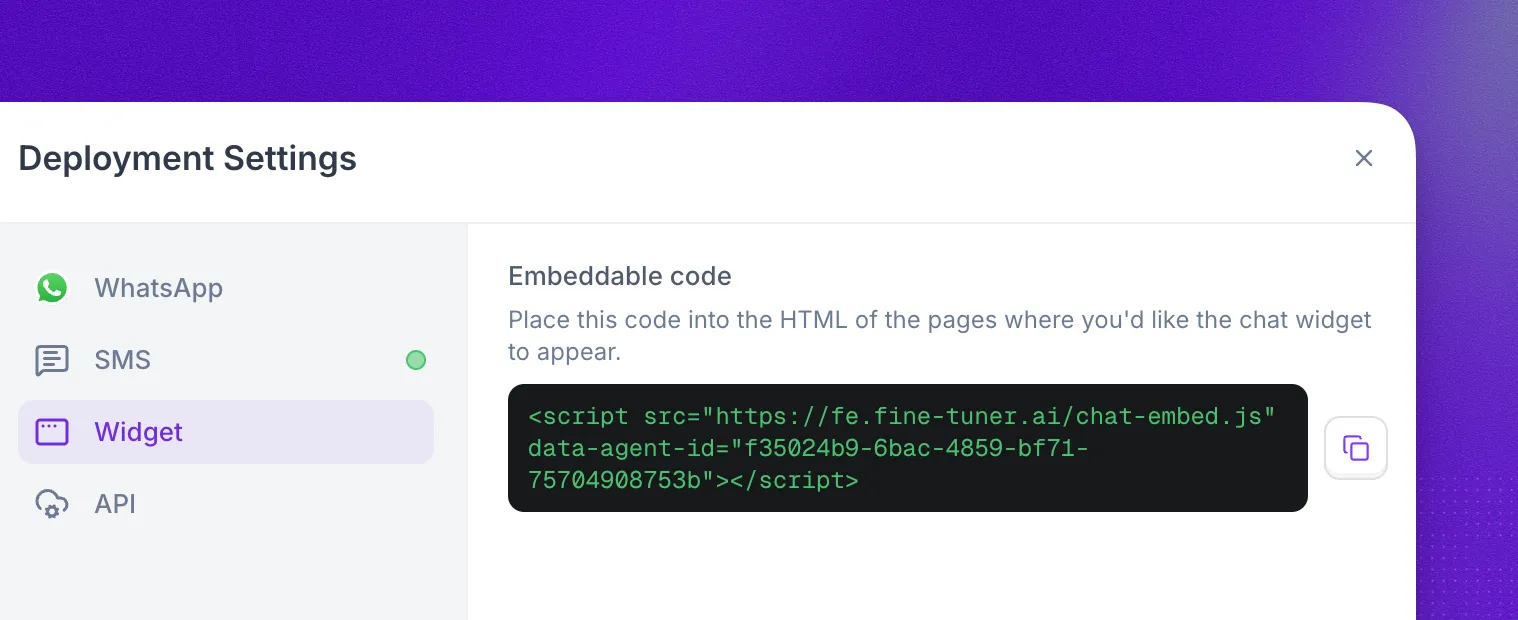
A chat agent runs the same Prompt Builder or Flow Designer logic as a voice agent, over text. To deploy one, select Deploy in the agent editor header and pick a channel in Deployment Settings:
- API for custom applications and backend-controlled chat sessions.
- Widget for a website or app embed managed by Synthflow.
- WhatsApp and SMS for messaging through your own Twilio account.
API endpoints and Twilio webhook URLs depend on your workspace cluster. Check yours in Settings → Workspace Settings → Preferences → Customer Region, and see Data Region for details.
WhatsApp and SMS are available for US-region workspaces only. Twilio does not yet offer EU data residency for its WhatsApp and SMS Conversations APIs, which GDPR processing and storage requirements depend on. API and widget chat agents are available in all regions.
API
Start a conversation by calling Create a chat with a new UUID as {chat_id} and your chat agent’s ID as model_id. The same API sends and receives messages and manages sessions, so you can build chat into any application.
Widget
The chat widget is an embed fully managed by Synthflow, so you can add a chat agent to a website or app with one script tag.
- Select Deploy in the agent editor header and choose Widget.
- Copy the snippet under Embeddable code.
- Paste it into the HTML of every page where the widget should appear.
Chat agents can send and receive WhatsApp messages through a connected Twilio account with a WhatsApp-enabled sender.
Connect your Twilio account
Go to Settings → Workspace Settings → Integrations → Twilio and enter your Twilio SID and Auth credentials. The Twilio integration guide covers the full setup.
Enable a WhatsApp sender in Twilio
If your Twilio account has no WhatsApp-enabled sender yet, register one with Twilio’s WhatsApp documentation.
Configure the sender webhooks
In the Twilio console, open your WhatsApp sender and set the webhook URLs for your cluster:
If the sender belongs to a Twilio Messaging Service, the Messaging Service webhook URLs override the sender-level URLs. Remove the sender from the Messaging Service, or set the same URLs on the Messaging Service.
SMS
Chat agents can also hold text conversations over SMS through your own Twilio account.
Connect your Twilio account
If you haven’t already, connect Twilio in Settings → Workspace Settings → Integrations → Twilio, following the Twilio integration guide.
Get an SMS-capable number
Use a Twilio number that supports SMS. You can buy a number through Synthflow or import your own.
Configure the phone number webhooks
In the Twilio console, open the phone number’s configuration and set the webhook URLs for your cluster:
If the number belongs to a Twilio Messaging Service, the Messaging Service webhook URLs override the number’s own URLs. Remove the number from the Messaging Service, or set the same URLs on the Messaging Service.
Twilio bills WhatsApp and SMS usage directly at its own rates, on top of Synthflow’s platform fee. If the agent uses a Memory Group, it shares context across SMS, WhatsApp, and voice conversations with the same phone number.
Idle reminders and timeouts
WhatsApp and SMS replies often arrive hours apart, so these conversations can send a reminder when the user goes quiet and end automatically after a timeout. Configure them on the agent; they apply to each conversation.
When a user stops responding:
- After
reminder_after_idle_seconds, the agent sendsreminder_messageover the same channel. - If the user still hasn’t replied
allowed_idle_time_secondsafter their last message, the conversation ends withend_reasonset toinactivity_timeout. - A reply at any point resets the timer.
Both values have a 60-second minimum. Lower values fall back to the defaults: 1 hour for the reminder and 24 hours for the timeout.
Start an outbound conversation
Send the first message of a WhatsApp or SMS conversation through the API. The endpoint creates the conversation and delivers the opening message to the recipient.
Request fields
Response
WhatsApp 24-hour session window
WhatsApp only accepts a freeform initial_message if the recipient messaged your sender in the last 24 hours. Outside that window, WhatsApp rejects freeform messages and you must send an approved Twilio Content Template instead. SMS has no session window, so initial_message always works for SMS.
Use initial_message inside the window:
Use template outside the window (it also works inside it):
Template object
Twilio Content Templates need approval before use. A template in pending or rejected status makes the outbound message fail. Manage templates in the Twilio Content Editor.
Post-conversation webhook
When a chat conversation ends, Synthflow can send a webhook to a URL you configure on your agent. The payload includes the full transcript, individual turns, and routing metadata.
Payload fields
Turn object
Each entry in the turns array represents a single message:
Route object
Present on WhatsApp and SMS conversations. Contains the provider and addressing details:
Example payload
FAQ
What is pricing for chat?
Synthflow measures chat at 5 AI-generated messages per usage minute. The rate applied to your account comes from your agreement or account setup. WhatsApp and SMS through Twilio add standard Twilio messaging fees on top.
Does chat work for both Prompt Builder and Flow Designer agents?
Yes. A chat agent can use either a single prompt or a Flow Designer configuration.
Where can I review chat conversations?
Every conversation appears in Chat logs, and the post-conversation webhook sends the same data to your own systems.
Why can't I use WhatsApp or SMS in my EU workspace?
Twilio does not yet offer EU data residency for its WhatsApp and SMS Conversations APIs. Until a compliant option exists, EU workspaces can deploy chat agents over the API and the widget.