Build Agents with Synthflow AI
Meet your AI-powered voice agent. Synthflow AI helps businesses automate conversations by handling both inbound and outbound calls. Your agent can answer questions, engage customers, and streamline operations—so you can focus on what matters most.
The BELL Framework
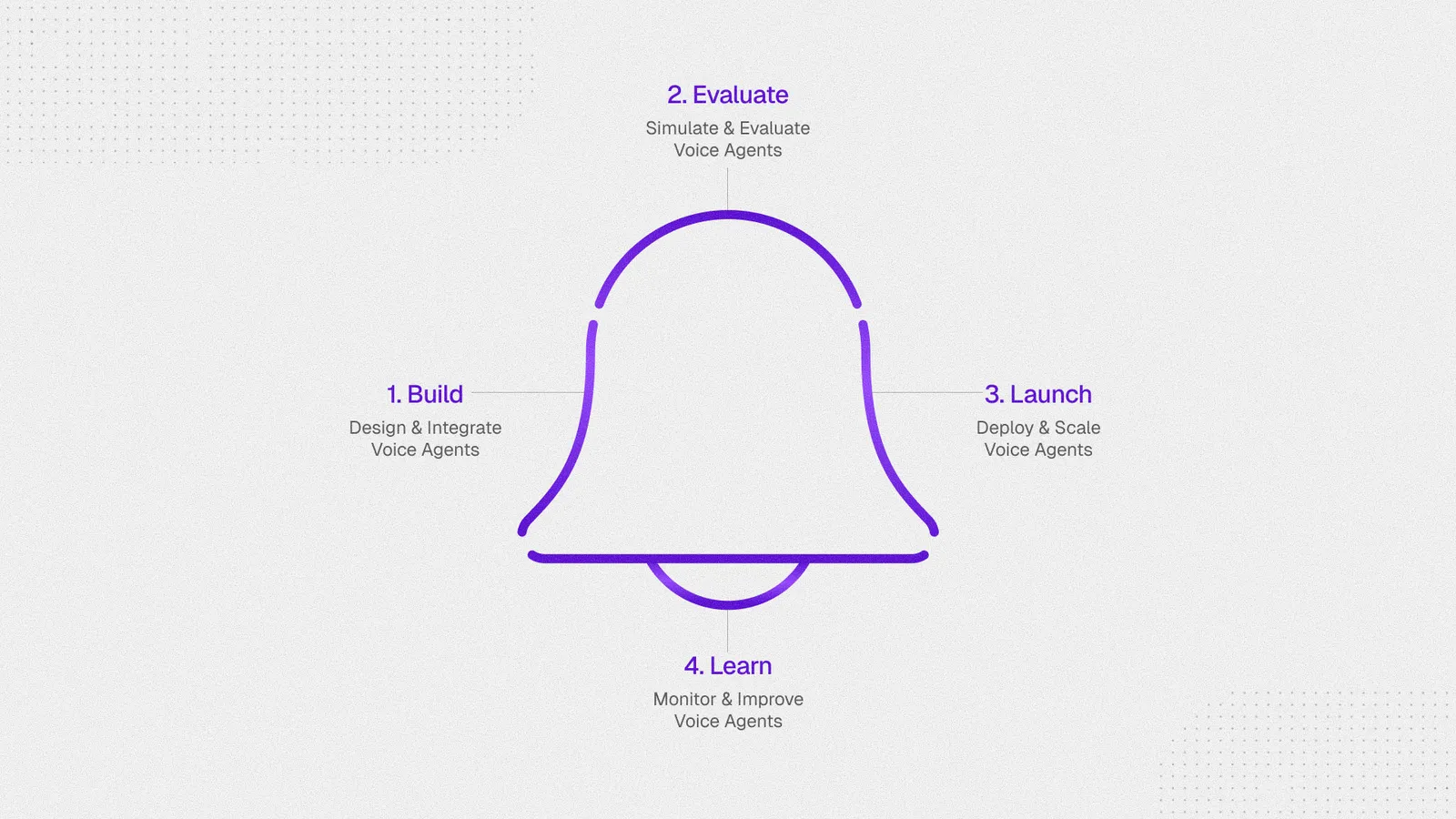
Synthflow organizes the entire agent lifecycle around the BELL loop—Build, Evaluate, Launch, and Learn. This is the operating system behind every polished experience we deliver: a repeatable rhythm that helps teams move from idea to world-class conversations without losing speed or quality.

Build
Design and integrate voice agents. Define, connect, and shape behavior in a clear, reviewable flow. Keep logic predictable so your team can trust every path.
Evaluate
Simulate and evaluate before going live. Run realistic conversations in safe environments, validate flows end-to-end, and add checks that reflect your domain and compliance needs.
Launch
Deploy and scale with confidence. Govern rollouts, trace behavior with execution logs, and manage releases with the ability to safely roll back. Integrate cleanly into your applications and systems.
Learn
Monitor and improve continuously. Close the loop with insights, spot gaps, and refine flows. Track usage, performance, and outcomes to keep quality high over time.
Integrations
Synthflow integrates with many platforms to fit into your stack. For the full catalog, visit Integrated platforms. Here we show some popular ones.
Popular starting points:
-
WhatsApp for inbound voice experiences inside WhatsApp Business.
-
Salesforce for CRM workflows and customer context.
-
Stripe for whitelabel billing and subaccount pricing.
-
HubSpot for marketing, CRM, and workflow automation.
-
WhatsApp Business Calling: Deploy an agent that accepts calls from WhatsApp Business accounts.
-
Salesforce: Embed Synthflow agents into Salesforce workflows.
-
Stripe: Manage whitelabel billing and subaccount pricing.
-
HubSpot: Connect Synthflow agents to HubSpot CRM and automation flows.
Quick links
Use these pages when you want to move from product overview into implementation details:
-
Developer for the API introduction and authentication flow.
-
Concurrent calls for rate limits, queueing, and capacity planning.
-
Whitelabeling for agency and reseller setup.
-
Billing for subscription and invoice management.
-
Developer: Start with the API reference and authentication flow.
-
Concurrent calls: Review rate limits, queueing, and capacity planning.
-
Whitelabeling: Set up agency and reseller workflows.
-
Billing: Manage subscriptions, invoices, and plan changes.
More resources
Additional resources outside the main docs:
-
YouTube for product walkthroughs and release videos.
-
Help Center for support-led troubleshooting content.
-
Academy for guided training.
-
Changelog for release notes.
-
Status for live service availability.
-
YouTube resources: Watch tutorials, feature walkthroughs, and customer stories.
-
Help Center: Browse troubleshooting articles and support-led guides.
-
Academy: Access in-depth training and video tutorials.
-
Changelog: Follow product updates and bug-fix releases.
-
Status: Check the current status of Synthflow services.
FAQ
Will the agent use the name I set in configuration?
No. The agent uses the name you give it in the prompt, not the label you assign in settings.
For example, if you name your agent “AI Call agent for ACME” in settings but name it Derreck in the prompt, it introduces itself as Derreck to customers.
Does the voice need to match the language?
Yes. The selected voice should match the language your agent is using.
Why do advanced voice tweaks change quality?
The default advanced settings are tuned for the best overall quality. Make only small adjustments unless you have a clear reason to change them.
Why is my agent reaching voicemail?
Voicemail detection is strong, but some voicemail recordings, especially ones using the customer’s own voice, can still pass through. If voicemail handling is important, switch the Voicemail Detection setting to Time based.
Why can’t inbound agents use variables?
Inbound agents do not know who is calling before the call starts, so they cannot rely on caller-specific variables up front. If you need external context, use a Custom Action that fetches it during the call.
Are there Synthflow prompt templates?
Yes. You can start from the built-in template section or use Copilot to help draft a prompt.
Can I use my own telephony app?
Custom telephony apps are not currently available on plans below Enterprise.
Can I query subaccount minutes via API?
No. Synthflow does not currently expose subaccount minute usage through the API.
Do subaccounts get their own minutes?
Subaccounts share the main agency account’s minutes unless you place the subaccount on Pay As You Go through the pricing-plan setup.
How are concurrent call limits shared?
Concurrency is tied to your plan, and accounts plus subaccounts share the main account total. Agency accounts currently share up to 100 concurrent calls unless you arrange a higher limit with sales.
When does billing occur each month?
Billing happens on your renewal date. You can find the exact date under Settings > Plan and billing in the Next billing section.
Can I move a subaccount between agencies?
No. Entire subaccounts cannot currently be imported or exported between agencies.
How do I buy an Australian number?
Provide a valid Australian address. Once that is on file, you can purchase an Australian number.