

Voice Configuration
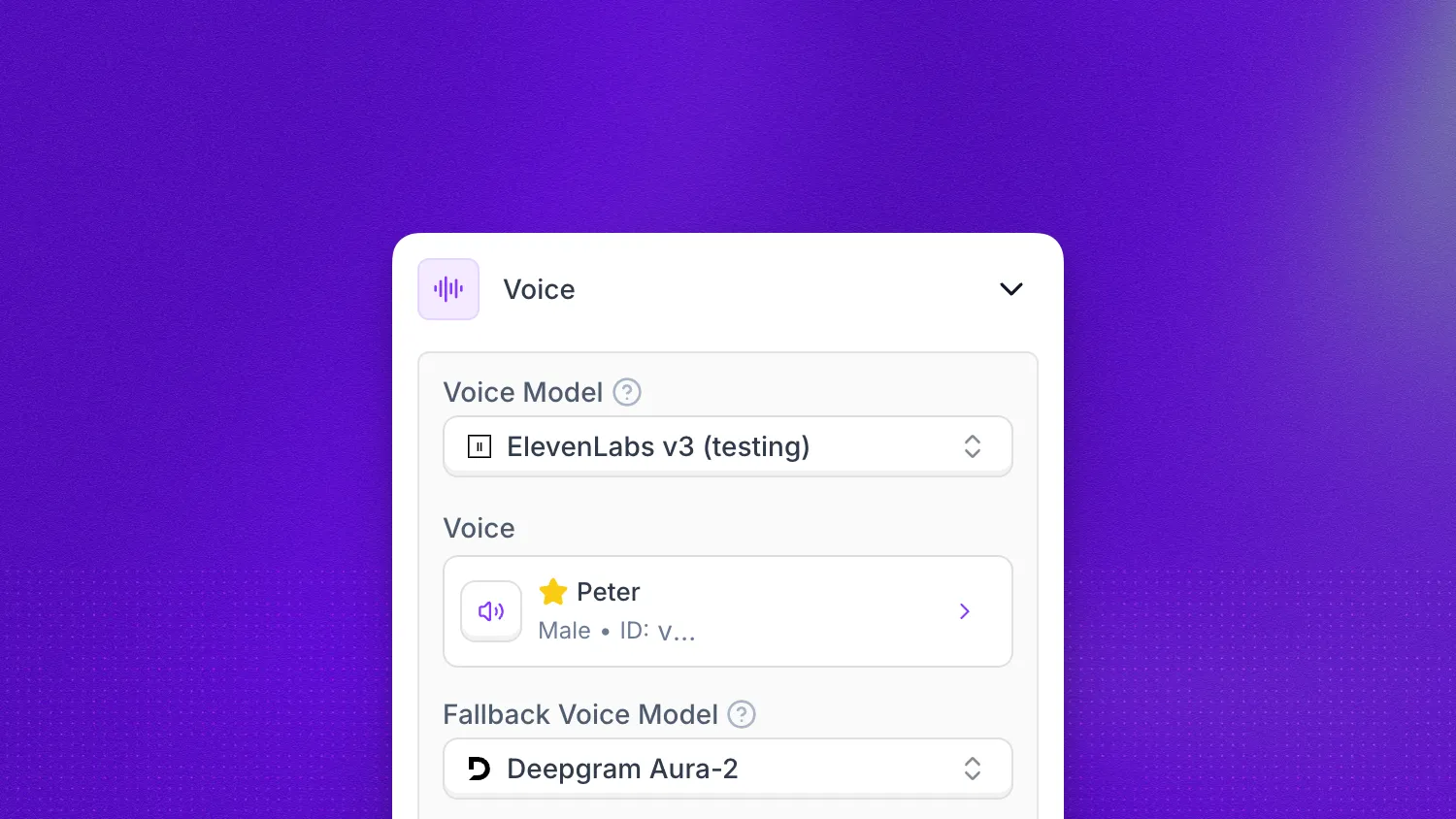
The Voice section of the agent editor controls how your agent sounds during conversations. From the voice engine and speaker selection to fine-grained controls over speed, expressiveness, and stability, these settings let you craft a natural, on-brand vocal identity.
In practice you will usually tune four things first: the voice model, the selected speaker, how quickly the agent responds, and how expressive or stable the speech should sound.
Voice model
The Voice Model dropdown selects the underlying engine that synthesizes your agent’s speech. The default is ElevenLabs Flash v2 for English and Flash v2.5 for multilingual synthesis, both optimized for ultra-fast, real-time responses. For other languages, switch to a model that supports multilingual synthesis.
Synthflow TTS
Synthflow TTS is Synthflow’s own text-to-speech engine, designed for real-time voice agent conversations. It delivers low-latency, natural-sounding speech across all supported agent languages with a single set of voices. No per-language voice switching is required.
For multilingual conversations, set the language to Multilingual in General configuration and set STT Provider to Synthflow STT in Additional settings. Synthflow TTS is selectable as the voice model and as the fallback voice model for Multilingual agents, and a voice you already picked is kept when you switch an agent to Multilingual. For single-language agents, choose that language instead of Multilingual.
A Multilingual agent using Synthflow TTS speaks mixed-language text correctly, but its delivery and accent stay biased toward English. If you need the accent of a specific language throughout the call, set that language instead of Multilingual.
Key capabilities:
- Low latency: Optimized for real-time conversational use cases with sub-200ms time-to-first-audio.
- All supported languages: All voices work consistently across every supported agent language without changing timbre or quality.
- 200 built-in voices: A catalog spanning a wide range of accents, ages, and speaking styles. Each voice lists a description, accent, and gender, and keeps its character across every language it speaks.
ElevenLabs V3
Select it when you want expressive, moment-by-moment control over how the agent sounds. It supports audio tags, inline bracket directives in prompts and flow messages that shape accent, emotion, and non-verbal delivery.
ElevenLabs v4 and v4 Turbo
ElevenLabs v4 and ElevenLabs v4 Turbo support audio tags like V3. They have no speed, style, or speaker boost settings, so the editor hides Speed, Speaker Boost, Style Exaggeration, and Voice Intonation / Prompting when either model is selected. Stability and Similarity still apply.
Voice
The Voice selector lets you pick from a library of pre-built voices, import a voice from a third-party provider, or clone a custom voice. Each voice comes with a preview so you can audition it before committing. The voice you choose here works together with the advanced settings below to shape the final output.
Filter the list by language, accent, and gender to narrow a large catalog down to a handful of candidates. The available accents depend on the voice model you selected, so switching models clears any accent filter the new model does not offer.
Fallback voice model
If the primary voice provider experiences an outage, Synthflow automatically switches to an alternative provider to keep the call running. In rare cases the caller may notice a slight change in the agent’s voice, but the conversation will continue without dropping or interruption. This setting is available on Enterprise plans.
Fallback voice
The Fallback Voice selector chooses the specific speaker used when Synthflow falls back to the alternative engine. Pick a speaker whose tone and gender are close to your primary voice so the transition is as imperceptible as possible to the caller. This selector is only used when the fallback model is active.
Patience level
Patience Level determines how long the agent waits after the caller finishes speaking before it begins its response. Low makes the agent respond almost immediately, Medium adds a natural pause, and High gives the caller extra time to continue. High is useful for conversations where callers tend to pause mid-thought.
Speed
The Speed slider adjusts how fast the agent speaks, from slow and deliberate to fast and energetic. The default of 100% mirrors natural conversational pacing. Lowering the value can improve clarity for complex information; raising it keeps the conversation moving.
Volume
The Volume slider sets the output loudness of the agent’s voice. Keep it at 100% for most use cases and lower it if callers report the agent is too loud relative to their own audio level.
Speaker boost
Speaker Boost amplifies the characteristics that make the selected voice sound like its original speaker. Enabling it increases vocal likeness but may add a small amount of latency.
Advanced settings
The settings below are collapsed under Advanced Settings by default. They give you precise control over the voice’s tonal characteristics.
Stability
Stability balances expressiveness against consistency. Lower values produce a more dynamic, emotive delivery that varies between utterances. Higher values keep the tone steady and predictable, which is better for reading structured information like addresses or confirmation numbers.
Style exaggeration
Style Exaggeration amplifies the stylistic traits of the original voice. A value of 0% keeps the output neutral; increasing it makes the voice more animated. Use sparingly, since high values can sound unnatural in certain contexts.
Similarity
Similarity controls how closely the synthesized output matches the original voice sample. Higher values prioritize fidelity to the source recording, while lower values give the model more freedom to optimize for clarity and naturalness.
Voice intonation / prompting
The Voice Intonation / Prompting field accepts free-text descriptors that influence how the agent delivers its lines, for example “She said fast” or “Speak in a calm, reassuring tone.” This is a powerful way to shape pacing, emotion, and emphasis without changing the prompt itself.
Audio tags
When your voice model is ElevenLabs V3, ElevenLabs v4, or ElevenLabs v4 Turbo, you can use audio tags in prompts and flow messages. These are inline directives in square brackets that control emotional delivery, vocal style, and non-verbal sounds.
Tags work like stage directions. They are not spoken aloud. They change how nearby text is delivered or insert a sound at that point.
There are two types of audio tags: global and situational tags.
Global tags
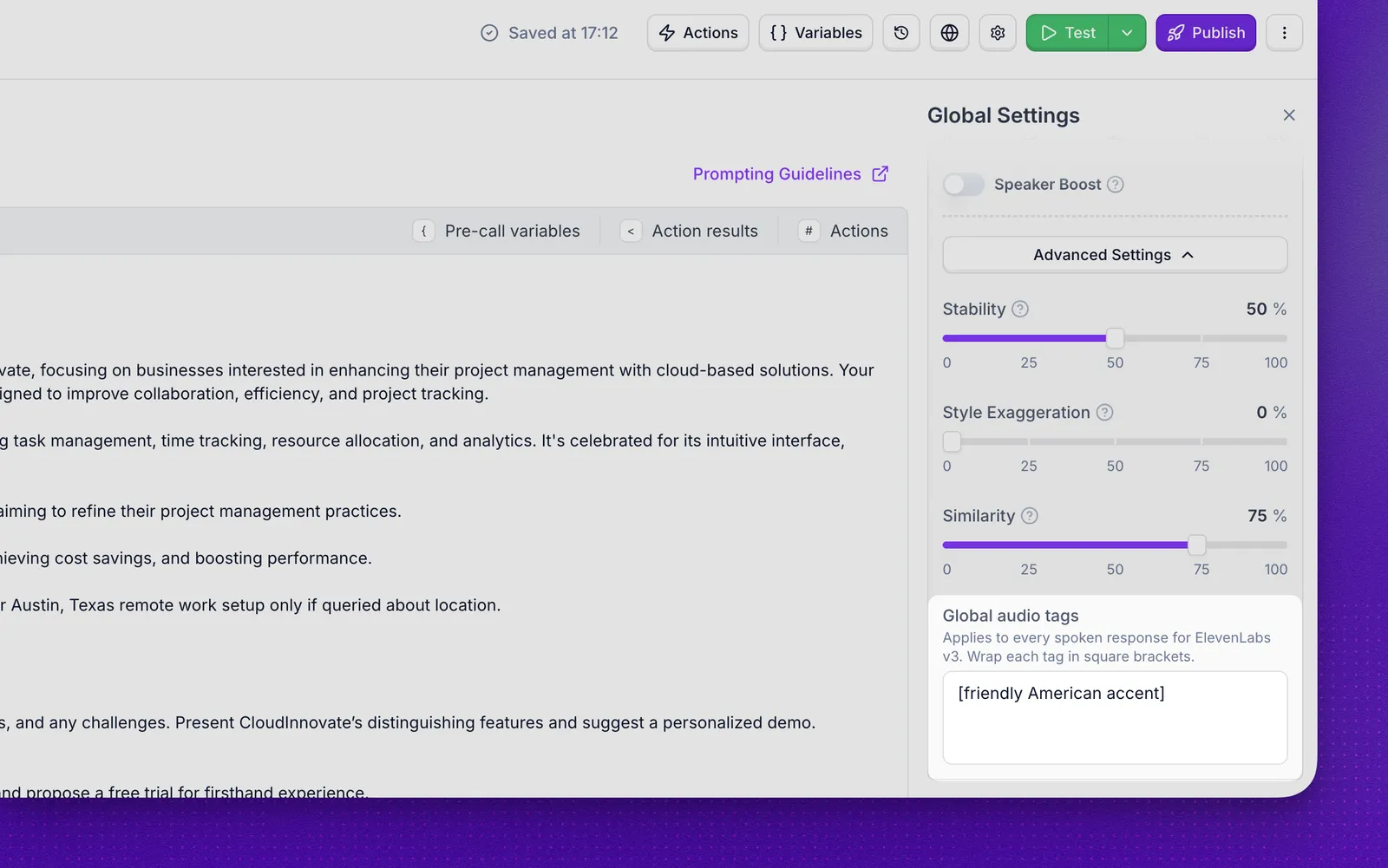
Global tags define a persistent voice character for the whole call. Use them to set an accent, a base mood, or a speaking style.
Enter global tags in Global Audio Tags under the advanced settings. Examples:
The table lists common examples, but you are not limited to them. Any description in square brackets works (for example [calm Australian accent]), and that style applies to every utterance for the rest of the call.
Situational tags
Place situational tags in your agent prompt or flow messages to shape delivery at specific moments. Each tag affects roughly the next four to five words.
Emotion and tone
Voice delivery
Non-verbal sounds
Example:
Best practices
- Start with global tags to set the baseline voice character, then add situational tags for specific moments.
- Use situational tags sparingly. Each tag affects only about four to five words. Overusing them can make delivery sound choppy.
- Combine tags for nuanced effects, such as
[sad][whispers]for a quiet, somber moment. - Test across languages. Audio tags work in multiple languages, but expressiveness can vary by language and voice.
- Keep tags natural. Simple tags like
[cheerful]or[serious]usually work better than long instructions.
FAQ
When should I use ElevenLabs V3 and audio tags?
Choose ElevenLabs V3 when you need expressive, moment-by-moment control over delivery. Use another voice model, such as Synthflow TTS or ElevenLabs Turbo, when low latency matters more than inline tags.
Will callers notice when the fallback voice kicks in?
In most cases the switch is seamless. If the primary and fallback speakers have very different tones, the caller may hear a subtle change, but the call itself continues without interruption. Pick a fallback voice whose gender and tone match your primary voice to minimize the difference.
Can I import or clone my own voice?
Yes. The Voice selector supports cloning and importing voices from supported third-party providers such as ElevenLabs. Choose the appropriate voice model first, then attach the cloned or imported voice as the speaker.
How do I add a new voice to an agent?
Open the agent editor, go to Voice, and choose a built-in speaker from the Voice selector. To use a custom or provider-specific voice, clone a voice or select Imported > Import Voice, then paste the provider voice ID, such as an ElevenLabs Voice ID. This is also how you can add a specific voice style, such as a British accent, when that voice is available from the provider.
Which voice model should I choose for non-English calls?
Switch Voice Model to a multilingual option such as Synthflow TTS, which handles non-English languages better than the default English-tuned model.
How does Synthflow TTS compare to ElevenLabs?
Synthflow TTS offers lower latency (about 100 to 200 ms time to first audio, compared with about 200 to 500 ms for many ElevenLabs models), a catalog of 200 voices, and strong multilingual coverage out of the box. ElevenLabs offers custom voice cloning, speed and pitch controls, and ElevenLabs V3 with audio tags.
Does the voice need to match the language?
Yes. Pick a voice that matches the agent’s language. Filter the Voice selector by language to see only matching voices.
Why do advanced voice tweaks change quality?
The default advanced settings are tuned for the best overall quality. Change them only when you have a clear reason, and in small steps.