

Pass Call Context
Your SBC, PBX, or carrier can attach data to an inbound call’s SIP INVITE, and the agent can use it from the first turn. This lets the agent greet a caller by name, look up their account, or route them, without asking for details your system already has.
To pull more data from your own API before the agent speaks, use a before-the-call action.
Custom X-headers
Add any X-* header to the INVITE. Synthflow turns each one into a variable with the same name, including the X- prefix.
This INVITE creates four variables: {X-Customer-Name}, {X-Account-ID}, {X-Language}, and {X-Priority}. Values resolve before the agent’s first turn.
Header rules
Send only the headers the agent needs. Every header adds to the size of the INVITE, and a large INVITE can fragment and fail on UDP trunks with a small MTU.
Headers travel in plain text unless your trunk uses TLS. If a header carries sensitive data, such as an account ID, turn on secure signaling or encrypt the value before you send it.
Header values
Reference a header as {X-Header-Name} anywhere Synthflow accepts variables. You can combine header values with system variables such as {call_id} and {from_phone_number}, and with action results.
In a prompt, the values give the agent context from the start of the call:
To pass the same data to the next leg of a call, add the headers in the call transfer action under Custom X-Headers, with the incoming header as the value. You can also add fixed headers, such as X-Handled-By set to synthflow-ai. See SIP transfers.
X-EI header
X-EI is an older header that carries up to three values in a single header. Custom X-headers cover the same cases with less setup, but X-EI still works, and it is required to hand off a live call.
Each value starts with a one-letter prefix and a dot, and ends with a semicolon. Send any combination, in any order:
Use the placeholders in before-the-call and during-the-call custom actions. The E. value also appears as call.external_id in the post-call webhook, so you can match Synthflow calls to your own records.
This TwiML example passes an external ID alongside the Synthflow call ID:
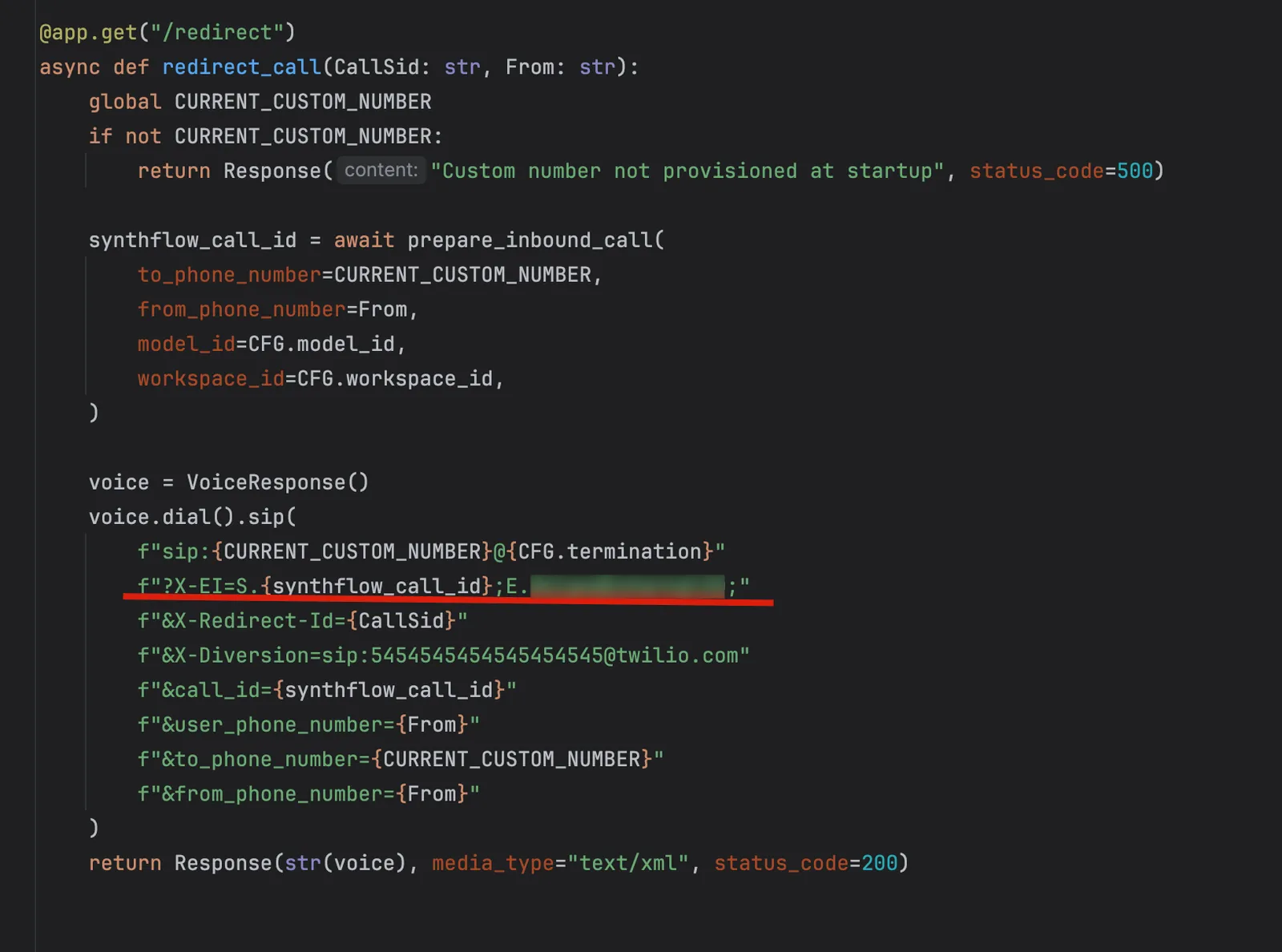
When you send X-EI:
- Do not use semicolons inside a value. Each semicolon ends a token.
- Keep values short, especially on UDP trunks.
- URL-encode the header when you add it to the query string of a SIP URI, and encode it only once.
- Make sure your SBC forwards custom SIP headers end to end. Some strip them by default.
Diversion header
When a call was forwarded before it reached Synthflow, its Diversion header records where it was going and why, for example reason=unconditional. Synthflow exposes that header as the <diversion> placeholder in before-the-call and during-the-call custom actions. Diversion is only available on inbound calls.
Some carriers strip Diversion. If yours does, send the same value in an X-Diversion header, and Synthflow uses it instead.
A common pattern is a before-the-call action that sends <diversion> to your API, which reads parameters such as brand and returns variables for the prompt. One agent can then switch persona by brand.
Your API returns a JSON object whose keys match the variable names in your prompt.
When you build parameters into the Diversion header:
- Keep the header under about 1 KB, or it can fragment on UDP.
- Use only letters and digits in parameter names. Some SBCs reject other characters.
- If another platform adds its own Diversion entry, keep yours last, so your API always reads the same position.
- Keep parameter names in sync with your prompt variables. If you rename one, update the header, your API, and the prompt together.
Before-the-call actions
A before-the-call custom action calls your API as the call connects, and fills prompt variables with the response before the agent speaks. Use it when the SIP headers carry an ID, and your API holds the rest of the data.
- Create a custom action that sends a
POSTrequest and runs before the call starts. Through the API, create the action withrun_action_before_call_startset totrue. - In the request body, include the values your API needs, such as
<external_id>,<diversion>, or{X-Account-ID}. - Return a JSON object whose keys match the variable names in your prompt. For example, if your prompt uses
{name}, return{"name": "John"}. You do not need to change the prompt. - Attach the action to the agent.