

Variables
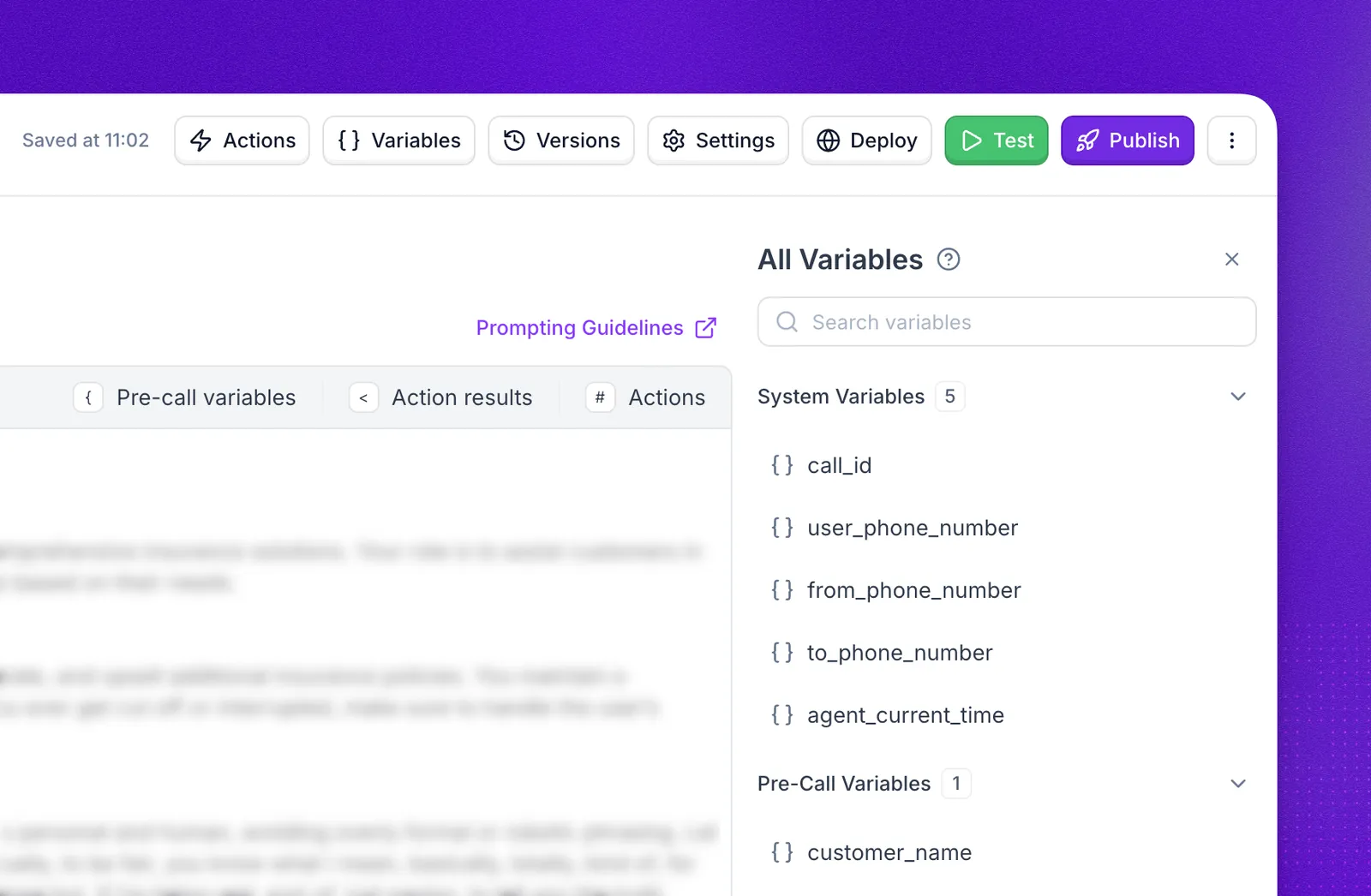
Variables are placeholders that let your agent work with dynamic data in prompts, actions, call transfers, SIP headers, and webhook payloads. In prompts, system and pre-call variables use curly braces, for example {call_id}, and action results use angle brackets, for example <get_order.results.data.status>. Action fields, such as a custom action’s URL or request body, use angle brackets for every variable, for example <call_id>.
Synthflow supports four types of variables:
Select Variables in the agent editor header to open the All Variables drawer. It lists every variable available to the agent, grouped by type, with a search bar to find one quickly.
To see the value each variable had on a specific call, open the call’s Variables tab in Call logs.
System variables
System variables are built-in values that Synthflow populates automatically for every call. You do not need to define them.
Example
Pass system variables in a custom action request body to identify the call in an external system. In the request body, type < to pick one from the list:
You can also reference system variables in prompts:
Pre-call variables
Pre-call variables, also called custom variables, are values you pass into the agent before the conversation starts. They inject external context without requiring the agent to collect it during the conversation.
Use pre-call variables to personalize conversations with user details, CRM data, campaign context, account status, or other backend data.
How to use pre-call variables
- Identify the data you want to inject (for example, a company name or user role).
- Pass it when you make a call, or return it from the inbound webhook for inbound calls.
- Reference the values in prompts, actions, transfers, SIP headers, or webhook payloads.
For API-specific details, see Dynamic prompt injection.
Collected variables
Collected variables are values gathered from the user during the conversation after the user provides the requested information.
Use collected variables when the agent needs to remember information for later steps, such as a caller’s name, email address, appointment date, issue type, or transfer reason.
How they work
- The agent asks for specific information.
- The user provides the response.
- Synthflow stores the response as a variable, for example
{user_email}or{appointment_date}. - The variable can be used later in prompts, Branch nodes, Custom Actions, transfers, SIP headers, and webhooks.
In Flow Designer, Conversation nodes are the primary way to define collected variables. You can also use the Variables drawer to view available variables, see where they are used, and navigate back to their source.
Post-call webhook payload
Post-call webhooks include collected values in the collected_variables field when they are available. Only variables with collected: true are included.
For the full payload shape, see Post-Call Webhook.
Action result variables
Action result variables hold fields from a custom action’s response. You choose them under Output Variables when you initialize the action, and the agent can use them later in the call.
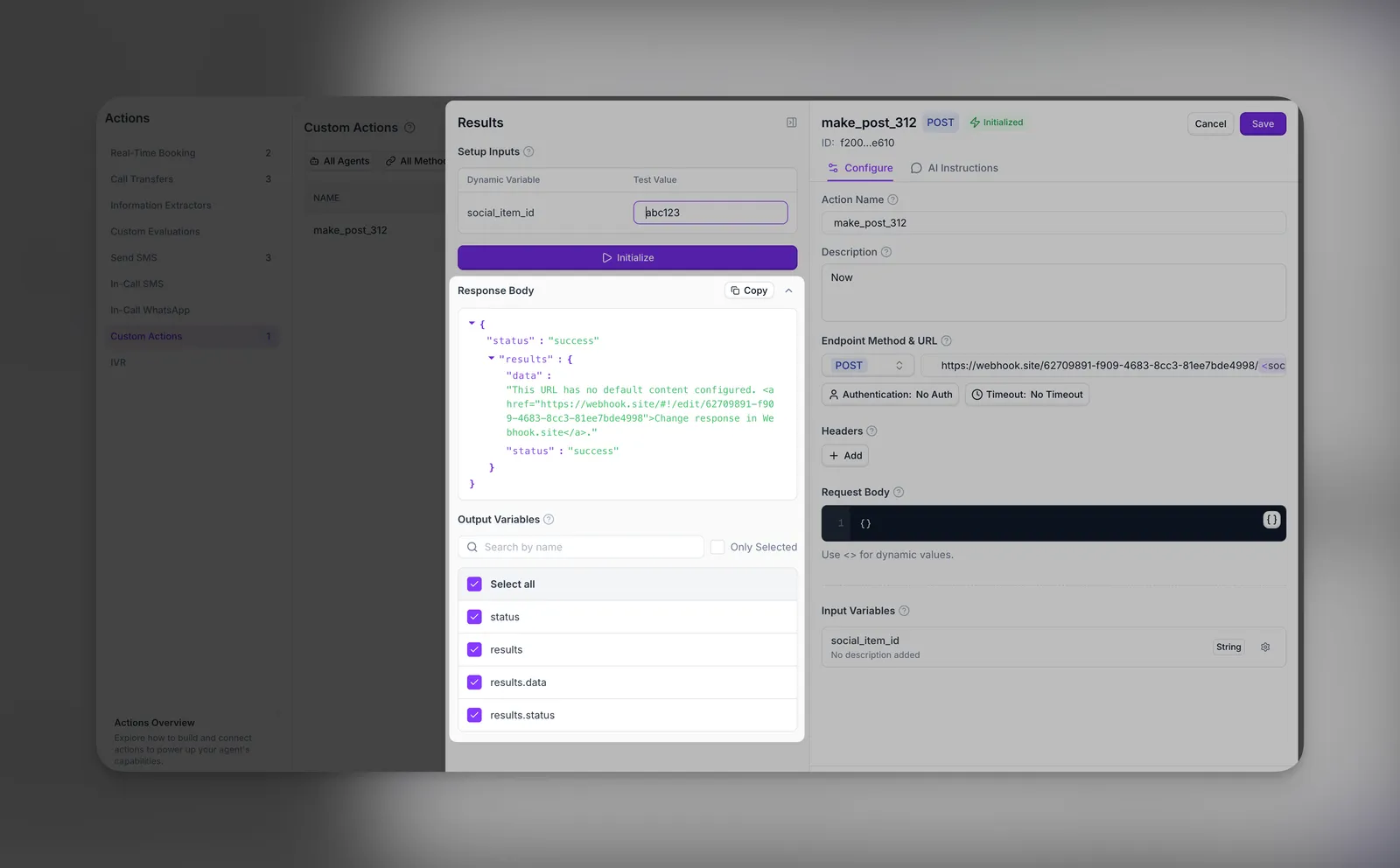
How they work
- A custom action sends its request.
- Your API returns a response.
- Synthflow stores each field you selected under Output Variables.
- You reference the stored fields in the prompt, or pass them to another action.
Each result is named after the action and the field’s path in the response. If an action named get_order returns {"status": "shipped"}, the result is get_order.results.data.status.
In-call messaging replies
In-Call Messaging actions populate a dedicated reply variable when the customer responds by text:
The variable is set as soon as the reply arrives, whether the action was configured to block the agent until then or to let the call continue in the background. If no reply arrives before the call ends, the variable remains empty.
Variables in prompts
The Prompt editor inserts each kind of reference with its own character, or with the matching button in the prompt toolbar:
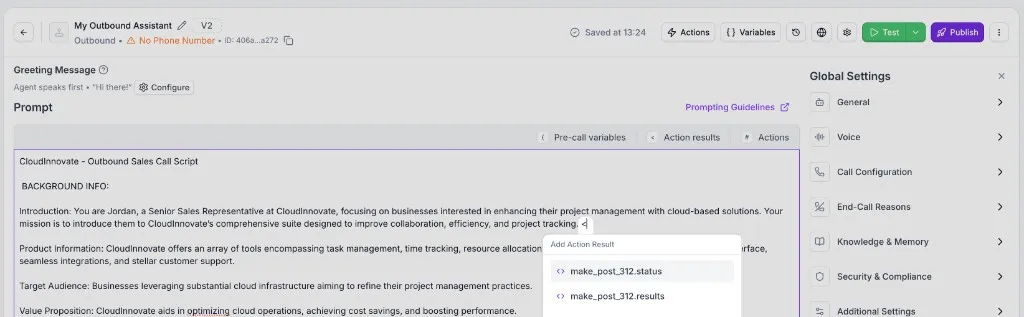
Select Variables in the agent editor header to see every variable the prompt can use, grouped into System Variables, Pre-Call Variables, and Action Results.
Action placeholders and mapping
Several actions let you embed placeholders with angle-bracket names, for example <customer_name> or <queue_ref>, in specific configuration fields such as the SMS message body, call transfer targets or SIP headers, or the lead_email input on real-time booking. Each distinct name becomes an input variable on that action.
On custom actions, placeholders go in the URL, the headers, and the request body. A system variable name, such as <call_id>, is filled in automatically and does not become an input variable.
After you attach the action to an agent, you choose where each input variable gets its value.
Choose how an input variable gets its value
In the agent editor, select the attached action to open its panel. Under Input Variables, choose a source for each variable:
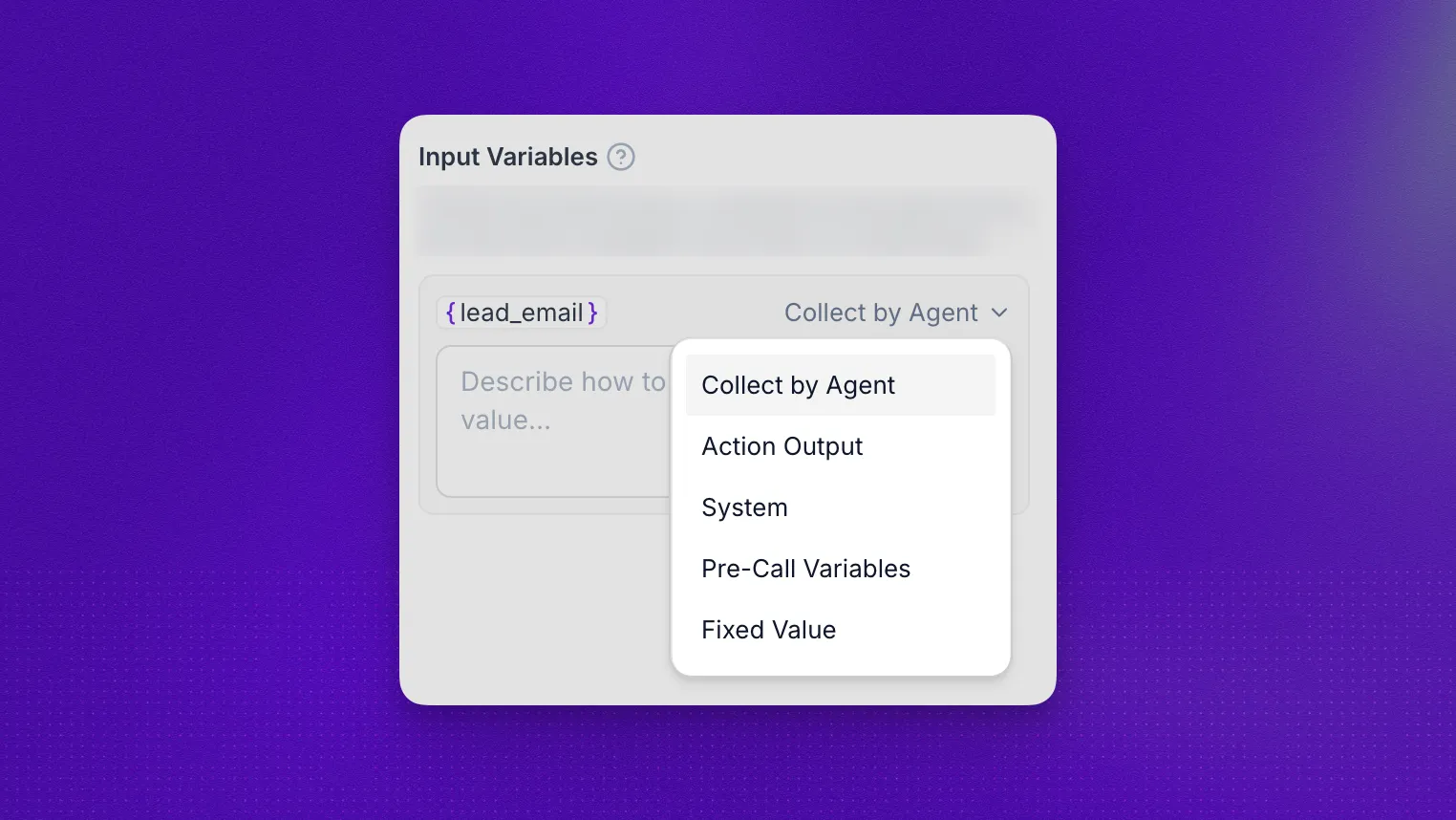
To set the sources through the API, use Attach an action.
Field-by-field setup lives in each action guide:
Mapping limits
- A Fixed Value is always sent as text.
- A value that is not available when the action runs is sent as the placeholder text, such as
<customer_id>, and the action runs without an error. - Action Output refers to the other action by its name. Renaming that action breaks the mapping.
Where to use variables
Angle-bracket placeholders on supported actions are covered in Action placeholders and mapping. Variables can also be referenced in several other places across your agent configuration:
- Prompts: Personalize your agent’s behavior, for example
"Hi {lead_name}, thanks for calling {company_name}.". - Custom Actions: Pass variables in API parameters or body fields on Custom Actions, shape JSON with placeholders, and reuse response fields in later steps.
- Real-Time Booking: When you attach real-time booking, define variables so details the caller gives you, like
<user_name>or<user_email>, flow into the booking request. - Call Transfers: On call transfers, define variables to capture context like
<caller_name>or<issue_type>for whispers, summaries, or SIP headers. - Post-call SMS: On Post-call SMS, define variables to personalize templates, for example
"Hi <customer_name>, your appointment is confirmed for <appointment_date>.". - Webhooks: Reference variables when configuring webhook payloads.
- Flow Designer nodes: Use variables in Conversation, Message, Branch, and Custom Action nodes in the Flow Designer.
- SIP headers: Pass system variables in SIP X-headers for telephony integrations, as described in Pass call context.
FAQ
Are all variable types available in both Flow Designer and Prompt Builder agents?
Yes. System variables, pre-call variables, collected variables, and action result variables are available in both Flow Designer and Prompt Builder agents.
Can inbound agents use pre-call variables?
Yes, through the inbound webhook. An inbound agent does not know who is calling before the call starts, so you cannot pass custom_variables up front as you do for outbound calls. Your webhook endpoint receives the caller’s number and returns custom_variables for that call. To fetch context during the call instead, use a custom action.