

Usage and Billing
Synthflow tracks usage so your team can understand call volume, chat usage, simulations, allowances, and invoice activity. Your exact rates, allowances, thresholds, and invoice terms come from your agreement or account setup.
How usage is measured
Calls
Phone calls are measured per second, starting when the human and the AI agent connect and ending when the call terminates. Partial seconds are rounded up to the nearest second.
If a transfer completes successfully, Synthflow stops measuring billable AI usage at the point of transfer. Usage after the transfer is not included.
How minutes appear on your invoice
Rather than rounding each individual call, Synthflow aggregates seconds across calls. Each whole minute that accumulates is reported as a billing event on your invoice, so usage reflects your actual call activity. All invoices available to your workspace are in the Billing Portal under Admin -> Workspace Settings -> Plan & Billing.
Here’s how it works:
In this example, four calls totaling 125 seconds produce 2 reported usage minutes, with the remaining 5 seconds carried over to the next call.
Unanswered calls
Calls with a no-answer or hangup_on_voicemail status are recorded as a flat 5 seconds of usage. Calls with a failed or user-canceled status are not billed.
Call states
Every call in Synthflow has one of the following states:
Calls marked as paused, spam, or in-progress are not charged on your invoice until they reach a terminal state.
Chat
Live chat through API, widget, SMS, and similar channels is converted into billable usage minutes: every 5 AI-generated messages count as 1 usage minute. The rate applied to those minutes comes from your agreement or account setup. Simulations are measured separately.
Simulations
Test Center simulations can be measured separately from live call and chat usage. Completed simulations may count messages from both the agent and the simulated counterpart, depending on your workspace configuration.
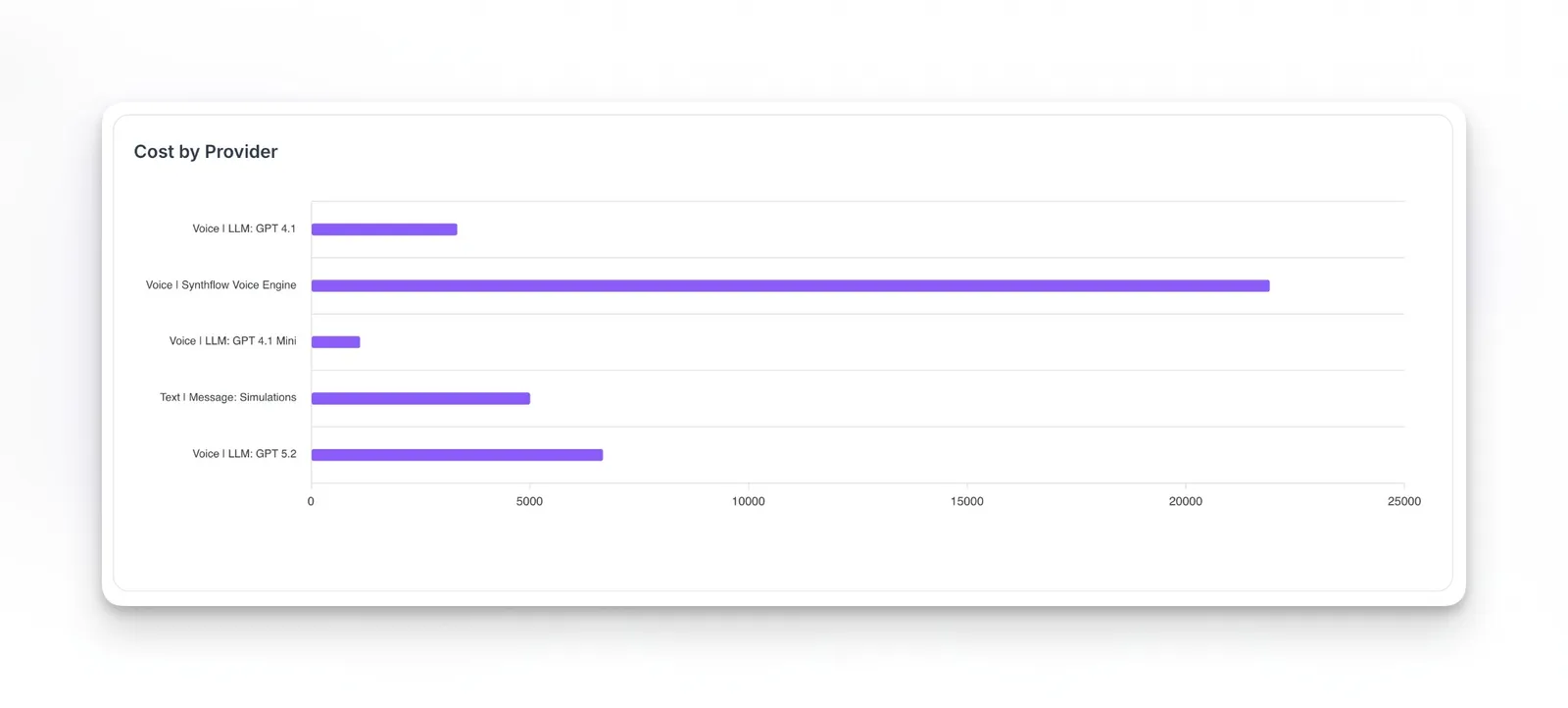
Simulation usage appears under Admin -> Workspace Settings -> Usage, including in Cost by Provider as text or message simulations.
Rates and account terms
Enterprise
Enterprise customers have custom rates, allowances, and invoice terms based on their agreement.
Existing account configurations
Some existing workspaces may still use legacy billing configurations. If so, the billing details shown in Plan & Billing, your invoices, and your agreement are the source of truth for your account.
Included usage and carryover
Plans that include a usage allowance only charge for usage above that allowance. If your total usage in the period stays within the included amount, only the included allowance is consumed.
When carryover is enabled, unused included minutes at the end of a contractual period can roll over to a later period instead of expiring. The exact carryover rules depend on your agreement.
Carryover is available only when included in your agreement. Contact your account team to review whether it applies to your account.
Invoice timing
Invoice timing depends on your agreement and account configuration. Some workspaces invoice on a fixed schedule, while others can generate invoices when configured usage thresholds are reached.
How threshold invoicing works
Billing thresholds are triggers, not spending caps. When unbilled usage reaches the configured threshold for your account, an invoice can be generated for the usage accrued up to that moment.
Thresholds may not be evaluated in real time. Usage can continue accruing between checks, so the invoice amount may be higher than the configured threshold.
A billing threshold is not a hard usage limit. If you need operational limits or alerts, coordinate them separately with your account team or your own internal controls.
Monitoring usage
Your current minute usage is displayed in the sidebar, giving you visibility into consumption at a glance.
Usage dashboard
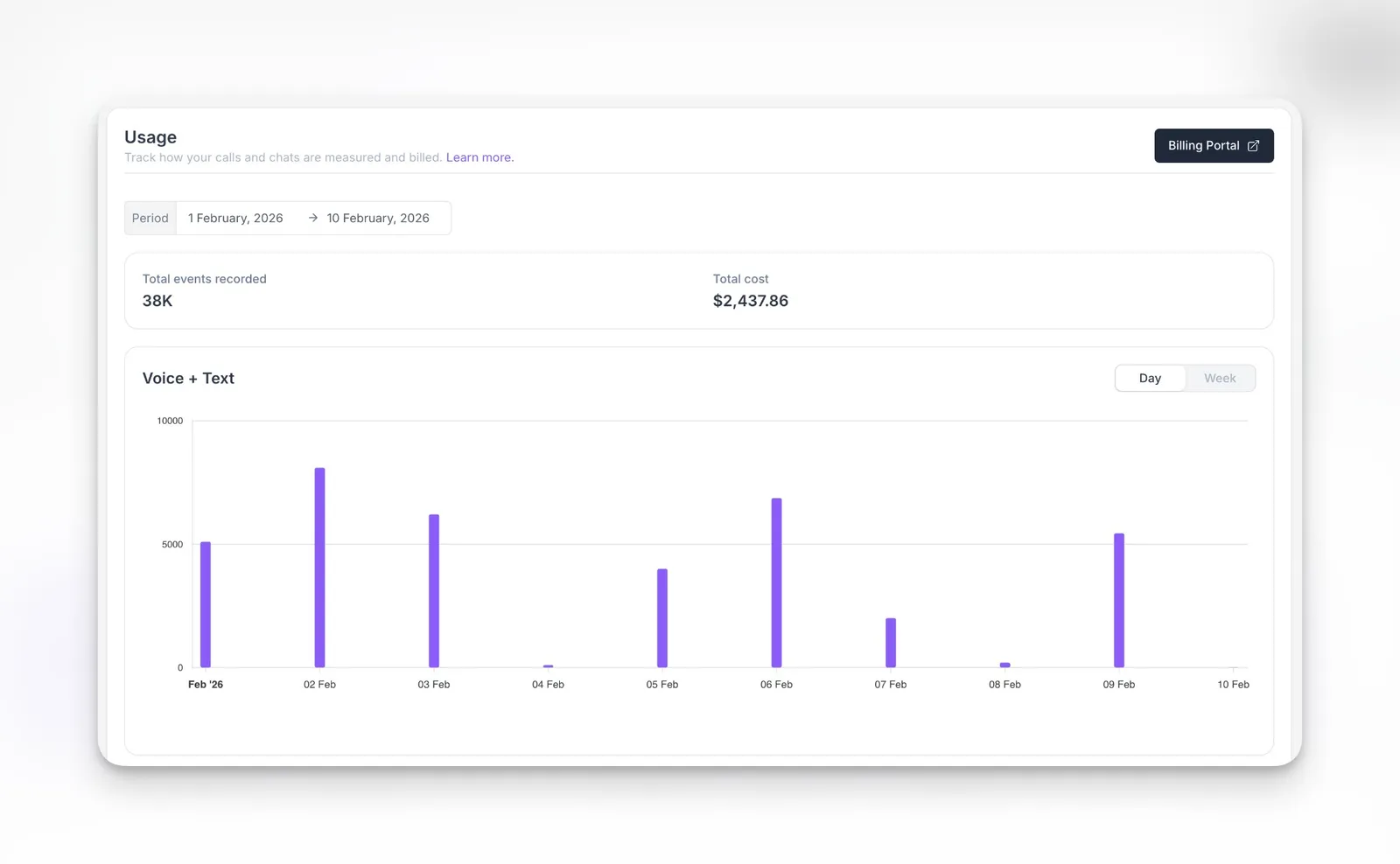
The Usage dashboard is available under Admin -> Workspace Settings -> Usage. It shows:
- Total events recorded and total cost for the selected period at the top
- A Voice + Text chart with total events grouped by date, with day or week granularity
- A Cost by Provider chart with cost or usage broken down by provider, such as LLM, voice engine, and text or message simulations
Usage shown reflects billable credits only. Credits used during call transfers are not included and may cause differences from other analytics views.
Subaccount usage and pricing
For subaccounts, call and chat usage is measured the same way as for the parent workspace. Billing rules are determined by the agency pricing configuration and connected Stripe account where agency billing is enabled.
To compare call activity across the subaccounts you manage, use the subaccount view in the analytics dashboard. It reports total minutes, calls, and average duration per subaccount, based on call analytics rather than billable credits.
FAQ
Are failed or unanswered calls charged?
Calls with a failed or user-canceled status are not billed. Calls with a no-answer or hangup_on_voicemail status are recorded as a flat 5 seconds of usage.
How do I see my current usage?
Your current minute usage is shown in the sidebar. For detailed usage history, open Admin -> Workspace Settings -> Usage. Invoices and billing history are in Plan & Billing.
Why doesn't the usage dashboard match my other analytics?
Usage on the dashboard reflects billable credits only. Credits used during call transfers are not included, which can cause differences from other analytics views.
Why did I receive an extra invoice?
If your account uses threshold invoicing, an invoice can be generated when unbilled usage reaches the configured threshold. This can happen in addition to regular invoice timing.
Why is my threshold invoice higher than the threshold?
Thresholds are triggers, not caps. Because checks are periodic, usage can continue to accrue before the invoice is created.
Can I set usage alerts?
Usage alerts depend on your account setup. Contact your account team if you need operational alerts or limits.
How is international calling priced?
International calling can vary by destination, carrier path, and telephony setup. Review your agreement or contact your account team for details.
How are call seconds calculated?
Billing starts when the human and the AI agent connect and stops when the call ends or a transfer completes successfully. Milliseconds are rounded up to the nearest second.