

Hamming
Voice agent QA, monitoring, and red-teaming for your Synthflow agents

Hamming is an enterprise platform for testing, monitoring, and securing voice AI agents. Connect your Synthflow workspace with a Synthflow API key and Hamming imports your voice agents, phone numbers, and call history, then keeps them synced so it can generate test scenarios, score outcomes, watch production quality, and run adversarial security tests.
This is a good fit when you run Synthflow agents in production and need repeatable quality assurance, continuous monitoring, and security coverage that spans the full lifecycle, from pre-launch testing to live traffic.
What you can do
Hamming reads your synced agents and their prompts to drive three workflows against the same agents:
- QA and testing: Hamming auto-generates conversation scenarios from each agent’s prompt, then runs simulated inbound and outbound calls at scale to exercise edge cases, interruptions, accents, and background noise. Outbound runs use the phone numbers it imports from Synthflow. Every call is graded on 50+ metrics spanning accuracy, conversation quality, voice performance, and task completion, so regressions surface before they reach callers. Your first test report is ready in minutes.
- Production monitoring: Hamming replays golden call sets as scheduled health checks to detect drift or outages, breaks down component latency across speech-to-text, LLM, and text-to-speech, and sends proactive alerts by email and Slack. Turning on Import Calls feeds your historical Synthflow calls and metrics into the monitoring dashboard.
- Red-teaming: Hamming runs security packs that probe for jailbreak attempts, prompt injection, and PII disclosure, and validates the guardrails your agents are supposed to enforce.
Keeping your agents and prompts synced is what lets Hamming generate relevant scenarios and scores, so leave Import Voice Agents enabled unless you have a reason not to.
Connect Synthflow to Hamming
You connect from inside Hamming by adding a Synthflow API key. Nothing needs to be configured on the Synthflow side beyond creating the key: connect the provider, sync your agents, then run your first calls.
Create a Synthflow API key
In Synthflow, open Settings → Workspace Settings → API Keys, click Create new API key, and copy the value. See Authentication for details and key-management practices. Keep the key secret and store it securely; you paste it into Hamming only once.
Add the key in Hamming
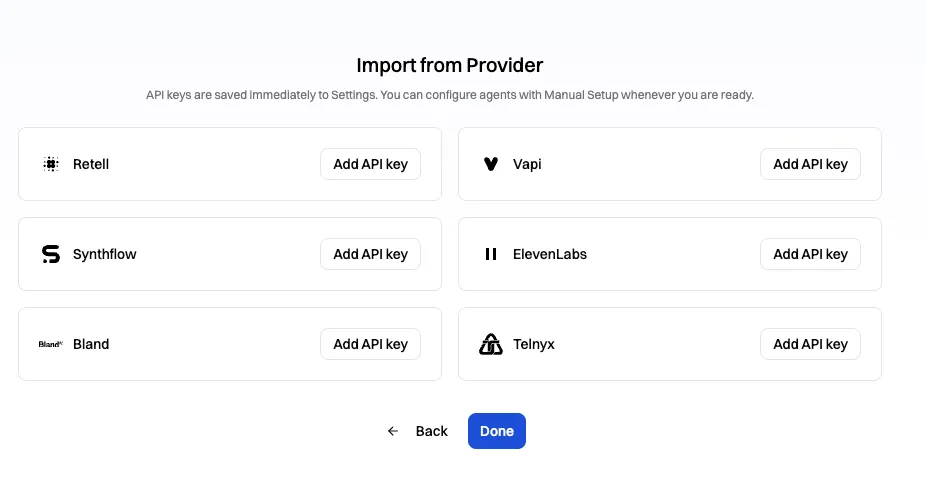
In Hamming, open the provider import screen and click Add API key on the Synthflow card.
In the Set your Synthflow API key dialog, give the credential a Name, paste your Synthflow key into the Key field, choose your data sync options, then click Create.
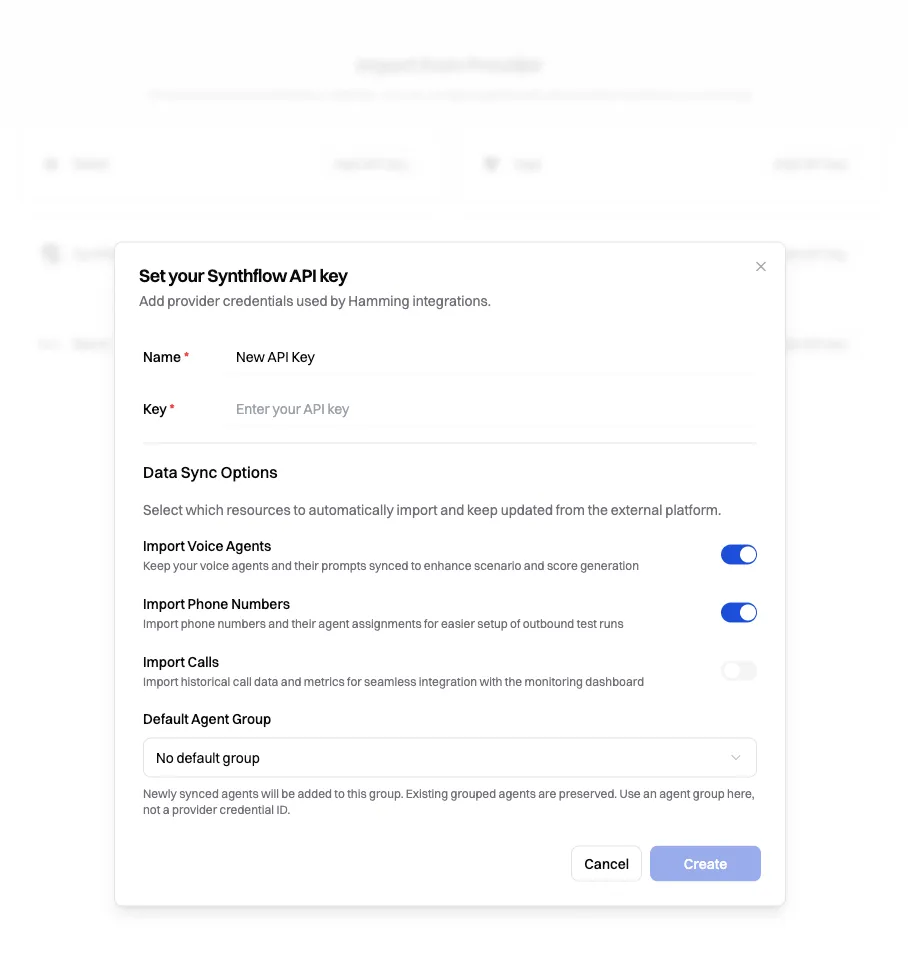
Data sync options
The dialog controls which resources Hamming imports from Synthflow and keeps updated:
FAQ
Where do I get the Synthflow API key Hamming asks for?
Create it in Synthflow under Settings → Workspace Settings → API Keys, then paste it into Hamming’s Set your Synthflow API key dialog. See Authentication for the full steps.
Do I need to re-import after editing an agent?
No. Once connected, Hamming keeps your synced agents, prompts, and phone numbers updated automatically, so scenario and score generation reflect your latest changes without a manual re-import.
Does connecting Hamming change my Synthflow agents?
No. Hamming reads your agents, phone numbers, and calls through the API key to run its own tests and monitoring. It does not modify your Synthflow agents or their prompts.
How is this different from Synthflow simulations?
Simulations run scripted test conversations inside Synthflow to validate an agent before launch. Hamming is an external platform that layers large-scale scenario generation, scoring, production monitoring, and security red-teaming on top of the same agents.
Why should I turn on Import Calls?
Importing calls brings your historical Synthflow call data and metrics into Hamming’s monitoring dashboard, so production quality tracking and health checks reflect real traffic. Leave it off if you only want pre-launch testing.
Can I connect more than one Synthflow workspace?
Yes. Each Synthflow API key maps to one workspace, so add a separate credential in Hamming for each workspace you want to test or monitor.