

Custom Actions
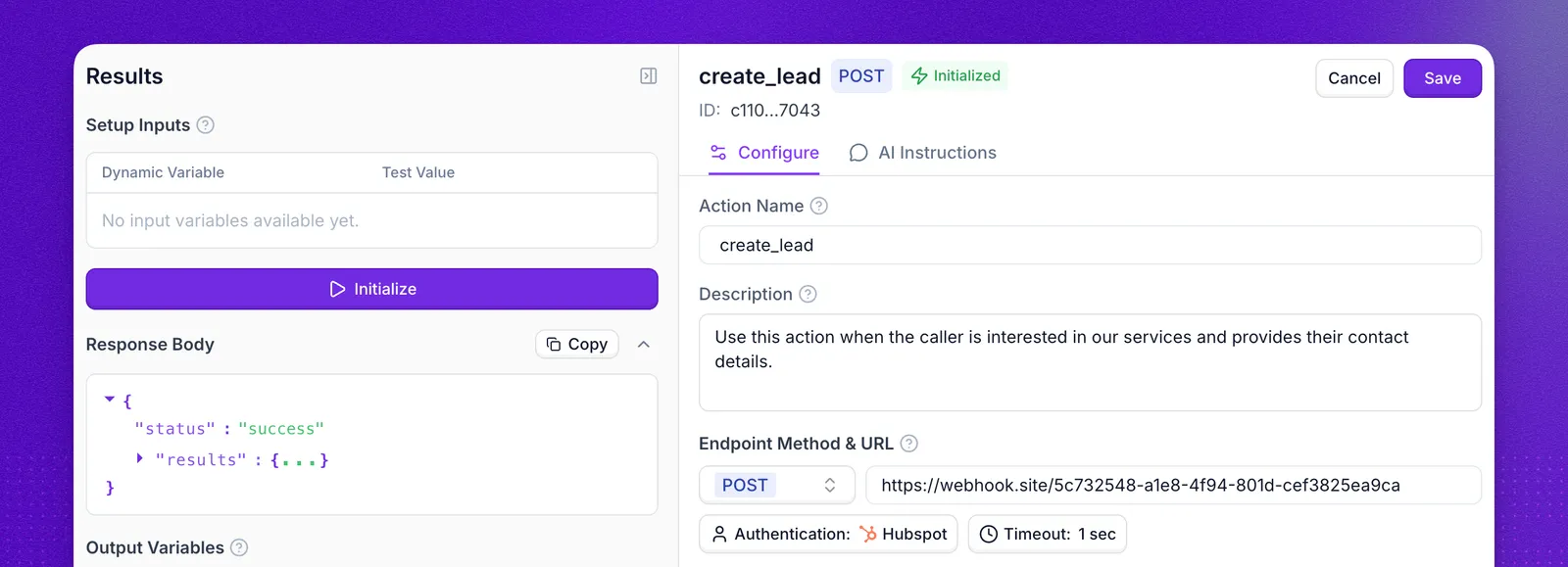
Custom actions are HTTP requests your agent can run before or during a call. Use them when you need live data from an external API or when the agent must trigger a workflow outside Synthflow, such as creating CRM records, checking an order status, or sending structured data to another system.
Create and configure a custom action
Open Actions, create a Custom Action, then configure four parts:
- Request setup: select method, endpoint URL, headers, body, and authentication.
- Variables: define fields the model should extract or inject.
- Action details: set a clear name and description so the model knows when to call it.
- Result handling: write prompt logic that uses returned data in the next turn.
Use the request method that matches the API operation you want to run:
Variables
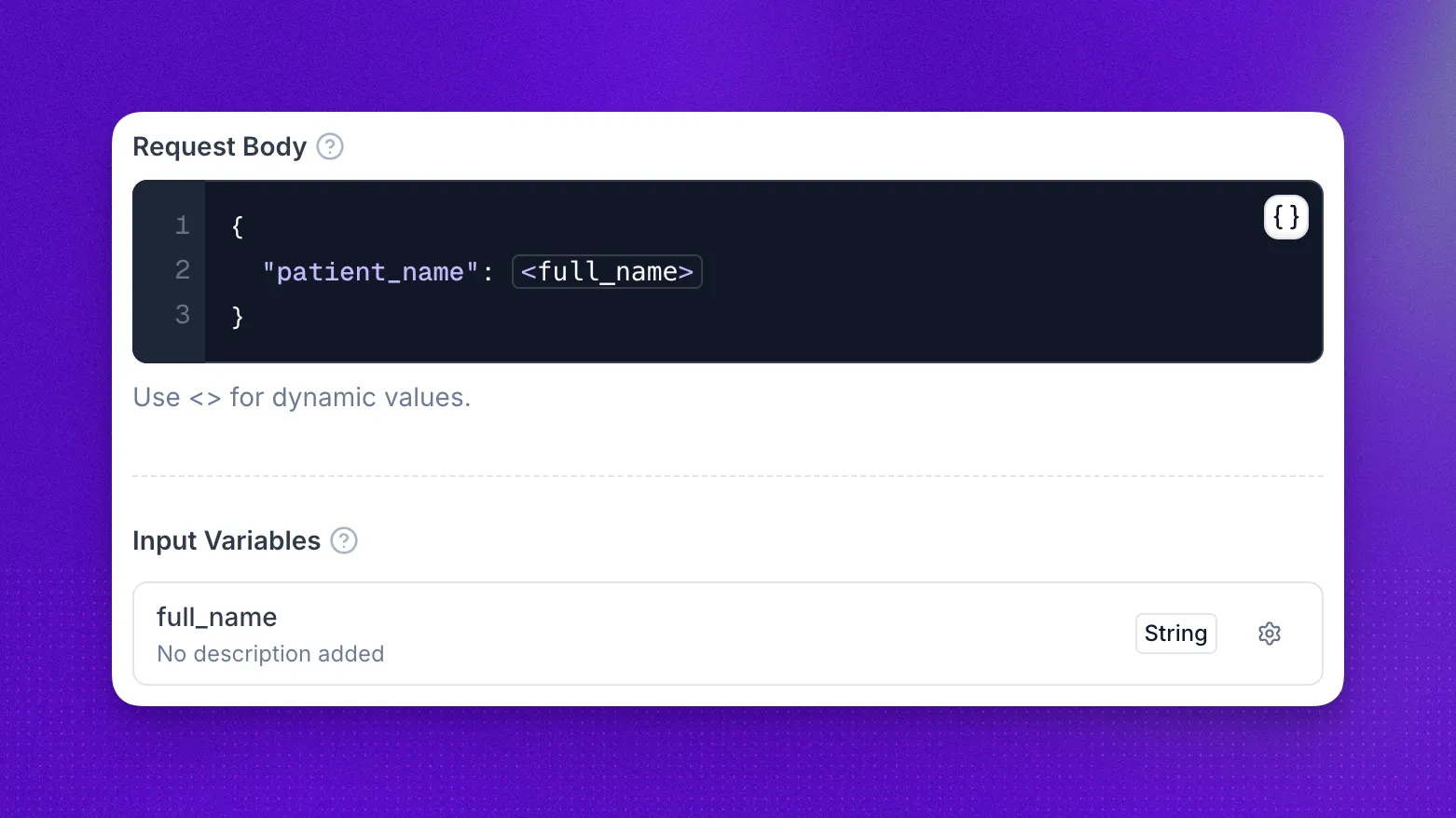
Use variables to map conversation context into requests:
- User-defined variables for values you want extracted during the call, such as
full_nameororder_id. - Default variables for call metadata, such as
call_id,twilio_call_sid,to_phone_number,from_phone_number, anduser_phone_number.
Reference every variable you define
Defining a variable is not enough on its own. A variable becomes an input variable on the action only when you also reference it as <variable_name> in one of these four places:
- The endpoint URL path
- Query parameters
- Headers
- The request body
A variable that is defined but never referenced has no effect. It does not appear under Input Variables in the action editor, and it is not offered for mapping when you attach the action to an agent. If a variable is missing from the dashboard, check that its placeholder appears in one of the four fields above.
Input variables in the API
The dashboard uses the label Input variables on two different screens, and each one corresponds to a different API field.
input_variables in the Get an action response is read only. There is no input_variables parameter on Create an action, because the field reports what the action resolves to rather than what you configure:
input_variables.valueslists the variables the action actually uses. A variable fromvariables_during_the_callappears here only once its placeholder is referenced in the URL path, query parameters, headers, or body, so this stays empty when every variable is unreferenced.input_variables.assistantslists the per-agentinput_variables_mappingcreated through Attach an action, so this stays empty until you attach the action to at least one agent.
variables_before_the_call is a separate field that holds fixed key and value pairs for data you already have before the conversation starts. It does not define input variables.
Authentication
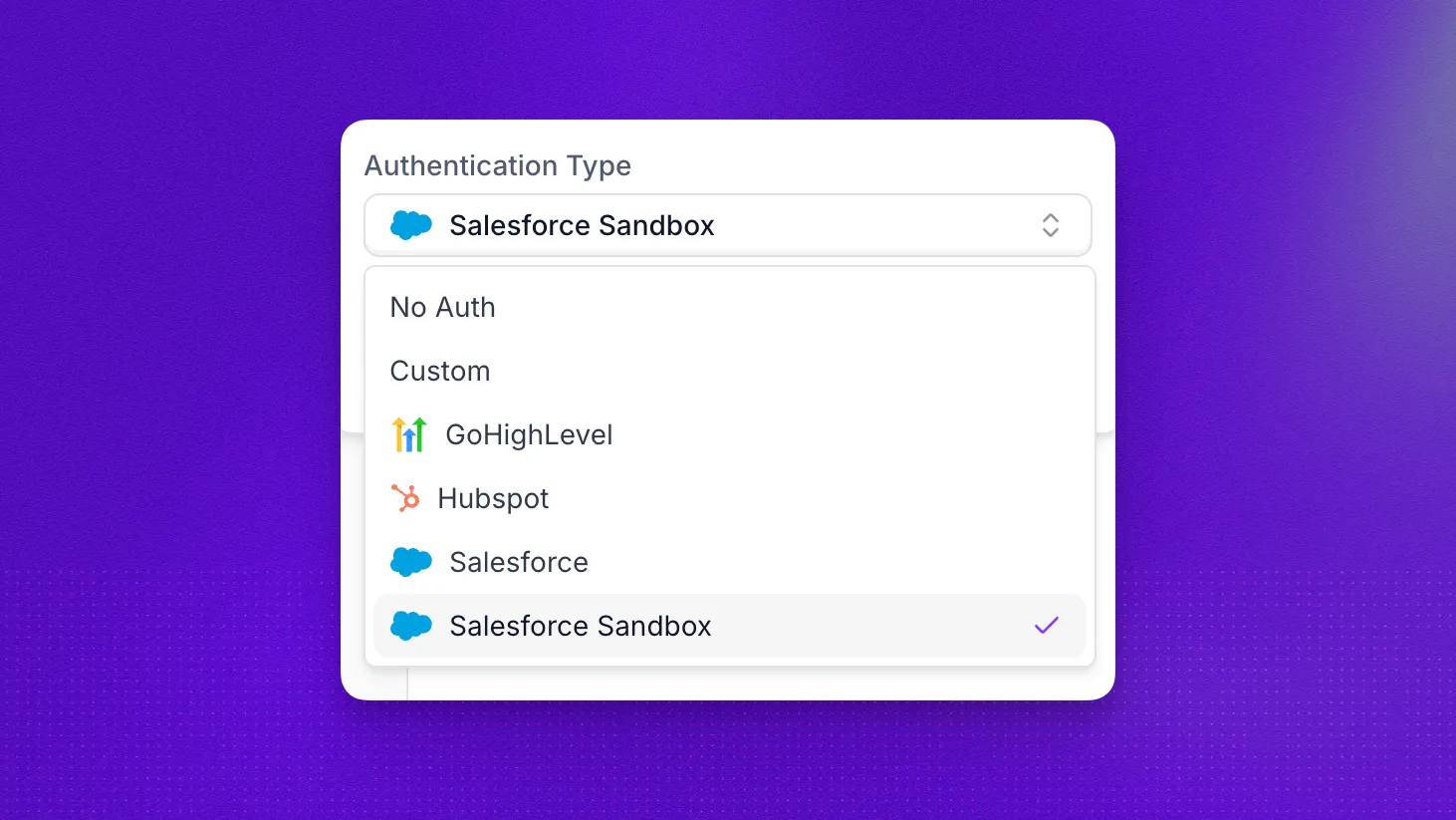
Choose the authentication mode your endpoint expects in the Authentication Type menu. Available built-in connections include:
Match the action configuration to your provider’s required header format and environment.
Instructions
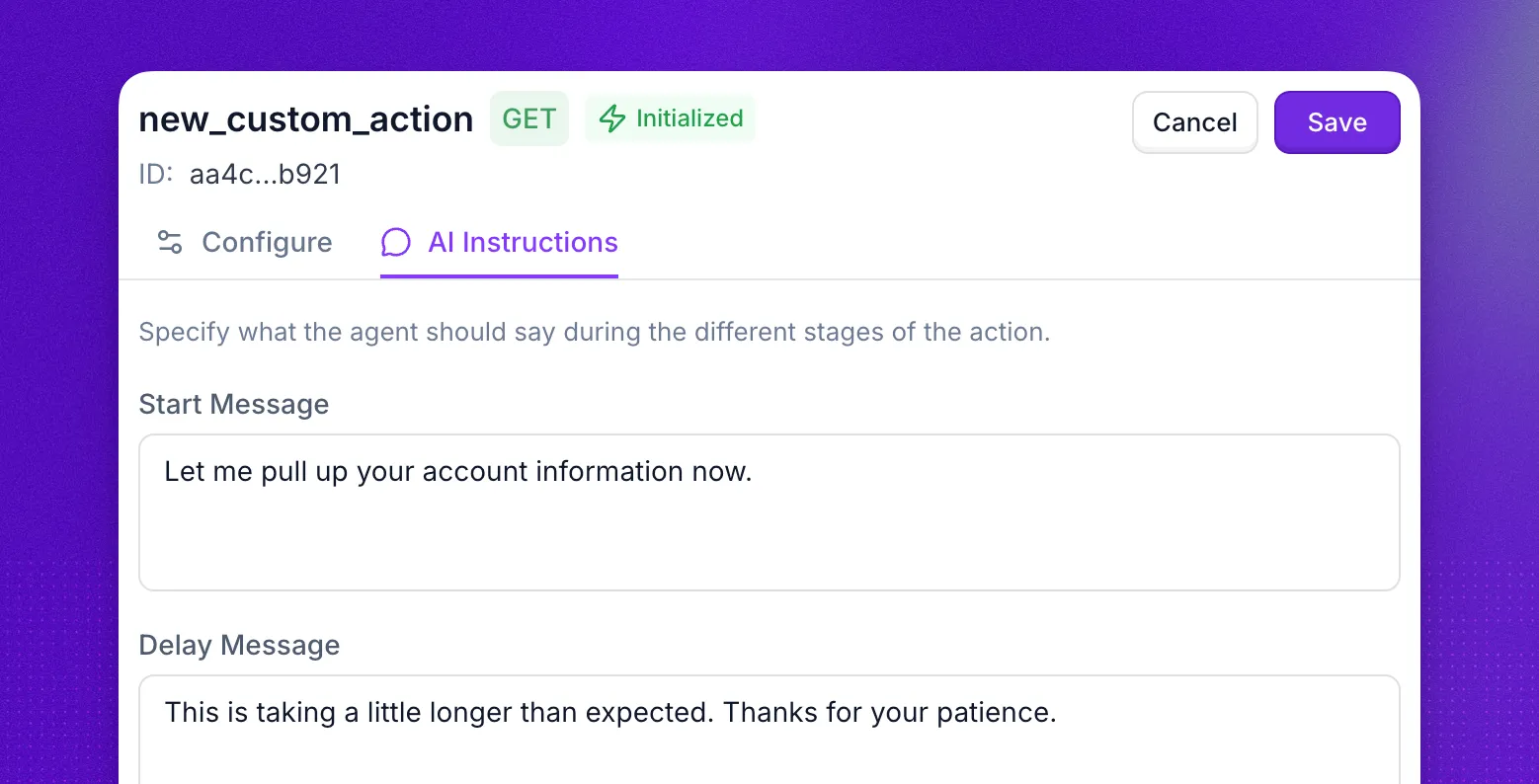
To configure what the agent says while an action runs, open Actions > your custom action > AI Instructions.
You can set:
- Start message
- Delay message
- Failure message
If you disable Let the agent speak naturally, the agent will follow your configured messages more strictly.
Play audio while the action runs
Action audio gives callers feedback while a custom action waits for an external API. During a live voice call, the selected sound starts when the action begins, loops while the request runs, and stops when execution finishes. The agent can speak the configured start and delay messages over the sound.
Dashboard
To configure action audio in the dashboard:
- Open Actions and select your custom action.
- Select the Configure tab and scroll below Input Variables.
- Under Action Audio, choose a sound.
- Click Save.
API
When you create a custom action through the API, you can include the optional action_sound field inside CUSTOM_ACTION. The default is no background audio. Omit action_sound, or set it to null or an empty string, to keep audio disabled. Setting it to "typing" plays the typing sound while the action executes.
Use action audio for requests that can leave a noticeable pause. Keep None for actions that usually finish immediately.
Initialize
After you finish configuration, variables, authentication, and message setup, click Initialize in the action editor before using the action in production flows.
Initialization validates that your endpoint, authentication, and payload are configured correctly. Without this step, your action is not ready for reliable use.
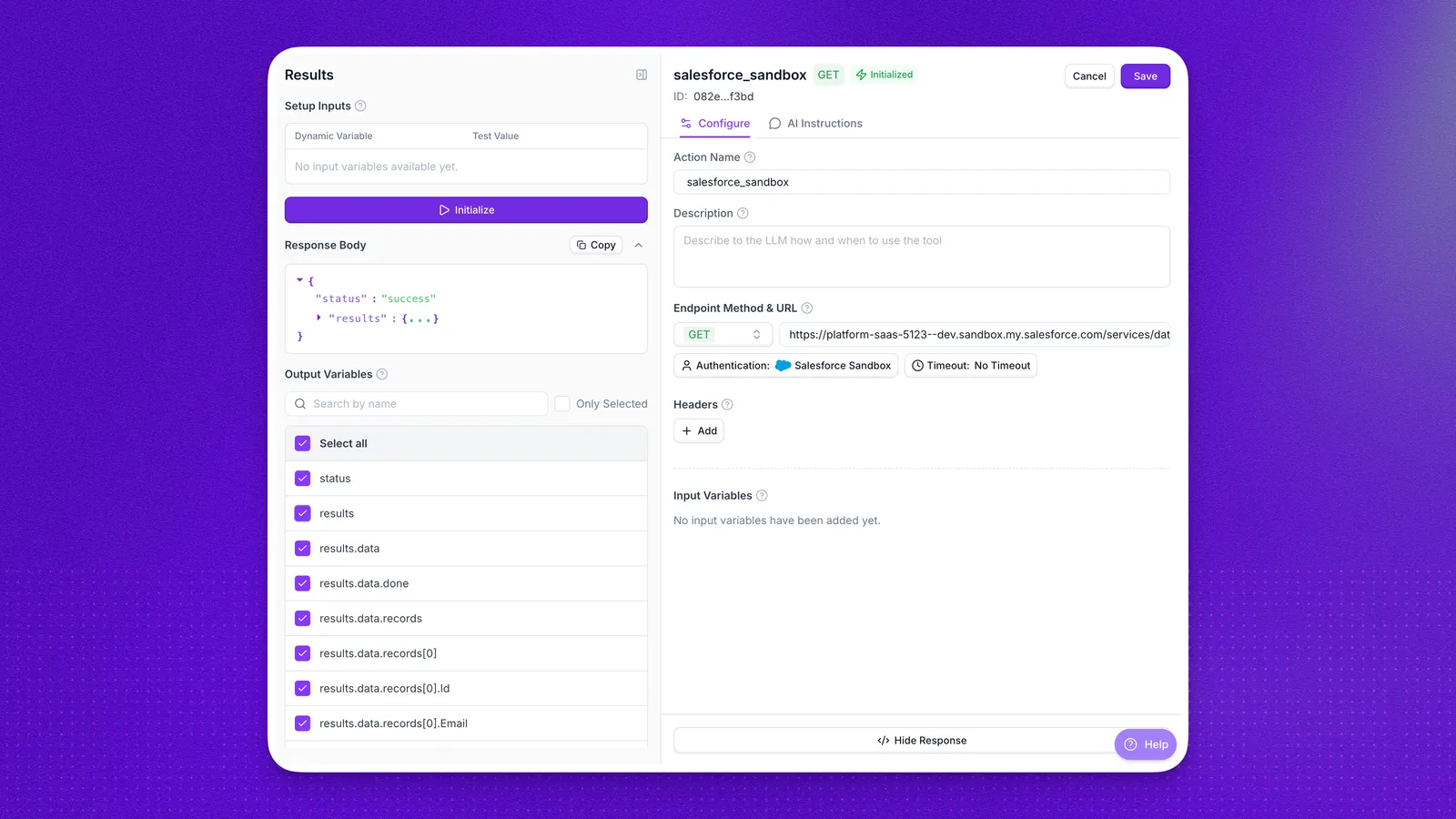
Once initialization succeeds, the returned fields become action result variables that you can reference later in prompts or pass into other actions.
Inspect requests
Every time your custom action runs during a call, the request and response are recorded in API logs. Open the matching entry to inspect the request URL, headers, body, response payload, and timing details for that specific call.
Examples
Retrieve date and time
For the current time in the agent’s own timezone, use the {agent_current_time} system variable rather than an action. Synthflow populates it on every call, so there is nothing to configure, and you can reference it in prompts and in action inputs.
If you need the time in a different timezone, you can create a lightweight GET custom action to fetch it before a call starts, then use that result in prompts. Call https://timeapi.io/api/Time/current/zone?timeZone=America/Chicago and replace the timezone with the one you need. For the full timezone list, call https://timeapi.io/api/TimeZone/AvailableTimeZones.
Send email
Synthflow has no built-in email action, but a custom action can send email through any provider with an HTTP API, such as SendGrid, Mailgun, or your own endpoint.
Create a POST custom action pointed at your provider’s send endpoint, set the authentication header your provider requires, and map conversation variables into the request body:
Attach the action to the During Call stage so the agent can send the email as soon as it has collected the recipient address. Only values available during the call can go into the body, such as collected variables and earlier action results; the transcript and call summary do not exist yet. To send an email that includes the summary or transcript, trigger it from your own system using the post-call webhook instead.
Run several custom actions
You can chain actions so one response feeds the next step.
For example, you can run one action to fetch a customer email from your CRM and a second action to use that email for booking or an update. Attach both actions to the same call flow stage (typically During Call) and describe execution order in your prompt logic so the model runs the first action before passing the returned fields to the second.
FAQ
When should I use a custom action instead of prompt-only logic?
Use a custom action when your agent needs live external data or must trigger a system outside Synthflow. Prompt-only logic is usually enough for static conversational behavior.
I created a variable through the API but it does not show up in the dashboard. Why?
A variable appears only once its <variable_name> placeholder is referenced in the endpoint URL path, query parameters, headers, or request body. Sending it in variables_during_the_call without referencing it anywhere has no effect. See Reference every variable you define.
What is the difference between input_variables and variables_during_the_call?
variables_during_the_call is what you send to define an action’s variables, and it is the field behind Input Variables in the action editor. input_variables is read only in the Get an action response, and it reports the variables the action resolves to along with their per-agent mappings. See Input variables in the API.
Can my agent send an email?
Yes, through your own email provider. Synthflow has no built-in email action, so create a custom action that sends a POST request to your email service’s API and map conversation variables such as the recipient address and message content into the request body. See the send email example for a walkthrough. For emails that should go out after the call ends, trigger them from your own system using the post-call webhook instead.
Can I run multiple custom actions in one call?
Yes. You can chain actions and pass outputs from one action into the next, as long as your prompt logic clearly defines order and mapping.
Can I use both Salesforce Production and Sandbox in one workspace?
Yes. Connect both and select the matching authentication per action.
Do I need different URLs for Salesforce Production and Sandbox?
Yes. Each environment has its own Salesforce domain, so each action should use environment-specific endpoints.
Can custom actions run before the call starts?
Yes. You can configure a custom action to run before the conversation begins when you need context ready in advance, such as account details or time data.
Which variables are available by default in custom actions?
Default variables include call metadata and phone context, such as call_id, twilio_call_sid, to_phone_number, from_phone_number, and user_phone_number.
How should I name custom actions so the model uses them correctly?
Use clear, task-oriented names and descriptions that describe one outcome. Good naming helps the model pick the right action in the right context.
What should I do if a custom action fails during a call?
Set a failure message in the action’s Messages settings, and add prompt guidance for fallback behavior so the agent can continue the conversation gracefully. To diagnose the failure itself, open the call in API logs and inspect the request and response that the action made.
Does action audio replace the start or delay message?
No. Action audio plays in the background while the action runs. The agent can still speak the start and delay messages configured under AI Instructions.
Should I keep one action per workflow or reuse one action for many tasks?
Use one action per business task whenever possible. Smaller, focused actions are easier to test, safer to maintain, and easier for the model to choose.