Skip to navigation

Chat

Deploy a chat agent over the API, a website widget, WhatsApp, or SMS

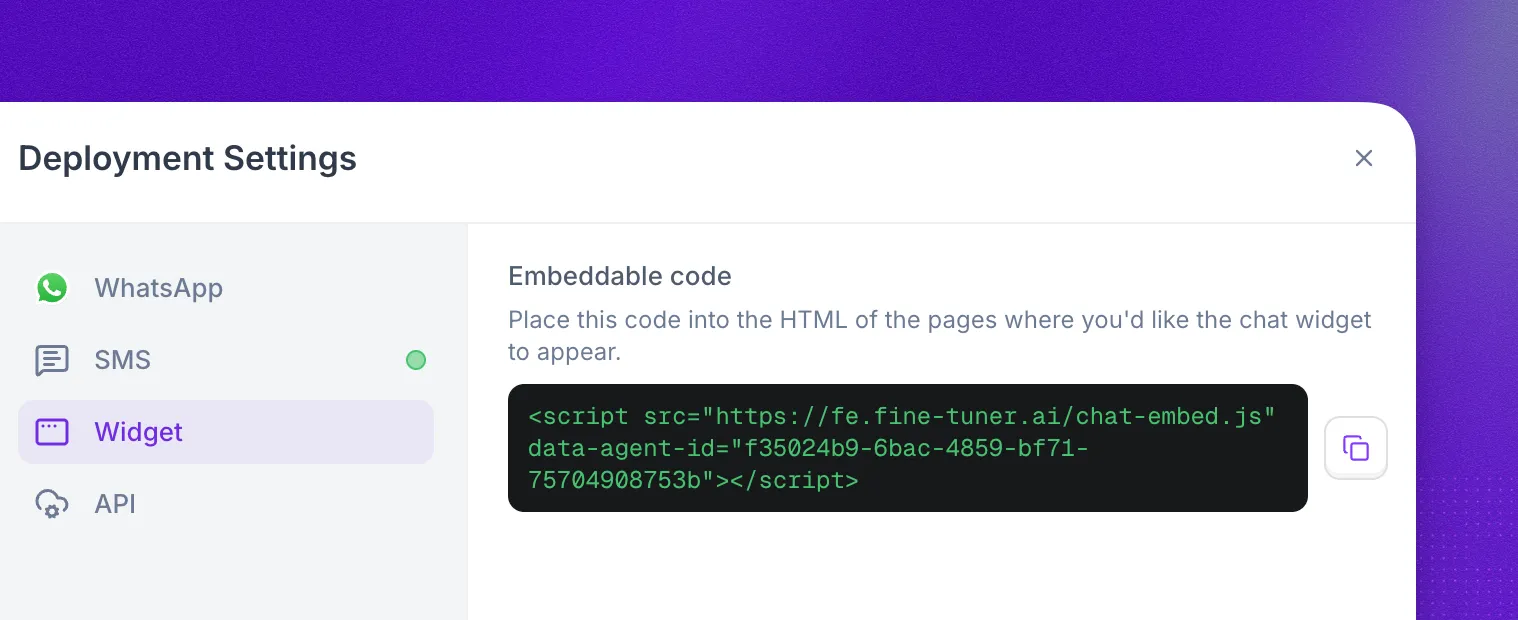
Deployment Settings for a chat agent with WhatsApp, SMS, Widget, and API channels, showing the widget's embeddable code

A chat agent runs the same Prompt Builder or Flow Designer logic as a voice agent, over text. To deploy one, select Deploy in the agent editor header and pick a channel in Deployment Settings:

  • API for custom applications and backend-controlled chat sessions.
  • Widget for a website or app embed managed by Synthflow.
  • WhatsApp and SMS for messaging through your own Twilio account.

API endpoints and Twilio webhook URLs depend on your workspace cluster. Check yours in Admin → Workspace Settings → Preferences → Customer Region, and see Data Region for details.

WhatsApp and SMS are available for US-region workspaces only. Twilio does not yet offer EU data residency for its WhatsApp and SMS Conversations APIs, which GDPR processing and storage requirements depend on. API and widget chat agents are available in all regions.

API

Start a conversation by calling Create a chat with a new UUID as {chat_id} and your chat agent’s ID as model_id. The same API sends and receives messages and manages sessions, so you can build chat into any application.

ClusterEndpoint
Globalhttps://api.synthflow.ai/v2/chat/{chat_id}
UShttps://api.us.synthflow.ai/v2/chat/{chat_id}
EUhttps://api.eu.synthflow.ai/v2/chat/{chat_id}
curl -X POST 'https://api.synthflow.ai/v2/chat/{chat_id}' \
--header 'Content-Type: application/json' \
--data '{
"model_id": "{model_id}",
"metadata": {}
}'

Widget

The chat widget is an embed fully managed by Synthflow, so you can add a chat agent to a website or app with one script tag.

  1. Select Deploy in the agent editor header and choose Widget.
  2. Copy the snippet under Embeddable code.
  3. Paste it into the HTML of every page where the widget should appear.

WhatsApp

Chat agents can send and receive WhatsApp messages through a connected Twilio account with a WhatsApp-enabled sender.

1

Connect your Twilio account

Go to Admin → Workspace Settings → Integrations → Twilio and enter your Twilio SID and Auth credentials. The Twilio integration guide covers the full setup.

2

Enable a WhatsApp sender in Twilio

If your Twilio account has no WhatsApp-enabled sender yet, register one with Twilio’s WhatsApp documentation.

3

Configure the sender webhooks

In the Twilio console, open your WhatsApp sender and set the webhook URLs for your cluster:

ClusterInbound webhookStatus callback
Globalhttps://chat.synthflow.ai/webhooks/twilio/inboundhttps://chat.synthflow.ai/webhooks/twilio/status
UShttps://chat.us.synthflow.ai/webhooks/twilio/inboundhttps://chat.us.synthflow.ai/webhooks/twilio/status
EUNot availableNot available
Twilio fieldURL
Callback URL (inbound messages)Inbound webhook for your cluster
Status Callback URL (delivery status)Status callback for your cluster

If the sender belongs to a Twilio Messaging Service, the Messaging Service webhook URLs override the sender-level URLs. Remove the sender from the Messaging Service, or set the same URLs on the Messaging Service.

4

Deploy your chat agent

Select Deploy in the agent editor header, choose WhatsApp, and assign the WhatsApp-enabled number. Incoming messages route to the agent, and replies go back over WhatsApp.

SMS

Chat agents can also hold text conversations over SMS through your own Twilio account.

1

Connect your Twilio account

If you haven’t already, connect Twilio in Admin → Workspace Settings → Integrations → Twilio, following the Twilio integration guide.

2

Get an SMS-capable number

Use a Twilio number that supports SMS. You can buy a number through Synthflow or import your own.

3

Configure the phone number webhooks

In the Twilio console, open the phone number’s configuration and set the webhook URLs for your cluster:

ClusterInbound webhookStatus callback
Globalhttps://chat.synthflow.ai/webhooks/twilio/inboundhttps://chat.synthflow.ai/webhooks/twilio/status
UShttps://chat.us.synthflow.ai/webhooks/twilio/inboundhttps://chat.us.synthflow.ai/webhooks/twilio/status
EUNot availableNot available
Twilio fieldURL
A message comes in (webhook URL)Inbound webhook for your cluster
Status callback URLStatus callback for your cluster

If the number belongs to a Twilio Messaging Service, the Messaging Service webhook URLs override the number’s own URLs. Remove the number from the Messaging Service, or set the same URLs on the Messaging Service.

4

Deploy your chat agent

Select Deploy in the agent editor header, choose SMS, and assign the number. The agent answers inbound texts and replies over SMS.

Twilio bills WhatsApp and SMS usage directly at its own rates, on top of Synthflow’s platform fee. If the agent uses a Memory Group, it shares context across SMS, WhatsApp, and voice conversations with the same phone number.

Idle reminders and timeouts

WhatsApp and SMS replies often arrive hours apart, so these conversations can send a reminder when the user goes quiet and end automatically after a timeout. Configure them on the agent; they apply to each conversation.

SettingDescription
Enable reminders (send_user_idle_reminder)Set to true to send idle reminders.
Reminder delay (reminder_after_idle_seconds)Seconds of user inactivity before the reminder is sent. Must be less than the idle timeout.
Reminder message (reminder_message)The text sent when the reminder fires.
Idle timeout (allowed_idle_time_seconds)Seconds of user inactivity before the conversation ends.

When a user stops responding:

  1. After reminder_after_idle_seconds, the agent sends reminder_message over the same channel.
  2. If the user still hasn’t replied allowed_idle_time_seconds after their last message, the conversation ends with end_reason set to inactivity_timeout.
  3. A reply at any point resets the timer.

Both values have a 60-second minimum. Lower values fall back to the defaults: 1 hour for the reminder and 24 hours for the timeout.

Start an outbound conversation

Send the first message of a WhatsApp or SMS conversation through the API. The endpoint creates the conversation and delivers the opening message to the recipient.

ClusterEndpoint
Globalhttps://api.synthflow.ai/v2/chat/outbound
UShttps://api.us.synthflow.ai/v2/chat/outbound
EUhttps://api.eu.synthflow.ai/v2/chat/outbound
curl -X POST https://api.synthflow.ai/v2/chat/outbound \
-H "Content-Type: application/json" \
-H "Authorization: Bearer YOUR_API_KEY" \
-d '{
"agent_id": "your-agent-id",
"channel": "whatsapp",
"to_number": "+15559876543",
"from_number": "+15551234567",
"initial_message": "Hi! How can I help you today?"
}'

Request fields

FieldTypeRequiredDescription
agent_idstringYesThe ID of your chat agent.
channelstringYessms or whatsapp.
to_numberstringYesRecipient phone number in E.164 format (for example +15559876543).
from_numberstringYesYour Twilio sender number in E.164 format.
initial_messagestringNoA freeform text message to send as the opening message.
templateobjectNoA Twilio Content Template to use as the opening message (see below).
custom_variablesobjectNoKey-value pairs for prompt variable substitution in the agent configuration.

Response

{
"status": "ok",
"response": {
"conversation_id": "a1b2c3d4-e5f6-7890-abcd-ef1234567890"
}
}

WhatsApp 24-hour session window

WhatsApp only accepts a freeform initial_message if the recipient messaged your sender in the last 24 hours. Outside that window, WhatsApp rejects freeform messages and you must send an approved Twilio Content Template instead. SMS has no session window, so initial_message always works for SMS.

Use initial_message inside the window:

{
"agent_id": "your-agent-id",
"channel": "whatsapp",
"to_number": "+15559876543",
"from_number": "+15551234567",
"initial_message": "Hi! Following up on your earlier question."
}

Use template outside the window (it also works inside it):

{
"agent_id": "your-agent-id",
"channel": "whatsapp",
"to_number": "+15559876543",
"from_number": "+15551234567",
"template": {
"content_sid": "HXxxxxxxxxxxxxxxxxxxxxxxxxxxxxxxxxxx",
"variables": {
"1": "Thursday at 9am"
}
}
}

Template object

FieldTypeRequiredDescription
content_sidstringYesThe SID of an approved Twilio Content Template. Starts with HX.
variablesobjectNoKey-value pairs for template parameter substitution (for example {"1": "value"}).

Twilio Content Templates need approval before use. A template in pending or rejected status makes the outbound message fail. Manage templates in the Twilio Content Editor.

Post-conversation webhook

When a chat conversation ends, Synthflow can send a webhook to a URL you configure on your agent. The payload includes the full transcript, individual turns, and routing metadata.

Payload fields

FieldTypeDescription
event_typestringThe event that triggered the webhook (for example conversation_completed).
chat_idstringUnique identifier for the conversation.
agent_idstringThe ID of the chat agent that handled the conversation.
workspace_idstringYour Synthflow workspace ID.
entry_modestringHow the conversation was initiated: omnichannel for WhatsApp/SMS, api for API or widget chats.
channelstringThe messaging channel used (sms, whatsapp, or api).
chat_statusstringFinal status of the conversation (for example ended).
end_reasonstringWhy the conversation ended (for example completed, inactivity_timeout).
started_atstringISO 8601 timestamp when the conversation started.
ended_atstringISO 8601 timestamp when the conversation ended.
transcriptstringPlain-text transcript. Each line is prefixed with User: for user messages or the agent ID for agent messages.
turnsarrayOrdered list of individual message turns (see below).
metadataobjectCustom metadata attached to the conversation, if any.
routeobjectRouting metadata for omnichannel conversations (see below).

Turn object

Each entry in the turns array represents a single message:

FieldTypeDescription
message_idstringUnique identifier for the message.
turn_numberintegerPosition in the conversation (1-indexed).
agent_idstringThe agent ID for agent messages, or "user" for user messages.
messagestringThe message content.
directionstringinbound (user → agent) or outbound (agent → user).
current_statestringThe Flow Designer state active when this message was sent. Present on all turns except the first inbound message.
provider_message_sidstringTwilio message SID. Present on outbound omnichannel turns only.
timestampstringISO 8601 timestamp.

Route object

Present on WhatsApp and SMS conversations. Contains the provider and addressing details:

FieldTypeDescription
providerstringThe messaging provider (for example twilio).
channelstringsms or whatsapp.
provider_account_sidstringYour Twilio Account SID.
agent_addressstringThe phone number used by the agent (for example +15551234567).
user_addressstringThe end-user’s phone number.

Example payload

{
"event_type": "conversation_completed",
"chat_id": "a1b2c3d4-e5f6-7890-abcd-ef1234567890",
"agent_id": "f0e1d2c3-b4a5-6789-0abc-def123456789",
"workspace_id": "your-workspace-id",
"entry_mode": "omnichannel",
"channel": "sms",
"chat_status": "ended",
"end_reason": "completed",
"started_at": "2026-01-15T10:30:00.000000Z",
"ended_at": "2026-01-15T10:32:45.000000Z",
"transcript": "User: Hi, I'd like to book an appointment\nf0e1d2c3-b4a5-6789-0abc-def123456789: Sure! I can help with that. What day works best for you?\nUser: Thursday morning\nf0e1d2c3-b4a5-6789-0abc-def123456789: Great, I have 9am or 11am available on Thursday. Which do you prefer?\nUser: 9am please\nf0e1d2c3-b4a5-6789-0abc-def123456789: Done! You're booked for Thursday at 9am. See you then!",
"turns": [
{
"message_id": "11111111-1111-1111-1111-111111111111",
"turn_number": 1,
"agent_id": "user",
"message": "Hi, I'd like to book an appointment",
"direction": "inbound",
"timestamp": "2026-01-15T10:30:02.000000Z"
},
{
"message_id": "22222222-2222-2222-2222-222222222222",
"turn_number": 2,
"agent_id": "f0e1d2c3-b4a5-6789-0abc-def123456789",
"message": "Sure! I can help with that. What day works best for you?",
"direction": "outbound",
"current_state": "main_state",
"provider_message_sid": "SMxxxxxxxxxxxxxxxxxxxxxxxxxxxxxxxx",
"timestamp": "2026-01-15T10:30:03.000000Z"
},
{
"message_id": "33333333-3333-3333-3333-333333333333",
"turn_number": 3,
"agent_id": "user",
"message": "Thursday morning",
"direction": "inbound",
"current_state": "main_state",
"timestamp": "2026-01-15T10:31:15.000000Z"
},
{
"message_id": "44444444-4444-4444-4444-444444444444",
"turn_number": 4,
"agent_id": "f0e1d2c3-b4a5-6789-0abc-def123456789",
"message": "Great, I have 9am or 11am available on Thursday. Which do you prefer?",
"direction": "outbound",
"current_state": "main_state",
"provider_message_sid": "SMyyyyyyyyyyyyyyyyyyyyyyyyyyyyyyyy",
"timestamp": "2026-01-15T10:31:16.000000Z"
},
{
"message_id": "55555555-5555-5555-5555-555555555555",
"turn_number": 5,
"agent_id": "user",
"message": "9am please",
"direction": "inbound",
"current_state": "main_state",
"timestamp": "2026-01-15T10:32:30.000000Z"
},
{
"message_id": "66666666-6666-6666-6666-666666666666",
"turn_number": 6,
"agent_id": "f0e1d2c3-b4a5-6789-0abc-def123456789",
"message": "Done! You're booked for Thursday at 9am. See you then!",
"direction": "outbound",
"current_state": "booking_state",
"provider_message_sid": "SMzzzzzzzzzzzzzzzzzzzzzzzzzzzzzzzz",
"timestamp": "2026-01-15T10:32:45.000000Z"
}
],
"route": {
"provider": "twilio",
"channel": "sms",
"provider_account_sid": "ACxxxxxxxxxxxxxxxxxxxxxxxxxxxxxxxx",
"agent_address": "+15551234567",
"user_address": "+15559876543"
}
}

FAQ

What is pricing for chat?

Synthflow measures chat at 5 AI-generated messages per usage minute. The rate applied to your account comes from your agreement or account setup. WhatsApp and SMS through Twilio add standard Twilio messaging fees on top.

Yes. A chat agent can use either a single prompt or a Flow Designer configuration.

Every conversation appears in Chat logs, and the post-conversation webhook sends the same data to your own systems.

Twilio does not yet offer EU data residency for its WhatsApp and SMS Conversations APIs. Until a compliant option exists, EU workspaces can deploy chat agents over the API and the widget.