

General Configuration
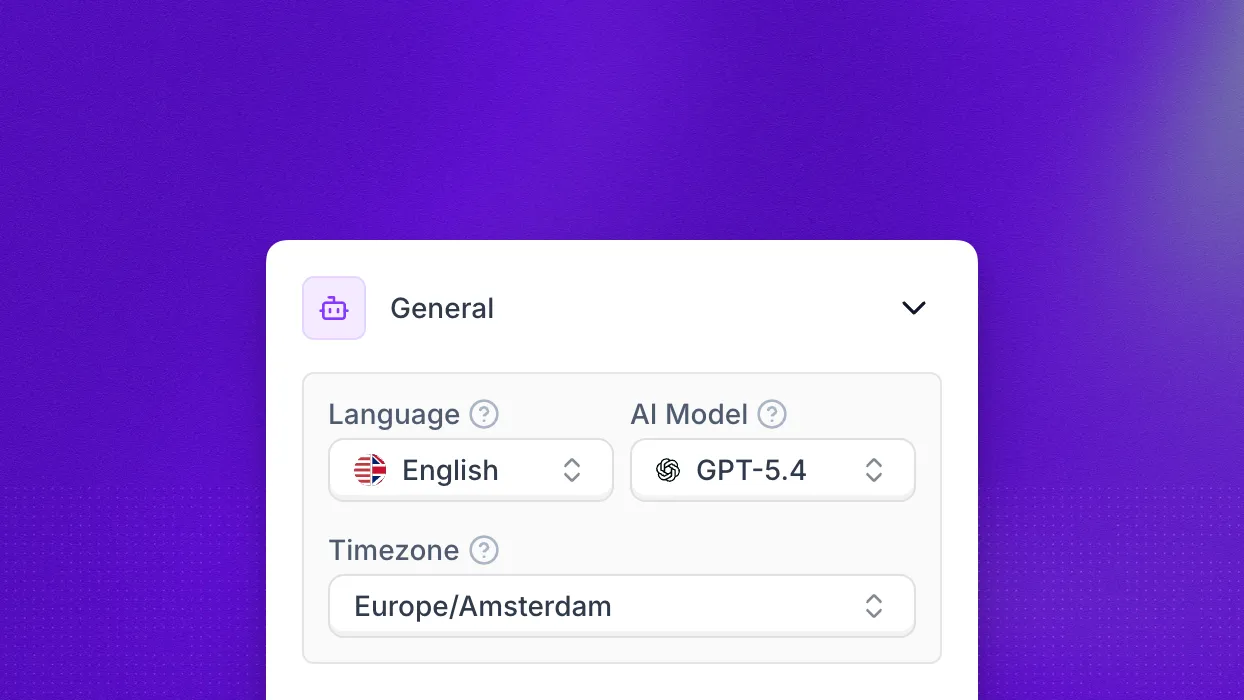
The General section of the agent editor contains the foundational settings that apply to every conversation your agent handles. This is where you choose the language your agent speaks, the AI model powering its responses, and the timezone it uses for date and time references.
Language
The Language dropdown determines which language your agent uses for both speech recognition and voice synthesis. Changing the language automatically adjusts the underlying transcription engine and voice options to match.
AI Model
GPT and other third-party models are only available on Enterprise plans. Synthflow LLM is the only model available to non-enterprise customers. Existing agents were migrated automatically on August 25, 2026. To access GPT models, upgrade to an Enterprise plan.
The AI Model selector controls which large language model powers your agent’s responses. Available options include:
- GPT-4o — fast, versatile model balancing quality and speed.
- GPT-4.1 — well-suited for complex tasks where latency is less critical.
- GPT-4.1 Nano — lightweight variant of GPT-4.1 optimized for speed and cost.
- GPT-4.1 Mini — similar reasoning power with lower cost.
- GPT-5 Chat — advanced model for cutting-edge conversational quality.
- GPT-5 Mini — compact GPT-5 variant balancing performance and cost.
- GPT-5 Nano — lightweight GPT-5 variant optimized for speed and cost.
- GPT-5.1 — advanced model with low latency. See the GPT-5.1 prompting notes for best results.
- GPT-5.2 — OpenAI’s most advanced model. See the GPT-5.2 prompting notes for best results.
- GPT-5.4 — OpenAI’s latest flagship model. See the GPT-5.4 prompting notes for best results.
- GPT-5.4 Mini — compact variant balancing performance and cost.
- GPT-5.4 Nano — lightweight variant optimized for speed and cost.
- Synthflow LLM — optimized for real-time, natural phone conversations.
- Advanced Synthflow LLM — strongest reasoning in the Synthflow family, for complex logic and long prompts.
The selector shows only the models available on your current plan. If you see only Synthflow LLM, that is expected on non-enterprise plans. Pick the model that matches your latency, cost, and quality requirements.
Timezone
The Timezone dropdown sets the local time context your agent operates in. New agents inherit the default from Admin → Workspace Settings → Preferences, but you can override it here. Keeping this accurate is critical for call openings, follow-up promises, and calendar booking contexts. The full list of supported values is available on the Timezones reference page.
For lower-level controls over transcription, latency, interruptions, and vocabulary, see Additional settings.
FAQ
Why can I no longer select GPT or other AI models?
Since August 25, 2026, non-enterprise plans run exclusively on Synthflow LLM, and existing agents were migrated automatically. GPT and other third-party models require an Enterprise plan. API requests that set llm to a GPT value are accepted, but the agent stays on Synthflow LLM.
Can I connect my own Claude or custom LLM endpoint?
No. The AI Model selector does not support Claude or custom LLM endpoints. The only bring-your-own option is an OpenAI API key through BYOK, which runs GPT models and so applies to Enterprise plans. For other providers, contact sales.
Which model should I choose?
On non-enterprise plans, every agent runs on Synthflow LLM, which is built for low-latency phone calls. On Enterprise plans, choose Advanced Synthflow LLM for complex logic, deep branching, or long instructions, or a GPT model when you need maximum reasoning quality.