

Synthflow for 8x8
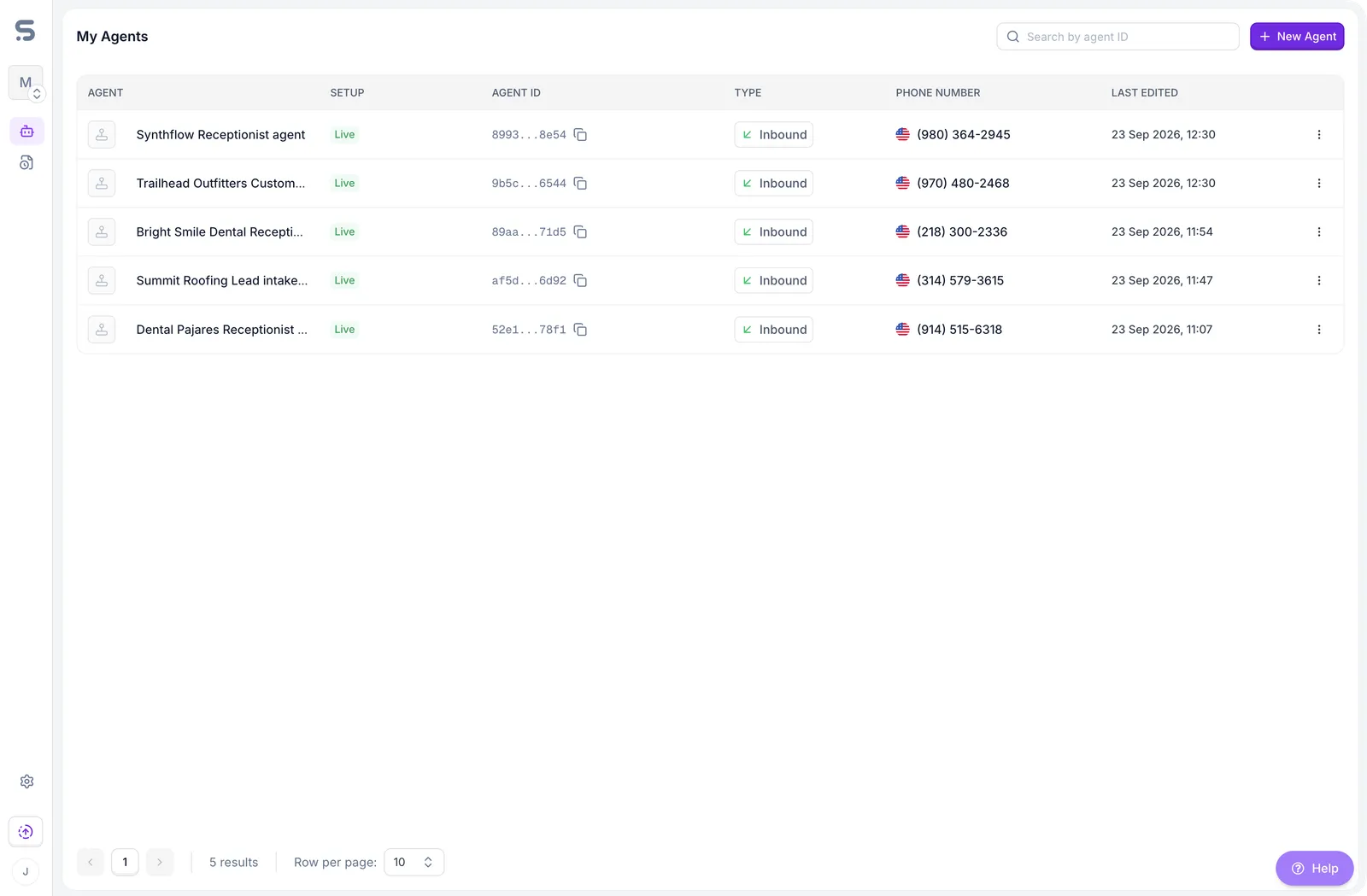
This guide helps you put an AI agent to work on your 8x8 phone lines. You describe what the agent should do in everyday language, and Synthflow takes care of the rest.
By the end of this guide, you’ll understand what an AI agent can do for your business, and you’ll have your first agent built in Synthflow and answering calls.
What is an AI agent?
An AI agent is a virtual team member that talks to your callers over the phone. It listens to what people say, understands what they need, and replies with a natural-sounding voice.
Unlike a traditional phone menu (“press 1 for sales, press 2 for support”), callers don’t have to navigate options. They simply say what they need, in their own words, and the agent responds like a person would.
How it helps your business
Your agent works alongside your existing 8x8 phone system. It answers on your 8x8 numbers, and when a caller needs a person, it hands the call over to your team.
How the agent holds a conversation
Throughout every call, the agent repeats the same simple cycle:
- It listens to what the caller says.
- It thinks about what the caller means and what to say next.
- It speaks its reply out loud.
Because this cycle runs continuously, the conversation feels natural. The agent isn’t reading from a rigid script, so it can handle questions in any order and follow the caller’s lead.
Curious about the technology behind it?
Each part of the cycle is handled by a different piece of technology:
- Speech-to-text turns the caller’s voice into written words. Think of it as the agent’s ears.
- A large language model (the same kind of AI behind tools like ChatGPT) reads those words, works out what the caller wants, and decides how to respond. This is the agent’s brain.
- Text-to-speech turns the reply back into a natural-sounding voice. This is the agent’s mouth.
You don’t need to set up or manage any of this. Synthflow connects all three for you.
What happens during a call
Every call follows the same journey, from the first ring to a result you can see.
The call starts
A customer calls one of your 8x8 numbers, or the agent calls a customer, for example to confirm an appointment.
The agent has a conversation
The agent greets the caller, asks questions, and gathers the information it needs, guided by the instructions you give it.
The agent takes action
Based on what the caller needs, the agent takes the next step: it answers the question, books an appointment, or transfers the call to someone on your team.
You’re in control at every stage. You decide what the agent says, what it can do, and when it should hand the call to a person.
Set up your Synthflow AI agent
Setting up an agent takes about two minutes. You pick a template, tell Synthflow about your business, choose a voice, and test your agent before sending calls to it from 8x8. Nothing is final. You can change every detail later, and changes apply from the next call.
How Synthflow and 8x8 connect
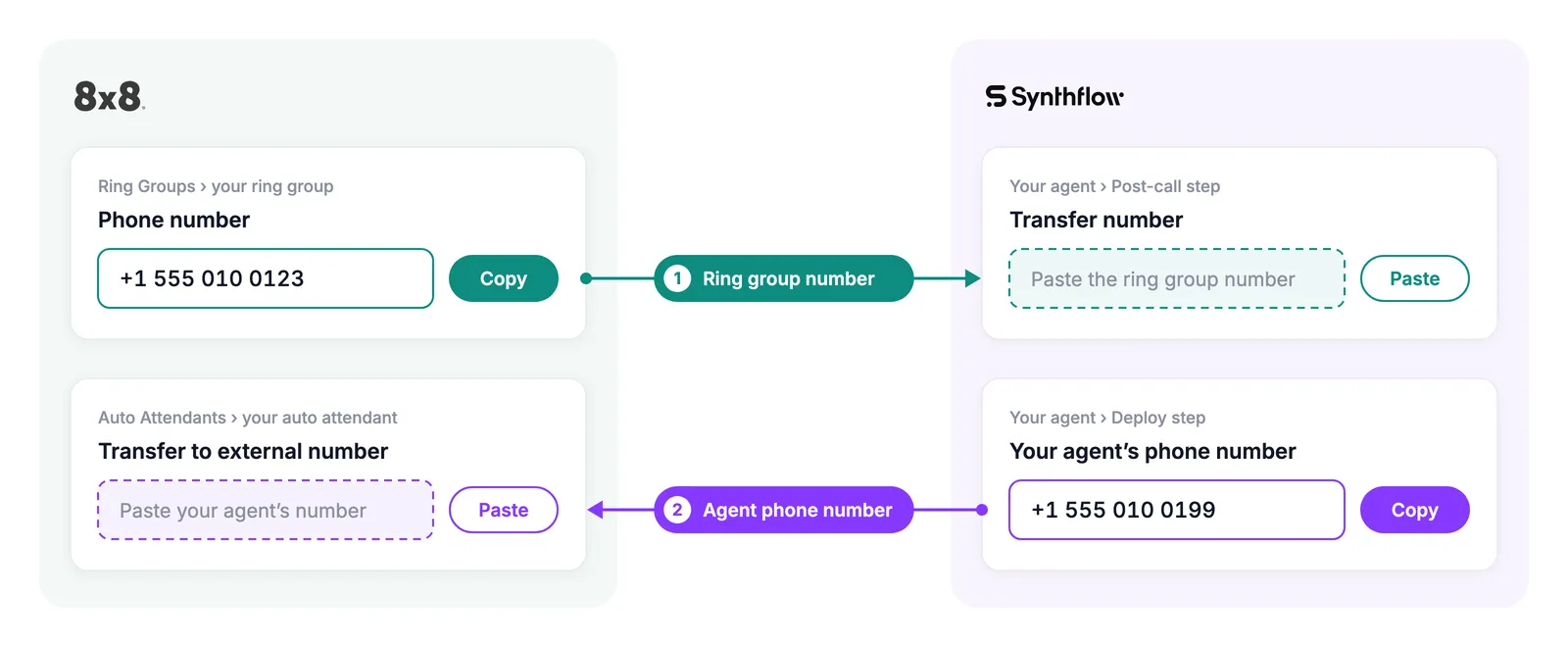
Connecting your agent to 8x8 comes down to copying two phone numbers. Your ring group number goes into Synthflow, so the agent can pass callers to your team. Your agent’s phone number goes into 8x8, so your phone menu can send callers to the agent. The after-hours receptionist only needs the second one, because it takes messages instead of passing calls to your team.
Before you start
If you’re setting up a lead intake or a customer support AI agent, we recommend getting the following ready first. You’ll use them while you set up your agent and when you connect it to your 8x8 phone line.
- Access to your 8x8 Admin Console: you’ll need it to create a ring group. If someone else looks after your phones, ask them to help you with this part.
- A spare 8x8 phone number: when a caller wants to speak to a person, your agent passes the call to this number.
The after-hours receptionist takes a message instead of passing calls to your team, so you don’t need a spare number for it. Instead, it emails you a summary of each call, so you know who to call back.
Choose a template
The first time you open Synthflow, it sets up your workspace and takes you straight to What should this agent do? Pick the template that matches the job you want the agent to handle. Each template has a guided tutorial that walks you through its setup.
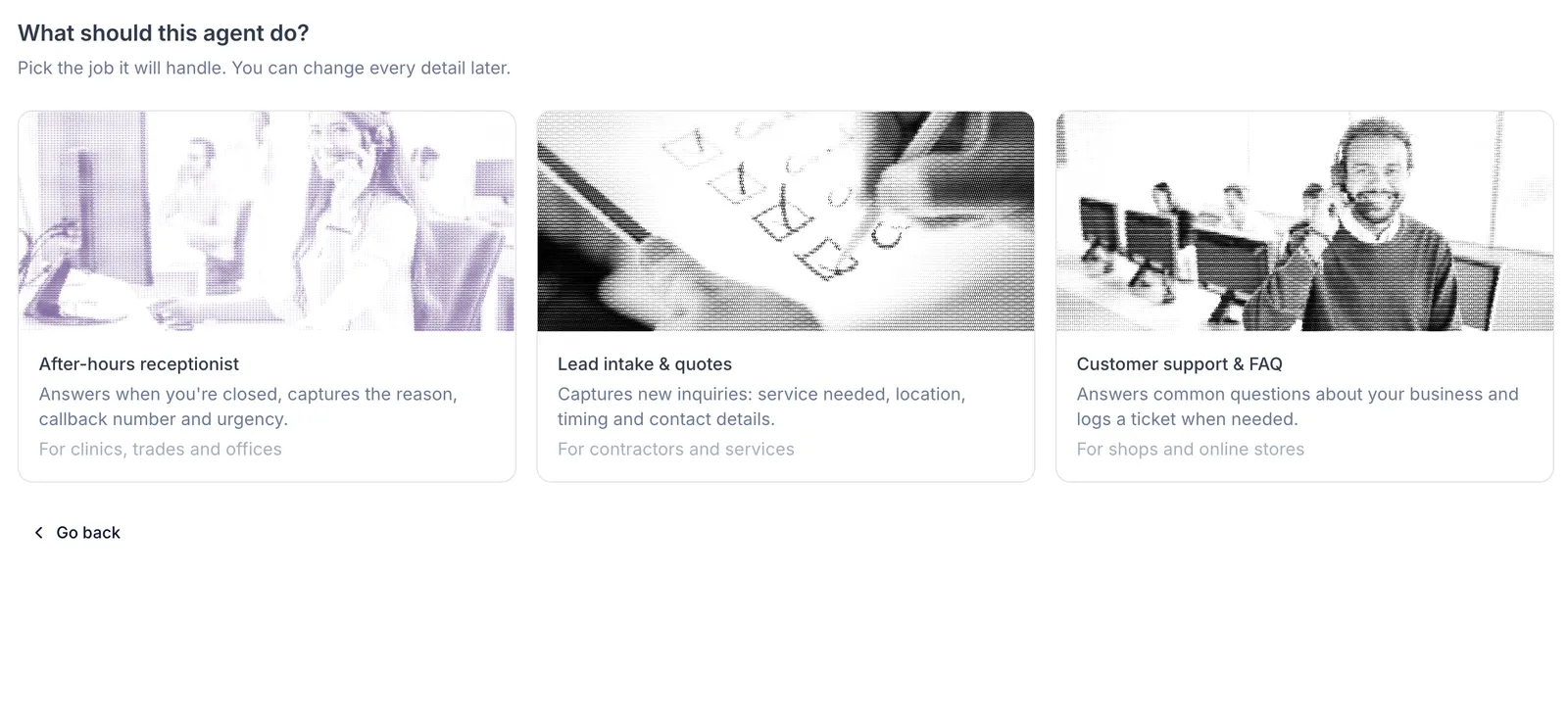
After-hours receptionist
Answers when you’re closed and takes a message with the reason for the call, a callback number, and how urgent it is. Daytime callers keep reaching your team exactly as they do today. A good fit for clinics, trades, and offices.
Lead intake and quotes
Captures new enquiries: the service needed, location, timing, and contact details. Callers choose “press 2 for a quote” in your phone menu to reach the agent. A good fit for contractors and service businesses.
Customer support and FAQ
Answers common questions about your business and logs a ticket when needed. Callers choose “press 1 for help” in your phone menu to reach the agent. A good fit for shops and online stores.
Test and go live
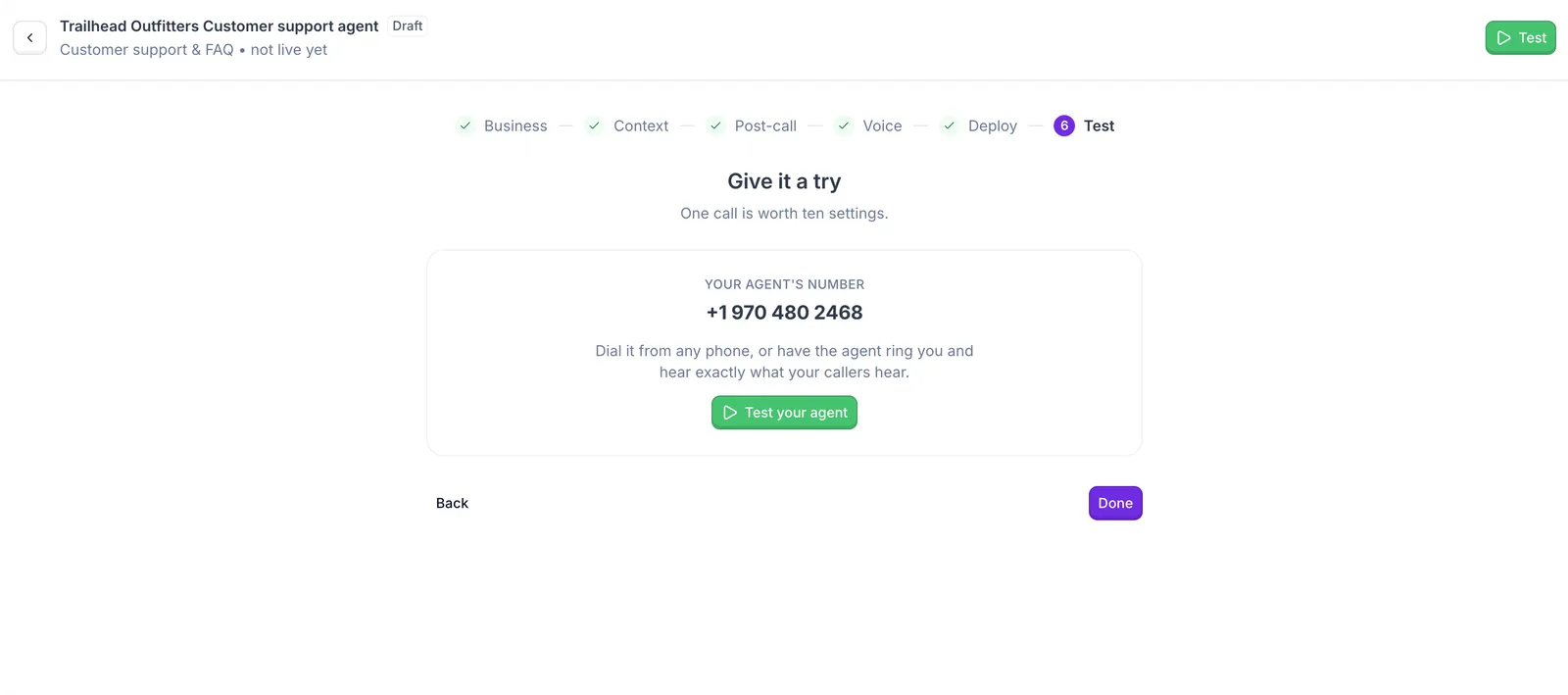
Your agent is ready for testing. This section is for trying it out and then connecting it to your 8x8 phone system, so your callers can reach it.
Test your agent
Call your agent yourself or receive a call from it to make sure it sounds right. Select Test your agent to have the agent ring your phone, or dial its number from any phone. You hear exactly what your callers will hear, and you can check that the agent transfers calls to your team.
This test calls your agent’s number directly, so it skips your 8x8 phone system. Your callers only reach the agent once you forward calls from 8x8 by pasting its number into your 8x8 Admin Console, for example on key 1 of your Auto Attendant.
If something isn’t right, go back and adjust the greeting, the business information, or the voice, then test again.
Test calls use minutes from your balance like any other call. Your account comes with 15,000 free minutes for your first 3 months, so you can test right away without paying. If a test call shows Insufficient minutes remaining, your balance is empty, and buying minutes in Billing tops it up again. We recommend turning on auto reload in Billing, so your balance tops up automatically and your agents keep answering calls.
Forward calls from 8x8
Your callers keep dialing your usual number, and your 8x8 phone system sends their calls to your agent. The last step happens in your 8x8 Admin Console: you paste your agent’s number into the Auto Attendant that answers your main number, as an external number. Where you paste it depends on your template:
- After-hours receptionist: as the destination of the closed-hours menus, so every call outside your business hours goes straight to the agent, without pressing a key.
- Lead intake and customer support: on a new menu key, for example “press 1”, so only callers who choose it reach the agent.
8x8’s Auto Attendant guide walks you through editing your Auto Attendant, step by step.
Check that it’s live
Call your main number the way a customer would. For the after-hours receptionist, call outside your business hours. For the other templates, choose the menu option you added. Your agent should answer with the greeting you set, and every other call keeps reaching your team as usual.
Call history
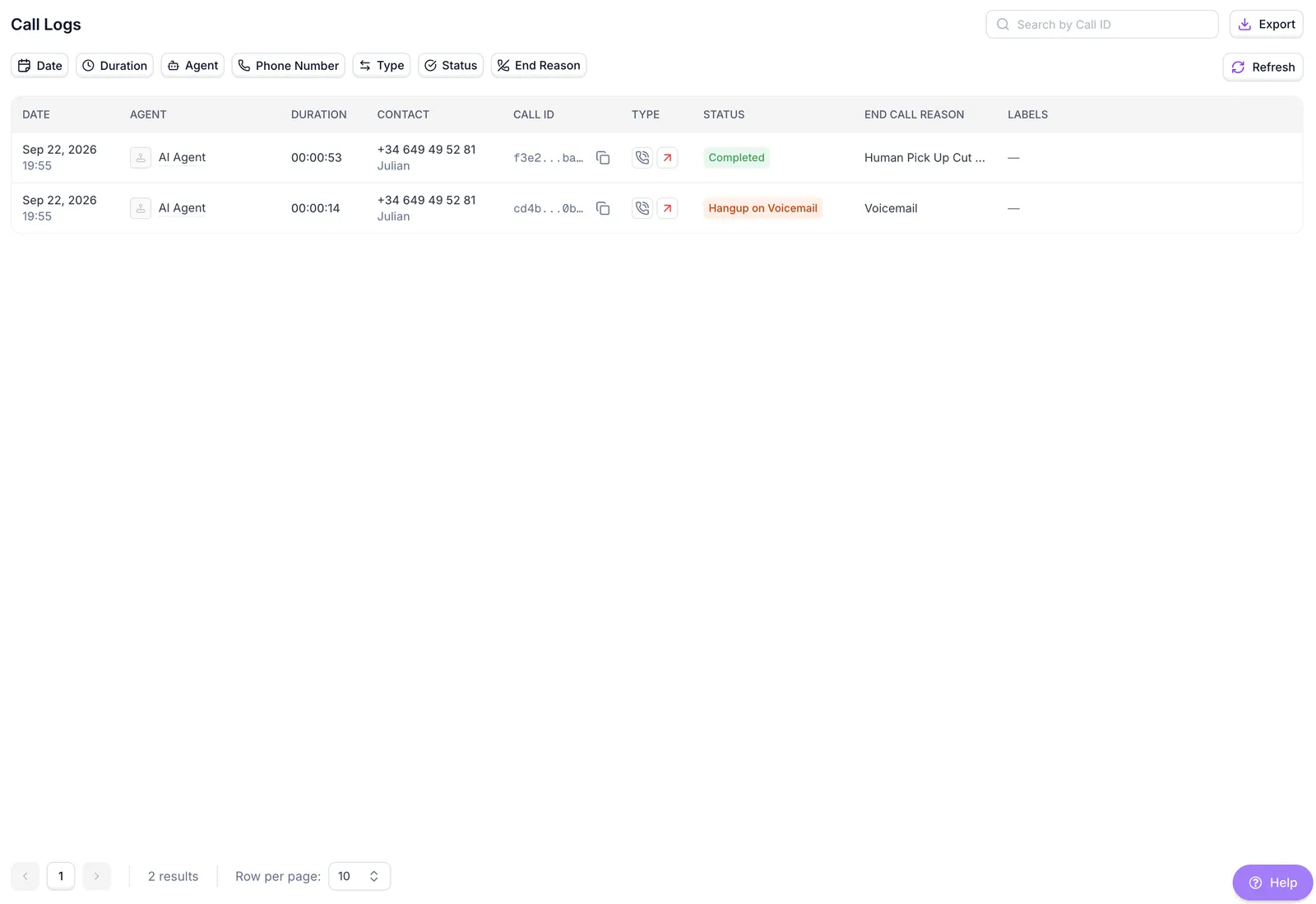
Every call your agents answer shows up on the Call Logs page, including your test calls. For each call, you see when it happened, which agent answered, who called, how long it lasted, and its status, for example whether it completed or went to voicemail. Select any call to see more about it, including the transcript of what the caller and the agent said.
As the list grows, the filters at the top help you find the calls you care about:
- Date: look at a specific day or week.
- Agent: see the calls of one agent when you have more than one.
- Status: spot calls that didn’t complete, like the ones that went to voicemail.
- End Reason: see why each call ended.
Workspace settings
Everything that isn’t about a specific agent lives on the Settings page: how you pay, who has access, which emails you receive, and how you sign in.
Billing
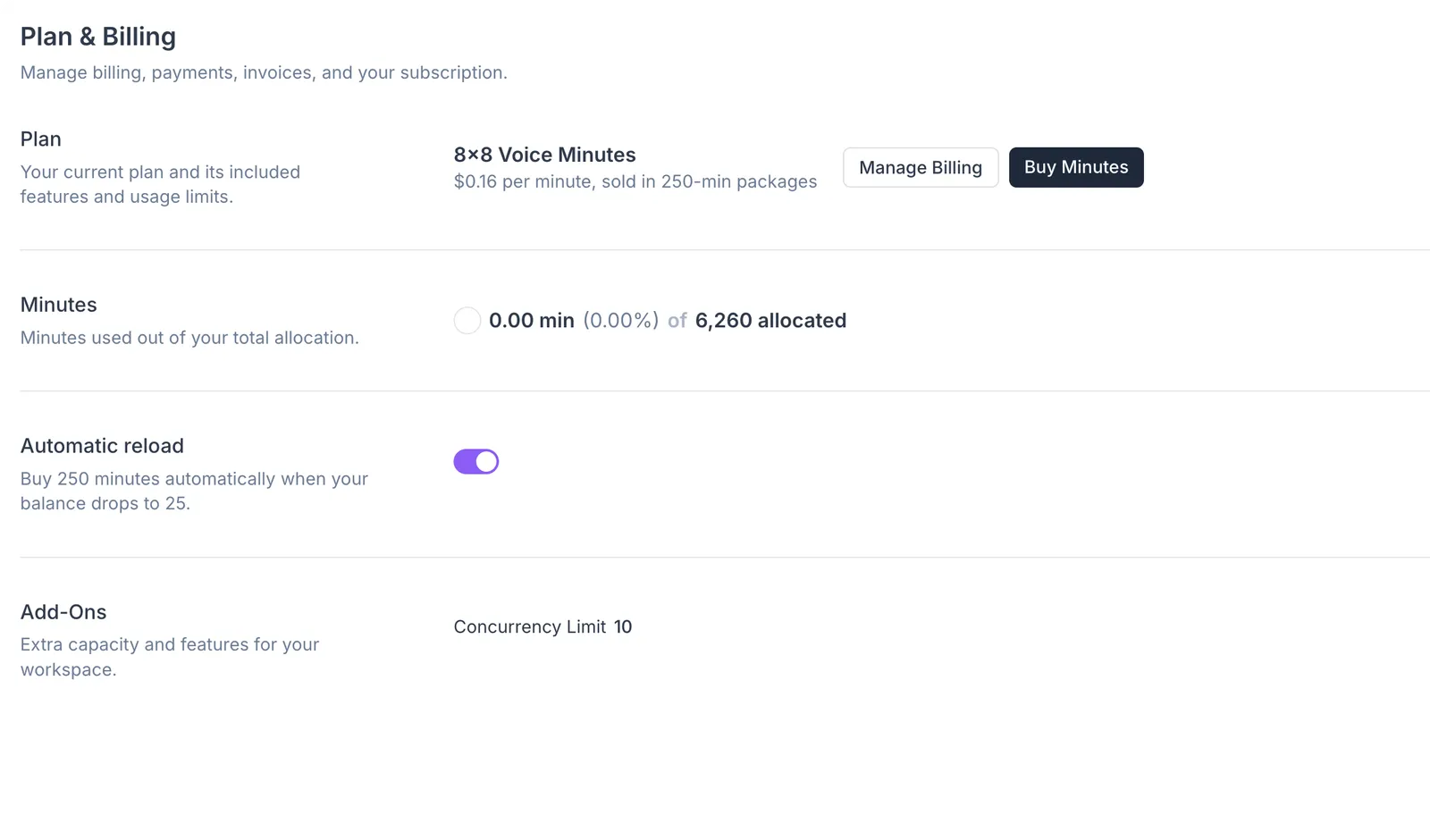
Your agents use minutes from your workspace balance while they’re on the phone, and you top up that balance by buying minutes in Billing. Billing is also where you check your balance and find your invoices.
When you create your Synthflow account, you get 15,000 free minutes to use over your first 3 months, with no payment needed. Any free minutes left at the end of the 3 months expire and don’t roll over.
Turn on auto reload to top up automatically, so your agents never stop answering because your balance ran out. When fewer than 25 minutes remain, Synthflow tops up your balance with 250 minutes and emails you from notifications@notifications.synthflow.ai to confirm that your account has been topped up. Add that address to your contacts so the confirmation doesn’t end up in spam.
Members
Invite teammates by email so they can build agents, listen to calls, or manage the workspace with you. When you invite someone, you choose their role, and they join as soon as they accept the invitation. Each invitation only works for the email address it was sent to.
- Super Admin: full access, including billing and every other setting. The Super Admin is also the main contact for the workspace.
- Admin: the same as a Super Admin, except they can’t make someone a Super Admin or remove one.
- Member: works with agents and calls, but can’t invite people, change roles, or manage billing.
Notifications
Choose which emails Synthflow sends you. These settings are personal, so each teammate picks their own.
- High frequency product updates: one email each time a new feature or improvement ships.
- Monthly product updates: a single monthly summary of those releases.
- System status updates: an email when there’s an outage or scheduled maintenance, and another when it’s resolved. Keep these on if your agents answer important calls, so you know when a problem isn’t on your side.
- Academy updates: new courses and tutorials in the Synthflow Academy.
Synthflow serves many kinds of businesses, so not every product update applies to 8x8 workspaces. If you only want what affects you, the monthly summary and system status updates are a good balance.
Credentials
Manage how you sign in: change your email address or password, turn on two-factor authentication for extra security, and sign out of other sessions, for example on a device you no longer use.
Useful resources
- 8x8 Admin Console: where you manage your 8x8 phone numbers, ring groups, and Auto Attendant.
- 8x8’s ring group guide: how to create the ring group your agent passes callers to.
- 8x8’s Auto Attendant guide: how to edit the phone menu that sends callers to your agent.
- Synthflow status page: check whether Synthflow is running normally, and subscribe to updates about outages and maintenance.
- Terms and conditions: the terms that apply when you use Synthflow through 8x8.
FAQ
Do my callers need to dial a new number?
No. Callers keep dialing your usual 8x8 number, and your 8x8 phone system forwards the calls to your agent. Your agent’s own number stays private, so don’t share it with customers.
Where do I find my agent's phone number?
Synthflow shows it in the last step of the setup, and you can find it again on your agent’s page at any time. It comes at no extra cost.
Can I change my agent after it's live?
Yes. You can change the greeting, the business information, the voice, and every other detail whenever you like. Changes apply from the next call, so test your agent again after a big change.
What happens when the agent can't help a caller?
The lead intake and customer support agents transfer the call to the phone number you set during setup. Without a transfer number, and for the after-hours receptionist, the agent takes a message and you get the details by email after the call.
Can I see what the agent said on a call?
Yes. Every call appears in your call history. Select a call to read the transcript of the conversation.
Do test calls use minutes?
Yes. Test calls are real calls, so they use minutes from your balance like any other call. Your account comes with 15,000 free minutes for your first 3 months, so you don’t need to buy minutes before your first test.
What happens when my minutes run out?
Your agents stop answering until you add more minutes in Billing. Turn on auto reload, and Synthflow tops up your balance automatically before it runs out.
Can my agent speak other languages?
Your agent replies in the language you choose during setup. It understands callers who speak other languages, but it always answers in the language you picked.
Can I have more than one agent?
Yes. For example, you can have an after-hours receptionist and a customer support agent, each with its own number. Start a new agent from the My Agents page and pick a different template.
How do I stop my agent from answering calls?
Remove the forwarding you added in the 8x8 Admin Console. Your calls go back to your team exactly as they did before.